
Nikon AF-S NIKKOR 200-400mm f/4G ED VR II 2187: ■ Lens protective glass ■ The built-in flash and vignetting ■ Slip-in filter holder
■ Lens protective glass ■ The built-in flash and vignetting ■ Slip-in filter holder: Nikon AF-S NIKKOR 200-400mm f/4G ED VR II 2187
Table of contents
- Notes on Safety Operations
- Observe the following precautions when handling the camera and lens
- ■ Nomenclature
- En
- ■ Major features ■ Usable cameras and available functions
- ■ Focusing
- ■ Focus operation selection switch and focus operation button (See p. 20 for compatible cameras.)
- ■ Vibration reduction mode (VR
- Setting the vibration reduction ON/OFF switch Setting the vibration reduction mode switch Notes on using vibration reduction
- ■ Setting the aperture ■ Focusing, zooming, and depth of field ■ Using a built-in rotating tripod collar ■ Using the lens hood
- ■ Lens protective glass ■ The built-in flash and vignetting ■ Slip-in filter holder
- ■ Recommended focusing screens
- ■ Lens care ■ Standard accessories ■ Optional accessories
- ■ Specifications
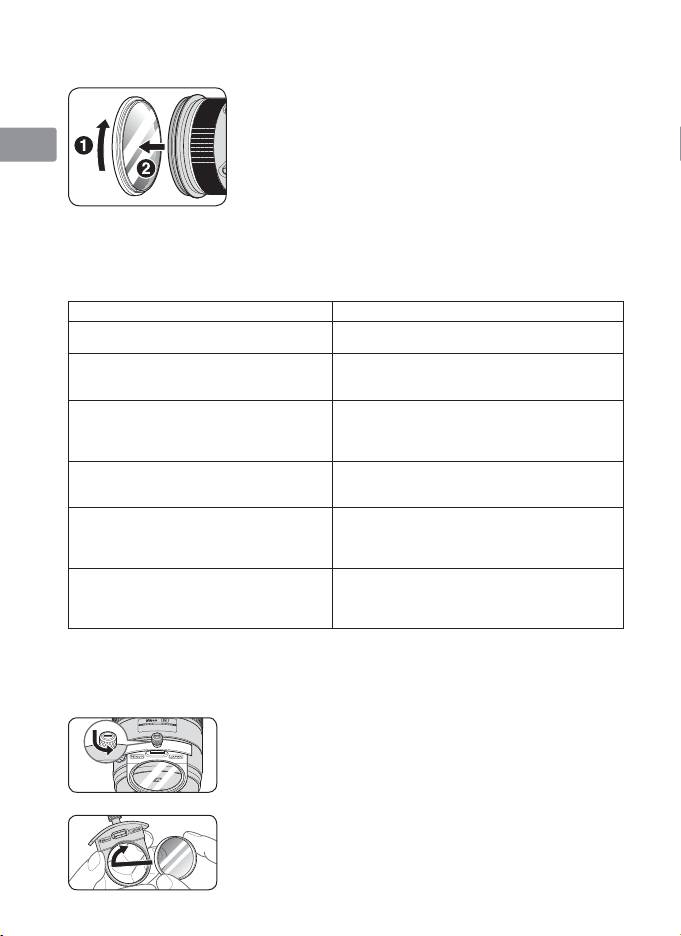
■ Lens protective glass
This lens is available with a lens protective glass
Jp
attached. Keeping this glass on the lens is recommended
at all times.
En
• If the picture you want to take includes a bright light
source, removing this glass may reduce ghost images.
To detach the glass, unscrew by rotating the rubber
De
ring around the glass (
1
,
2
).
• Store the glass in the dedicated lens protective glass
Fr
case provided.
■ The built-in flash and vignetting
Es
To prevent vignetting, do not use the lens hood.
Cameras Supported focal length/Shooting distance
Se
• 200mm/3 m (9.8 ft.) or greater
D90, D80, D50
• 250mm or longer/No restriction
Ru
• 200mm/4 m (13.1 ft.) or greater
D70-Series
• 250mm/2.5 m (8.2 ft.) or greater
• 300mm or longer/No restriction
Nl
• 200mm/5 m (16.4 ft.) or greater
D5100, D5000, D3100, D3000, D60,
• 250mm/3 m (9.8 ft.) or greater
D40-Series
• 300mm/2.5 m (8.2 ft.) or greater
It
• 350mm or longer/No restriction
• 200mm/3 m (9.8 ft.) or greater
F80-Series/N80-Series*
• 250mm or 300mm/2.5 m (8.2 ft.) or greater
Ck
• 350mm or longer/No restriction
• 250mm/5 m (16.4 ft.) or greater
• 300mm/4 m (13.1 ft.) or greater
Ch
F75-Series/N75-Series*, F70-Series/N70*
• 350mm/3 m (9.8 ft.) or greater
• 400mm/No restriction
Kr
F65-Series/N65-Series*, F60-Series/N60*,
F55-Series/N55-Series*, F50-Series/N50*,
Vignetting occurs at any shooting distance.
F-401/N4004*, F-401x/N5005*, F-401s/
N4004s*, Pronea 600i/6i*, Pronea S
*Sold exclusively in the USA
■ Slip-in filter holder
Always use a (52mm screw-on) filter. A 52mm Screw-on NC Filter is attached to
the filter holder when shipped from the factory.
1 Press down on the slip-in filter holder knob, and turn
counterclockwise until the white line on the knob is at
a right angle to the axis of the lens.
2
Pull the slip-in filter holder from the lens body
3
Detach the attached filter from the filter holder.
4
Screw a filter onto the side of the filter holder marked
with the words “Nikon” and “JAPAN”.
• The slip-in filter holder can be attached with the
“Nikon” and “JAPAN” facing either the lens or camera
side without any effect on your pictures.
26
