
Canon i-SENSYS MF5980dw: English Connecting the Power Cord and Turning ON the Power English Specifying the Initial Settings
English Connecting the Power Cord and Turning ON the Power English Specifying the Initial Settings: Canon i-SENSYS MF5980dw
Table of contents
- Starter Guide
- Check! Check!
- Option
- English
- English Contents
- English About the Supplied Manuals
- English Navigating the Menu and Text Input Method
- English Attach the Optional Drawer to the Main Unit English
- English Connecting the Power Cord and Turning ON the Power English Specifying the Initial Settings
- English Setting a Paper Size and Type
- English Specifying Initial Fax Settings and Connecting a Telephone Cable
- English
- Selecting the method for connecting to the machine English
- English Connecting to Wired LAN
- English Installing the Driver/Software
- Copy Perform Useful Tasks
5
English
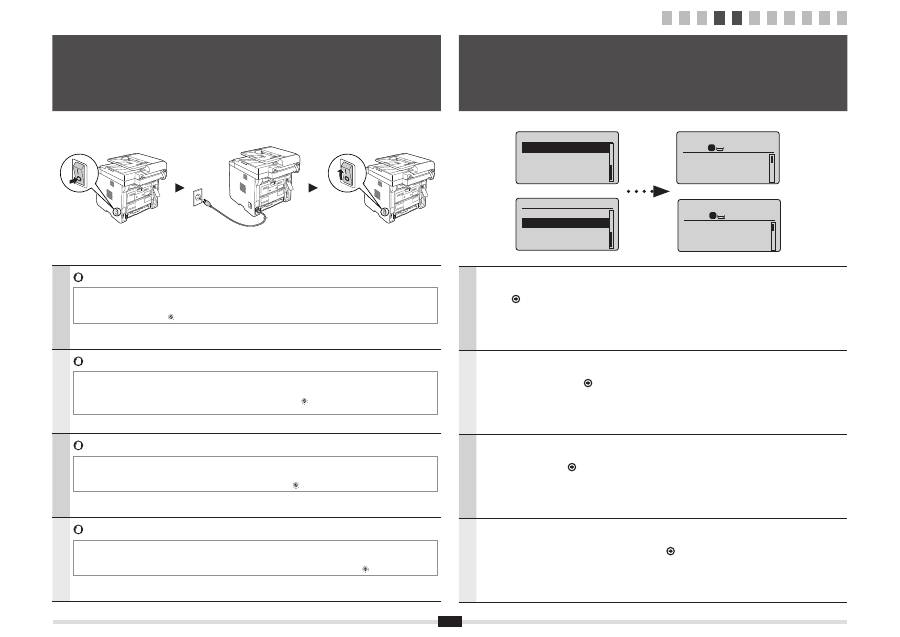
Do not connect the USB cable. Connect the USB cable when installing the software.
* A single sheet of paper may be ejected when the power is turned on the
fi
rst time after installing this machine. This is not a
malfunction.
* If no operations are performed for a
fi
xed period of time, the machine automatically enters the energy saver state (sleep mode).
To cancel sleep mode, press [
] (Energy Saver) on the control panel.
Français
Ne branchez pas le câble USB. Vous le connecterez lors de l'installation du logiciel.
* Une seule feuille de papier peut être éjectée lors que vous allumez la machine pour la première fois après l'avoir installée. Ce
comportement est normal.
* Si vous n'effectuez aucune opération pendant le délai spéci
fi
é, la machine passe automatiquement en mode d'économie
d'énergie (mode Veille). Pour annuler le passage en mode Veille, appuyer sur [
] (Economie d'énergie) sur le panneau de
commandes.
Italiano
Non collegare il cavo USB. Collegare il cavo USB quando si installa il software.
* Dopo aver installato la macchina, alla prima accensione potrebbe essere espulso un foglio di carta singolo. Non si tratta di un
malfunzionamento.
* Se per un periodo di tempo pre
fi
ssato non viene eseguita alcuna operazione, la macchina entra automaticamente nello stato di
risparmio energetico (modo riposo). Per annullare il modo riposto, premere [
] (Risparmio energetico) sul pannello di controllo.
Deutsch
Schließen Sie nicht das USB-Kabel an. Schließen Sie das USB-Kabel bei der Installation der Software an.
* Es wird möglicherweise ein einzelnes Blatt Papier ausgegeben, wenn die Stromversorgung nach der Installation des Geräts
zum ersten Mal eingeschaltet wird. Dies ist keine Fehlfunktion.
* Wenn über einen festgelegten Zeitraum keine Vorgänge durchgeführt werden, wechselt das Gerät automatisch in den
Stromsparmodus (schlafmodus). Zum Abbrechen des Schlafmodus drücken Sie auf dem Bedienfeld [
] (Stromsparmodus).
4
Connecting the Power Cord and Turning ON the Power
Branchement du cordon d'alimentation et allumage de la machine
Collegamento del cavo di alimentazione e accensione della macchina
Anschließen des Netzkabels und Einschalten des Geräts
English
Follow the instructions on the screen, set the language and time.
For details on navigating the menu and how to input the numbers, see 2 "Navigating the Menu and Text Input
Method" (
P.3).
Français
Suivez les instructions à l'écran pour dé
fi
nir la langue et l'heure.
Pour en savoir plus sur la navigation dans le menu et la saisie des nombres, voir 2 "Navigation dans le menu
et méthode de saisie de texte" (
P.3).
Italiano
Seguire le istruzioni visualizzate per impostare la lingua e l'orario.
Per i dettagli sulla navigazione del menu e su come immettere i numeri, vedere 2 "Navigazione del menu e
metodo di input del testo" (
Pag.3).
Deutsch
Folgen Sie den Anweisungen auf dem Bildschirm, und stellen Sie die Sprache und die Uhrzeit ein.
Nähere Informationen zum Navigieren durch das Menü und zur Eingabe der Zahlen
fi
nden Sie unter 2
"Navigieren durch das Menü und Texteingabemethode" (
S.3).
Language
English
French
Spanish
German
Language
English
French
Spanish
German
Copie: tche Copie
100% A4
Densité: 0
Type d'original: Te
...
Recto verso: Non
1
+
-
1
5
Specifying the Initial Settings
Spéci
fi
cation des paramètres initiaux
Selezione delle impostazioni iniziali
Angeben der Anfangseinstellungen
Copy: Press Start
100% A4
Density: 0
Original Type: Text
...
2-Sided: Off
1
+
-
1
1 2 3 4 5 6 7 8 9 10 11
