
Canon i-SENSYS MF5980dw: English Attach the Optional Drawer to the Main Unit English
English Attach the Optional Drawer to the Main Unit English: Canon i-SENSYS MF5980dw
Table of contents
- Starter Guide
- Check! Check!
- Option
- English
- English Contents
- English About the Supplied Manuals
- English Navigating the Menu and Text Input Method
- English Attach the Optional Drawer to the Main Unit English
- English Connecting the Power Cord and Turning ON the Power English Specifying the Initial Settings
- English Setting a Paper Size and Type
- English Specifying Initial Fax Settings and Connecting a Telephone Cable
- English
- Selecting the method for connecting to the machine English
- English Connecting to Wired LAN
- English Installing the Driver/Software
- Copy Perform Useful Tasks
English Français
Italiano Deutsch
4
English
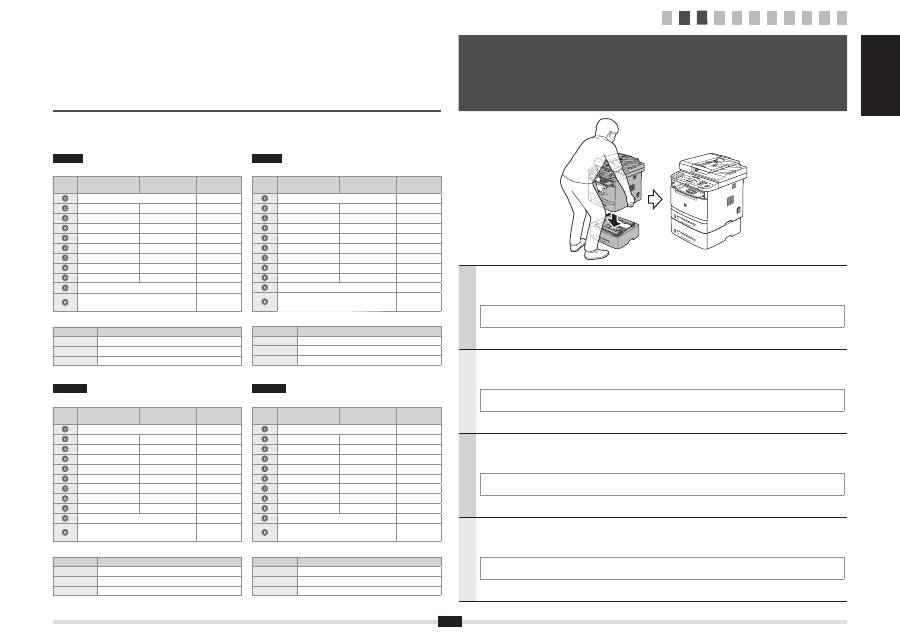
Take the drawer from the carton, and remove all packing materials, including shipping tape before attaching
the optional drawer to the main unit. Make sure the main unit and the optional drawer are facing in the same
direction when being attached.
When moving the main unit, be sure to carry it from front side by using the provided hand grips on the left and right sides, as seen
in the illustration.
Français
Sortez la cassette de son carton et retirez tous les matériaux d'emballage, y compris la bande adhésive
d'expédition, avant de
fi
xer la cassette en option sur l'unité principale. Véri
fi
ez que l'unité principale et la
cassette en option font face à la même direction lorsque vous les
fi
xez.
Lorsque vous déplacez l'unité principale, veillez à la transporter depuis l'avant en la tenant par les poignées de transport à gauche
et à droite, comme dans l'illustration.
Italiano
Estrarre il cassetto opzionale dal cartone e prima di agganciarlo all'unità principale provvedere a rimuovere
tutto il materiale d'imballaggio, incluso il nastro di trasporto. Quando li si aggancia, assicurarsi che l'unità
principale e il cassetto opzionale siano rivolti nella stessa direzione.
Quando si sposta l'unità principale, trasportarla guardandola dal davanti e afferrandola dalle apposite maniglie che si trovano sui
lati destro e sinistro, come si vede illustrato nella
fi
gura.
Deutsch
Nehmen Sie die Kassette aus dem Karton, und entfernen Sie das gesamte Verpackungsmaterial, einschließlich
des Versandbandes, bevor Sie die optionale Kassette an der Haupteinheit anbringen. Vergewissern Sie sich,
dass die Haupteinheit und die optionale Kassette beim Anbringen in dieselbe Richtung zeigen.
Beim Transport der Haupteinheit tragen Sie diese unbedingt von der Vorderseite aus, indem Sie sie an den dafür vorgesehenen
Handgriffen links und rechts festhalten, wie in der Abbildung dargestellt.
3
Attach the Optional Drawer to the Main Unit
Fixez la cassette en option sur l'unité principale
Collegare il cassetto opzionale all'unità principale
Anbringen der optionalen Kassette an der Haupteinheit
English
Entering text, symbols, and numbers
Key
Entry mode: <A>
Entry mode: <a>
Entry mode:
<12>
@ . - _ /
1
ABC
abc
2
DEF
def
3
GHI
ghi
4
JKL
jkl
5
MNO
mno
6
PQRS
pqrs
7
TUV
tuv
8
WXYZ
wxyz
9
(Not available)
0
- . * # ! “ , ; : ^ ` _ = / | ‘ ? $
@ % & + \ ( ) [ ] { } < >
~
(Not available)
Changing the entry mode
Entry mode
Available text
<A>
Alphabet (capital letters) and symbols
<a>
Alphabet (small letters) and symbols
<12>
Numbers
Italiano
Immissione di testo, simboli e numeri
Tasto
Modo
d'immissione: <A>
Modo
d'immissione: <a>
Modo d'immissione:
<12>
@ . - _ /
1
AÀBC
aàbc
2
DEÈF
deèf
3
GHIÌ
ghiì
4
JKL
jkl
5
MNOÒ
mnoò
6
PQRS
pqrs
7
TUÙV
tuùv
8
WXYZ
wxyz
9
(Non disponibile)
0
- . * # ! “ , ; : ^ ` _ = / | ‘ ? $
@ % & + \ ( ) [ ] { } < >
~
(Non
disponibile)
Cambio della modalità d'immissione
Modo d'immissione
Testo disponibile
<A>
Alfabeto (lettere maiuscole) e simboli
<a>
Alfabeto (lettere minuscole) e simboli
<12>
Numeri
Deutsch
Eingeben von Text, Symbolen und Zahlen
Taste
Eingabemodus:
<A>
Eingabemodus:
<a>
Eingabemodus:
<12>
@ . - _ /
1
AÄBC
aäbc
2
DEF
def
3
GHI
ghi
4
JKL
jkl
5
MNOÖ
mnoö
6
PQRSß
pqrs
7
TUÜV
tuüv
8
WXYZ
wxyz
9
(nicht verfügbar)
0
- . * # ! “ , ; : ^ ` _ = / | ‘ ? $
@ % & + \ ( ) [ ] { } < >
~
(nicht
verfügbar)
Ändern des Eingabemodus
Eingabemodus
Verfügbarer Text
<A>
Alphabet (Großbuchstaben) und Symbole
<a>
Alphabet (Kleinbuchstaben) und Symbole
<12>
Zahlen
Français
Saisie de texte, de symboles et de chiffres
Touche
Mode de saisie:
<A>
Mode de saisie:
<a>
Mode de saisie:
<12>
@ . - _ /
1
AÀÂBCÇ
aàâbcç
2
DEËÉÈÊF
deëéèêf
3
GHIÏÎ
ghiïî
4
JKL
jkl
5
MNOÔ
mnoô
6
PQRS
pqrs
7
TUÜÙÛV
tuüùûv
8
WXYZ
wxyz
9
(Non disponible)
0
- . * # ! “ , ; : ^ ` _ = / | ‘ ? $
@ % & + \ ( ) [ ] { } < >
~
(Non
disponible)
Modi
fi
cation du mode de saisie
Mode de saisie
Texte disponible
<A>
Lettres (majuscules) et symboles
<a>
Lettres (minuscules) et symboles
<12>
Chiffres
1 2 3 4 5 6 7 8 9 10 11
