
Canon i-SENSYS MF5980dw: English About the Supplied Manuals
English About the Supplied Manuals: Canon i-SENSYS MF5980dw
Table of contents
- Starter Guide
- Check! Check!
- Option
- English
- English Contents
- English About the Supplied Manuals
- English Navigating the Menu and Text Input Method
- English Attach the Optional Drawer to the Main Unit English
- English Connecting the Power Cord and Turning ON the Power English Specifying the Initial Settings
- English Setting a Paper Size and Type
- English Specifying Initial Fax Settings and Connecting a Telephone Cable
- English
- Selecting the method for connecting to the machine English
- English Connecting to Wired LAN
- English Installing the Driver/Software
- Copy Perform Useful Tasks
English Français
Italiano Deutsch
2
English
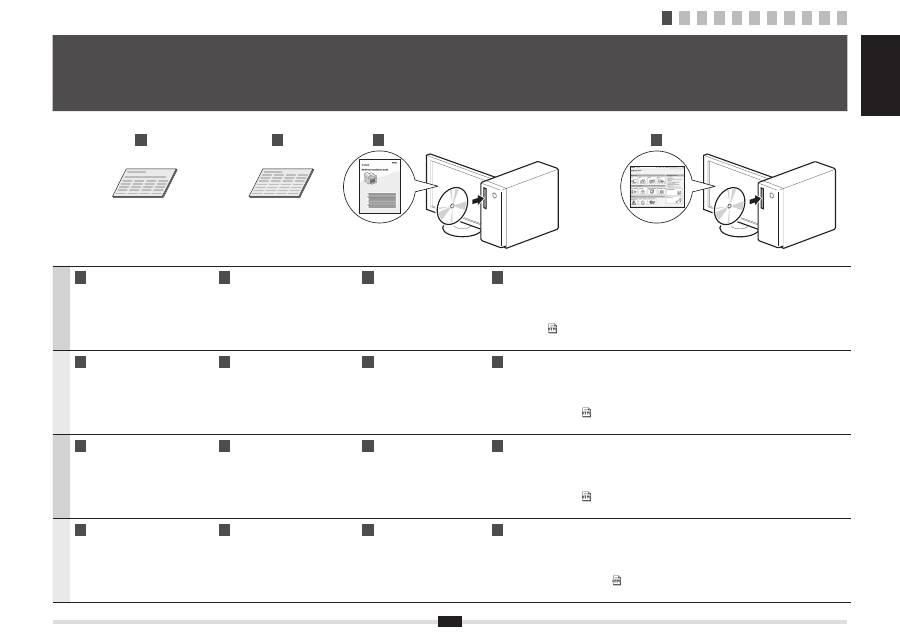
A
Starter Guide (This manual):
Read this manual
fi
rst.
This manual describes the
installation of the machine, the
settings, and a caution. Be sure to
read this manual before using the
machine.
B
Wireless LAN Setting Guide:
Read this manual next.
This manual describes the procedure for
con
fi
guring wireless LAN setting and the
causes and resolutions of problems that
occur in the settings. Be sure to read this
manual before using the machine.
C
MF Driver Installation Guide
(User Software CD-ROM):
Read this manual third.
This manual describes
software installation.
D
e-Manual (User Manual CD-ROM): Read the desired chapter to suit your needs.
The e-Manual is categorized by subject to
fi
nd desired information easily.
Displaying the e-Manual from the CD-ROM
1. Insert the User Software CD-ROM in your computer.
2. Click [Display Manuals].
3. Click the [
] for [e-Manual].
* Depending on the operating system you are using, a security protection message is displayed. Allow the contents to be displayed.
Français
A
Guide de démarrage (ce manuel) :
Lisez ce manuel en premier.
Ce manuel décrit l'installation de
la machine, les paramètres et les
précautions à prendre. Veillez à
lire attentivement ce manuel avant
d'utiliser la machine.
B
Guide des paramètres du réseau sans
fi
l :
Lisez ensuite ce manuel.
Ce manuel décrit la procédure de
con
fi
guration des paramètres du réseau
sans
fi
l, et présente les causes et solutions
des problèmes qui se produisent avec ces
paramètres. Veillez à lire attentivement ce
manuel avant d'utiliser la machine.
C
Guide d'installation des
pilotes MF (CD-ROM "User
Software CD-ROM") :
Lisez ce manuel en troisième.
Ce manuel décrit l'installation
du logiciel.
D
Manuel électronique (CD-ROM "User Manual CD-ROM") : Lisez le chapitre qui répond à vos besoins.
Le manuel électronique est divisé en catégories par sujet, ce qui permet de trouver facilement les informations voulues.
Af
fi
chage du manuel électronique directement depuis le CD-ROM
1. Insérez le CD-ROM "User Software CD-ROM" dans votre ordinateur.
2. Cliquez sur [Af
fi
cher manuel].
3. Cliquez sur le bouton [
] correspondant à [Manuel électronique].
* Selon votre système d'exploitation, un message de protection de la sécurité peut s'af
fi
cher. Autorisez l'af
fi
chage du contenu.
Italiano
A
Guida all'avvio (questo manuale):
Leggere prima questo manuale.
In questo manuale vengono descritti
l'installazione della macchina, le
impostazioni e le avvertenze da
osservare. Leggere attentamente il
manuale prima di utilizzare la macchina.
B
Guida alla con
fi
gurazione LAN wireless:
Successivamente leggere questo manuale.
In questo manuale viene descritta la procedura
da eseguire per con
fi
gurare le impostazioni della
rete LAN wireless e vengono trattate le cause e
le soluzioni agli eventuali problemi che possono
presentarsi con le impostazioni. Leggere attentamente
il manuale prima di utilizzare la macchina.
C
Guida di Installazione del
Driver MF (User Software
CD-ROM):
Leggere questo manuale in
terza battuta.
Questo manuale descrive
l'installazione del software.
D
e-Manual (User Manual CD-ROM): Leggere il capitolo desiderato in base alle proprie esigenze.
L'e-Manual è suddiviso in una serie di categorie per argomento che consentono di trovare le informazioni desiderate più facilmente.
Visualizzazione dell'e-Manual dal CD-ROM
1. Inserire l'User Software CD-ROM nel computer.
2. Fare clic su [Visual. manuale].
3. Fare clic sul pulsante [
] relativo a [e-Manual].
* A seconda del sistema operativo in uso, è possibile che venga visualizzato un messaggio di protezione. Consentire la visualizzazione dei contenuti.
Deutsch
A
Handbuch für Starter (dieses Handbuch):
Lesen Sie zuerst dieses Handbuch.
In diesem Handbuch werden die
Geräteinstallation, die Einstellungen und
Vorsichtshinweise beschrieben. Lesen
Sie dieses Handbuch vor Inbetriebnahme
des Geräts unbedingt durch.
B
Handbuch der WLAN-Einstellungen:
Lesen Sie als nächstes dieses Handbuch.
In diesem Handbuch werden die Vorgehensweisen
zur Kon
fi
guration der Wireless LAN-Einstellung
sowie die Ursachen und Abhilfemaßnahmen bei
Problemen beschrieben, die bei den Einstellungen
auftreten. Lesen Sie dieses Handbuch vor
Inbetriebnahme des Geräts unbedingt durch.
C
Installationshandbuch zum
MF-Treiber (User Software
CD-ROM):
Lesen Sie dieses Handbuch
an dritter Stelle.
In diesem Handbuch wird
die Softwareinstallation
beschrieben.
D
e-Anleitung (User Manual CD-ROM): Lesen Sie das gewünschte Kapitel entsprechend Ihren Anforderungen.
Die e-Anleitung ist thematisch gegliedert, sodass Sie die gewünschten Informationen problemlos
fi
nden.
Anzeigen der e-Anleitung von der CD-ROM
1. Legen Sie die User Software CD-ROM in Ihren Computer ein.
2. Klicken Sie auf [Zeige Handbuch].
3. Klicken Sie für [e-Handbuch] auf [
].
* Abhängig von dem von Ihnen verwendeten Betriebssystem wird eine Sicherheitswarnung angezeigt. Lassen Sie die Anzeige des Inhalts zu.
D
C
A
B
1
About the Supplied Manuals
A propos des manuels fournis
Informazioni sui manuali forniti a corredo con il prodotto
Informationen zu den mitgelieferten Handbüchern
1 2 3 4 5 6 7 8 9 10 11
