
Acme V-160: Thank You Package Contents Features Controls at a Glance
Thank You Package Contents Features Controls at a Glance: Acme V-160
Table of contents
- Thank You Package Contents Features Controls at a Glance
- Getting Started Charging the Battery Charging with a Computer Turning the Player On/Off Main Menu
- Play Music Mode Play Music Screen Play Music Controls
- Repeat A-B Mode Repeat Mode FM Tuner Mode FM Tuner Controls
- FM Tuner Menu Automatically Saving Preset Stations Manually Saving Preset Stations Deleting Preset Stations Folder Mode
- Folder Controls Settings Mode
- Connecting to a Computer Transferring/Managing Files Disconnecting from a Computer
- Specications Troubleshooting
GB
Thank You
Congratulations on your purchase of an MP3 player. This manual is designed to help you easily set up and begin
using your new player straight away. Please read this manual carefully and retain it for future reference. Please read
these instructions carefully before using your player.
Package Contents
Please make sure that the items shown below are included in the package. Should an item be missing, please
contact the local retailer from which you purchased this product.
• MP3 player V-160
• Stereo earphones
• USB cable
• User manual
• Warranty card
This package may contain plastic bags or other materials that pose
a hazard to children. Please be sure to that you safely dispose of all
packing materials after opening.
Features
• Plays MP3 and WMA digital music les
• Integrated FM Radio
• Mobile data storage
• USB 2.0 Hi-speed for fast le transfers
• Integrated rechargeable battery
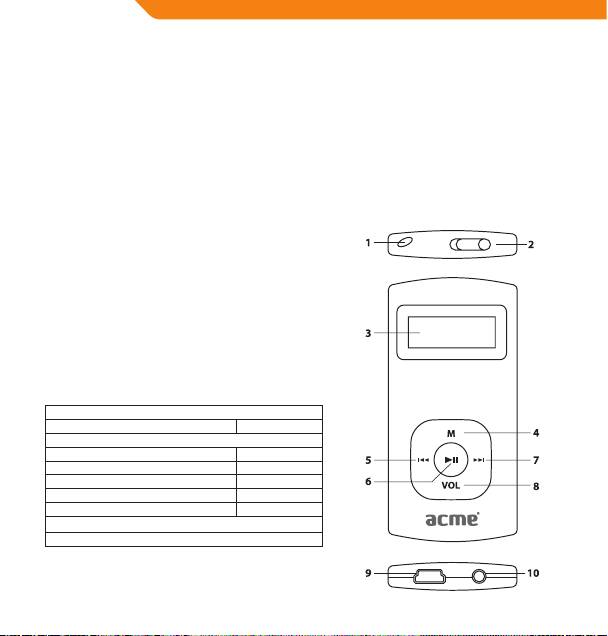
Controls at a Glance
1. Neck strap hole
2. Power Switch <POWER>
3. LCD Display
4. Menu Button <MENU>
5. Previous/Rewind Button <LEFT>
6. OK/Play/Pause Button <OK>
7. Next/Fast-forward Button <RIGHT>
8. Volume Button <VOL>
9. USB Port
10. Headphone output
4
