
Acme V-160: Getting Started Charging the Battery Charging with a Computer Turning the Player On/Off Main Menu
Getting Started Charging the Battery Charging with a Computer Turning the Player On/Off Main Menu: Acme V-160
Table of contents
- Thank You Package Contents Features Controls at a Glance
- Getting Started Charging the Battery Charging with a Computer Turning the Player On/Off Main Menu
- Play Music Mode Play Music Screen Play Music Controls
- Repeat A-B Mode Repeat Mode FM Tuner Mode FM Tuner Controls
- FM Tuner Menu Automatically Saving Preset Stations Manually Saving Preset Stations Deleting Preset Stations Folder Mode
- Folder Controls Settings Mode
- Connecting to a Computer Transferring/Managing Files Disconnecting from a Computer
- Specications Troubleshooting
GB
Getting Started
Charging the Battery
Your player has an integrated rechargeable battery. Upon rst use, the battery should be charged fully to ensure the
very best performance and a long battery life.
If the player has not been used in a while, the battery may need to be recharged overnight (for about eight hours).
The battery used in this device may pose a risk of re or chemical burn if mistreated. Do not disassemble, incinerate, or heat
the battery. Do not leave the battery lying in direct sunlight, or in a car with its windows closed.
Do not connect the player to a power source other than that which is indicated here or on the label, as this may pose a risk
of re or electric shock.
Charging with a Computer
Your player can be charged through a USB computer connection. Use the supplied USB cable to connect the player to
a high-power USB port on your computer. The computer must be powered on and not in sleep mode.
When the player is connected and charging, a USB symbol will be displayed on the player’s screen.
Turning the Player On/Off
• To turn the player on, slide the <POWER> switch to the left.
• To turn the player o, slide the <POWER> switch to the right.
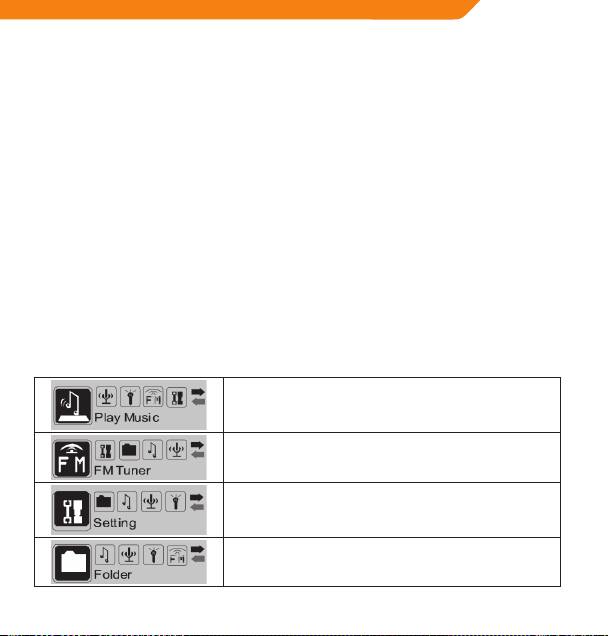
Main Menu
The Main Menu gives you access to the dierent function modes on your player.
Play Music
Play your digital MP3 or WMA music les.
FM Tuner
Listen to FM radio broadcasts.
Setting
Set your player’s internal options.
Folder
Play, view, or delete les from your player.
5
