
Acme BTDG-30-BLK: Safety information Product specification
Safety information Product specification: Acme BTDG-30-BLK
Table of contents
- Install application program – IVT BlueSoleil (Figure 1) Setup.exe (Figure 2) Select application language
- (Figure 3) Select Application Install Location (Figure 4) Complete installation
- (Figure 5) Insert the USB Dongle into PC Run the application IVT BlueSoleil
- Create stereo audio connection via a PC
- Chat using your stereo headset as a voice input/output device Troubleshooting Care and maintenance
- Safety information Product specification
- Appendix
- Declaration of conformity
GB
• Do not bring your USB Dongle into contact with any sharp objects as this
will cause scratches and damage.
• Do not stick anything inside the USB Dongle as this may damage internal
components.
• Do not attempt to disassemble the USB Dongle as it does not contain
serviceable components.
Safety information
• Never allow children to play with the USB Dongle-small parts may be a choking
hazard.
• Observe all signs that require an electrical device or RF radio product to be
switched o in designated areas. These could include hospitals, blasting areas,
and potentially explosive atmospheres.
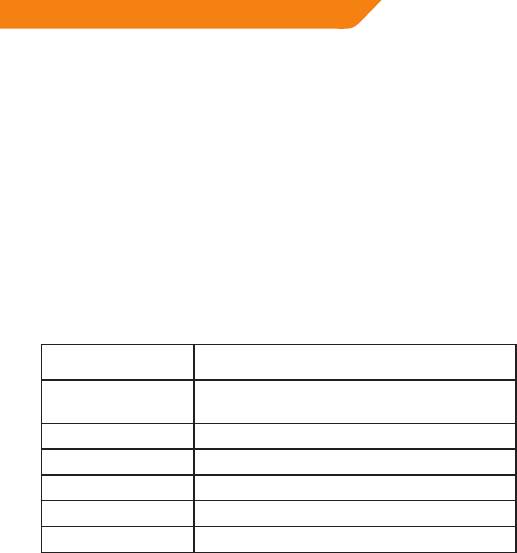
Product specification
Version 2.1 (Backward compatible
Bluetooth Specification:
with 1.1, 1.2 and 2.0)
Bluetooth Profile
A2DP, AVRCP, BIP, BNEP, DUN, FAX, FTP, GAP,
Supported:
GAVDP, HCRP, HEADEST, BEX, OPP, PAN & SPP
Range of Frequency: 2.4GHz Spectrum
Operating Distance: Up to 10 meters
Data Throughput: Max. 3Mbps
OS Support: Windows 98SE/ME/2000/XP/Vista/7
Application Software: IVT BlueSoleil
9


