
Acme BTDG-30-BLK: Install application program – IVT BlueSoleil (Figure 1) Setup.exe (Figure 2) Select application language
Install application program – IVT BlueSoleil (Figure 1) Setup.exe (Figure 2) Select application language: Acme BTDG-30-BLK
Table of contents
- Install application program – IVT BlueSoleil (Figure 1) Setup.exe (Figure 2) Select application language
- (Figure 3) Select Application Install Location (Figure 4) Complete installation
- (Figure 5) Insert the USB Dongle into PC Run the application IVT BlueSoleil
- Create stereo audio connection via a PC
- Chat using your stereo headset as a voice input/output device Troubleshooting Care and maintenance
- Safety information Product specification
- Appendix
- Declaration of conformity
GB
Install application program –
IVT BlueSoleil
Please follow the steps below for installing the IVT BlueSoleil program.
1. On first opening the contents of your BTDG, please insert the CD-ROM to
commence the software installation.
2. Do not plug the Dongle into your PC until the software has been downloaded.
Note: If the Auto-Run function of CD-ROM is enabled (in Windows, the default setting
of this function id usually enable), the installation program will start automatically. If
not, you can utilize the Windows explorer to browse CD content and execute the Setup.
exe manually. See Figure 1.
BlueSoleil 5.4.2
(F:)
(Figure 1) Setup.exe
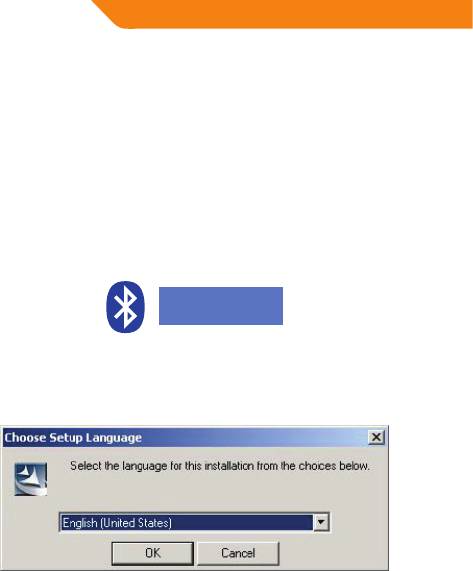
3. Please select the language, and then click “Next” . Please see Figure 2.
(Figure 2) Select application language
4


