
Acme BTDG-30-BLK: (Figure 3) Select Application Install Location (Figure 4) Complete installation
(Figure 3) Select Application Install Location (Figure 4) Complete installation: Acme BTDG-30-BLK
Table of contents
- Install application program – IVT BlueSoleil (Figure 1) Setup.exe (Figure 2) Select application language
- (Figure 3) Select Application Install Location (Figure 4) Complete installation
- (Figure 5) Insert the USB Dongle into PC Run the application IVT BlueSoleil
- Create stereo audio connection via a PC
- Chat using your stereo headset as a voice input/output device Troubleshooting Care and maintenance
- Safety information Product specification
- Appendix
- Declaration of conformity
GB
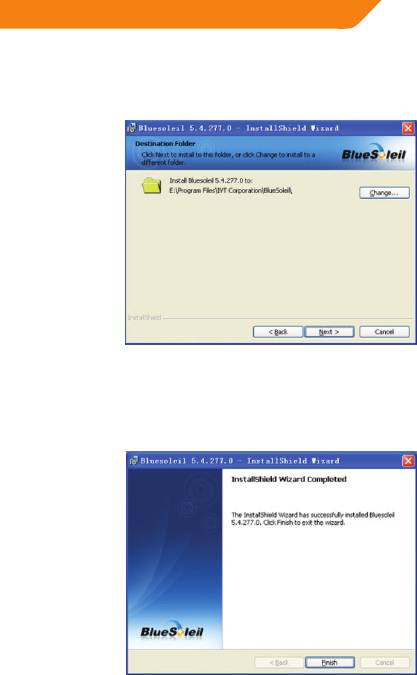
4. Please click “Next” (Figure 3) to start the application installation. If you
would like to change the destination location, please click “Change” to select
the folder.
(Figure 3) Select Application Install Location
5. After installation, you need to restart your PC, when prompted, please select
“Yes” and click “Finish”.
(Figure 4) Complete installation
5
Top 10 manuals
100.00
NZXT HALE90 1000W99.99
Samsung SM-R38099.97
AEG BSB 18C99.97
Dell 2700W99.97
Smeg KSEC70X99.96
Beurer HDE 4099.96
Pyramida KH 50 v.299.96
MSI CSM-H81M-P3299.96
AEG HR 562799.95
Melissa 640-048


