
Panasonic CS-22KA1E5: PRODUCT OVERVIEW & OPERATIONS PRODUCT OVERVIEW & OPERATIONS (WIRELESS REMOTE CONTROL) (WIRELESS REMOTE CONTROL)
PRODUCT OVERVIEW & OPERATIONS PRODUCT OVERVIEW & OPERATIONS (WIRELESS REMOTE CONTROL) (WIRELESS REMOTE CONTROL): Panasonic CS-22KA1E5
PRODUCT OVERVIEW & OPERATIONS
PRODUCT OVERVIEW & OPERATIONS
(WIRELESS REMOTE CONTROL)
(WIRELESS REMOTE CONTROL)
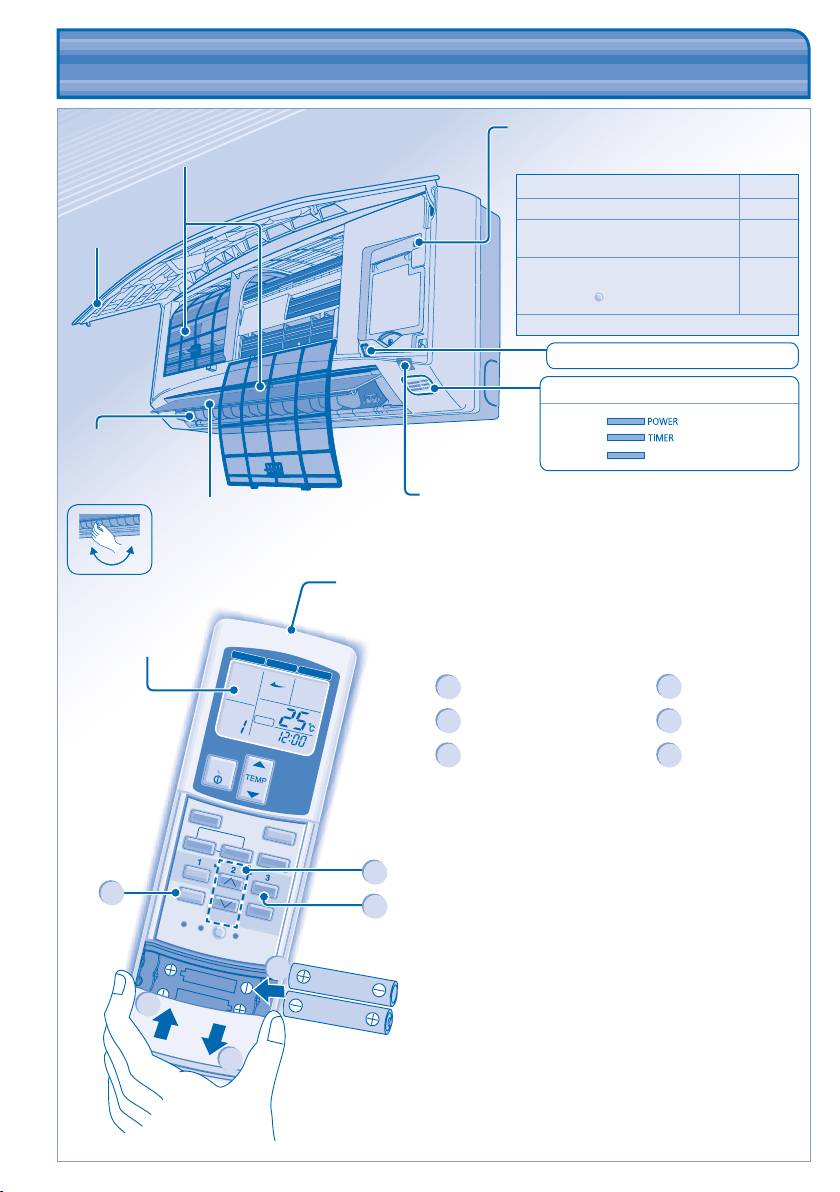
Auto OFF/ON button
• To operate the unit if the wireless remote
control is misplaced or malfunctioning.
Action Mode
Press once. Auto
Press and hold until you hear 1
Cooling
beep, then release.
1. Press and hold until you hear 2
beeps then release.
Heating
2. Press the
SET
button for 5 seconds.
Press the button to turn off.
Remote Control Preparation
1
Press and pull out
4
Set time
Insert AAA or R03 batteries
2
5
Confi rm
(can be used ~ 1 year)
3
Press CLOCK
6
Close the cover
6
MODE
MODE
AIR SW
ING
O
FAN SPEED
AUTOAUT
ADDRESS
TIMER
ON
OFF/ON
MODE
AIR SWING
FILTER RESET
AUTO
MANUAL
FAN SPEED
SELECT
SET
CLOCK
TIMER
CANCEL
RC RESET ADDRES
S
SET AC
RESET
Air Filters
Front panel
Error Code Display (For servicing use only)
INDICATOR
(Green)
(Orange)
Horizontal airfl ow
FILTER
(Red)
direction louver
• Manually
adjustable.
Receiver
Vertical airfl ow
direction louver
• Do not adjust
by hand.
Transmitter
Maximum distances: 8m
Remote control
display
4
3
5
2
6
1
CZ-RWS1 (Heat-pump model)
CZ-RWC1 (Cooling model)
ENGLISH
7
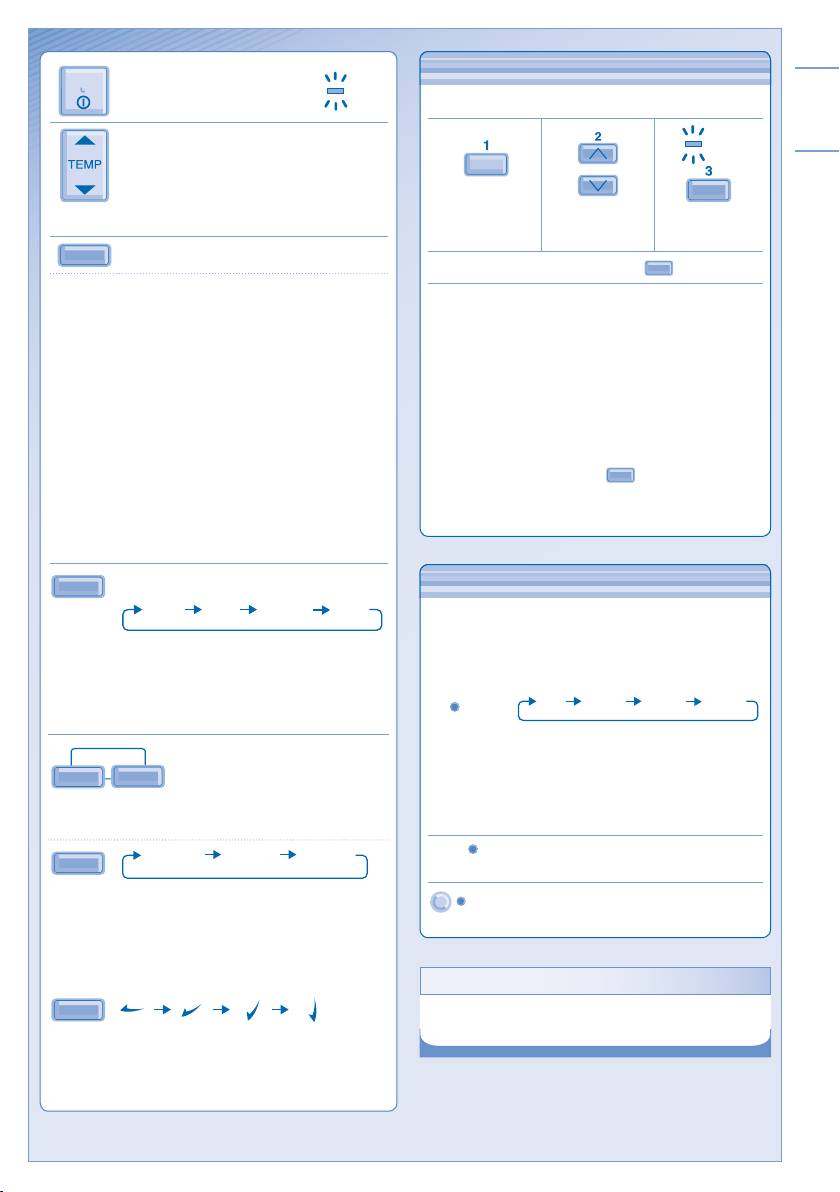
TO SET DAILY TIMER
TO SET DAILY TIMER
• To turn ON or OFF the unit at a preset time.
TIMER
SELECT
SET
Select ON or
Set the time. Confi rm.
OFF timer.
• To cancel ON or OFF timer, press
CANCEL
.
• When ON timer is set, the unit may start early before
the actual set time in order to achieve the desired
temperature on time.
• Timer operation is based on the clock set in the remote
control and repeats daily once set. For clock setting,
please refer to Remote Control preparation.
• The timer closest to the current time will be activated
fi rst.
• If timer is cancelled manually, you can restore the
previous setting by pressing
SET
.
• If the main power is switched off for an hour or more,
the clock and timer will need to be set again.
• To avoid unintentional operation, you can
assign a different address to each indoor
unit.
• Press repeatedly to select your desired
address setting.
Address 1 Address 2Group Address 3
ADDRESS
• By default, ADDRESS 1 is selected. You
do not need to change this setting for
normal operation.
• If the address is set to GROUP, more
than one indoor unit can be operated at
the same time.
Press to restore the remote control’s default
RC RESET
setting.
Not used in normal operations.
SET
AC RESET
HINT
HINT
• Use curtains to screen off sunlight and outdoor heat to
reduce power consumption during cool mode.
OPTIONAL SETTINGS
OFF/ON
TO TURN ON OR OFF THE
POWE
UNIT
FAN SPEED
OPTIONAL SETTINGS
TO SELECT FAN SPEED (3 OPTIONS)
LOW MEDIUMAUTO HIGH
• For AUTO, the indoor fan speed is automatically
adjusted according to the operation mode.
• If the operation mode is set to Fan, the fan speed will
be fi xed at MEDIUM regardless of the temperature
setting.
AIR SWING
TO ADJUST AIRFLOW
AUTO
MANUAL
DIRECTION
• Keeps the room ventilated.
• The air is discharge evenly through 4 output vents.
AUTO 1 AUTO 2
AUTO 3
AUTO
• There are 3 options for auto vertical airfl ow direction
but with same swing angles.
• The vertical airfl ow louver swings up and down
automatically.
• Do not adjust the vertical airfl ow direction louvers by
hand.
MANUAL
• There are 4 options for manual vertical airfl ow
direction.
• The airfl ow direction can be adjusted as desired by
using remote control.
R
TO SET TEMPERATURE
• Selection range: 16°C ~ 31°C.
MODE
TO SELECT OPERATION MODE
AUTO mode - For your convenience
• Unit selects operation mode according to temperature
setting, outdoor and room temperature.
HEAT mode - To enjoy warm air
• Unit takes a while to warm up.
FAN mode - To enables air circulation in the room
COOL mode - To enjoy cool air
DRY mode - To dehumidify the environment
• Unit operates at low fan speed to give a gentle cooling
operation.
• During soft dry operation, the indoor fan operates at a
low fan speed.
• The louvers movement might not align with the remote
control display.
Table of contents
- Operating Instructions FS Multi Air Conditioner
- SAFETY PRECAUTIONS SAFETY PRECAUTIONS
- INFORMATION INFORMATION
- MULTI AIR CONDITIONER FUNCTION MULTI AIR CONDITIONER FUNCTION
- PRODUCT OVERVIEW & OPERATIONS PRODUCT OVERVIEW & OPERATIONS (WIRELESS REMOTE CONTROL) (WIRELESS REMOTE CONTROL)
- PRODUCT OVERVIEW & OPERATIONS PRODUCT OVERVIEW & OPERATIONS (WIRED REMOTE CONTROL) (WIRED REMOTE CONTROL)
- CARE & CLEANING CARE & CLEANING
- TROUBLESHOOTING TROUBLESHOOTING
- PERINGATAN KESELAMATAN PERINGATAN KESELAMATAN
- MAKLUMAT MAKLUMAT
- FUNGSI ALAT PENYAMAN UDARA BERBILANG FUNGSI ALAT PENYAMAN UDARA BERBILANG
- GAMBARAN KESELURUHAN PRODUK & OPERASI GAMBARAN KESELURUHAN PRODUK & OPERASI (ALAT KAWALAN JAUH TANPA DAWAI) (ALAT KAWALAN JAUH TANPA DAWAI)
- GAMBARAN KESELURUHAN PRODUK & OPERASI (ALAT KAWALAN JAUH TERDAWAI)
- PENJAGAAN & PEMBERSIHAN PENJAGAAN & PEMBERSIHAN
- MENGESAN MASALAH MENGESAN MASALAH
- 安全措施 安全措施
- 信息 信息
- 一對多空調器功能 一對多空調器功能
- 產品概觀與操作(無線遙控器) 產品概觀與操作(無線遙控器)
- 產品概觀與操作(有線遙控器) 產品概觀與操作(有線遙控器)
- 保養與清洗 保養與清洗
- 故障檢修故障檢修
- ขอกําหนดเพื่อความปลอดภัย ขอกําหนดเพื่อความปลอดภัย
- ขอมูลทั่วไป ขอมูลทั่วไป
- การทํางานของเครื่องปรับอากาศแบบมัลติ การทํางานของเครื่องปรับอากาศแบบมัลติิ
- ภาพรวมผลิตภัณฑและการใชงาน ภาพรวมผลิตภัณฑและการใชงาน (รีโมทคอนโทรลไรสาย) (รีโมทคอนโทรลไรสาย)
- ภาพรวมผลิตภัณฑและการใชงาน (รีโมทคอนโทรลมีสาย) ภาพรวมผลิตภัณฑและการใชงาน (รีโมทคอนโทรลมีสาย)
- การดูแลและการทําความสะอาด การดูแลและการทําความสะอาด
- การแกไขปญหา การแกไขปญหา
- MEMO MEMO
- Petunjuk Pengoperasian Pendingin Ruangan Multi Sistem
- LANGKAH KESELAMATAN LANGKAH KESELAMATAN
- INFORMASI INFORMASI
- FUNGSI MULTI PENDINGIN RUANGAN FUNGSI MULTI PENDINGIN RUANGAN
- GAMBARAN & PENGOPERASIAN PRODUK GAMBARAN & PENGOPERASIAN PRODUK (REMOT KONTROL NIRKABEL) (REMOT KONTROL NIRKABEL)
- GAMBARAN & PENGOPERASIAN PRODUK GAMBARAN & PENGOPERASIAN PRODUK (REMOT KONTROL BERKABEL) (REMOT KONTROL BERKABEL)
- PERAWATAN & PEMBERSIHAN PERAWATAN & PEMBERSIHAN
- MENCARI DAN MENGATASI MASALAH
- MEMO MEMO
- PRECAUCIONES DE SEGURIDAD PRECAUCIONES DE SEGURIDAD
- INFORMACIÓN INFORMACIÓN
- FUNCIÓN DE AIRE ACONDICIONADO MÚLTIPLE FUNCIÓN DE AIRE ACONDICIONADO MÚLTI PLE
- DESCRIPCIÓN DEL PRODUCTO Y OPERACIÓN DESCRIPCIÓN DEL PRODUCTO Y OPERACIÓN (CONTROL REMOTO INALÁMBRICO) (CONTROL REMOTO INALÁMBRICO)
- DESCRIPCIÓN DEL PRODUCTO Y OPERACIÓN DESCRIPCIÓN DEL PRODUCTO Y OPERACIÓN (CONTROL REMOTO CON CABLE) (CONTROL REMOTO CON CABLE)
- CUIDADO Y LIMPIEZA CUIDADO Y LIMPIEZA
- DIAGNÓSTICO DE FALLAS DIAGNÓSTICO DE FALLAS
- MEMO MEMO
- Инструкции по эксплуатации FS Система многозонного кондиционирования воздуха
- МЕРЫ ПРЕДОСТОРОЖНОСТИ МЕРЫ ПРЕДОСТОРОЖНОСТИ
- ИНФОРМАЦИЯ ИНФОРМАЦИЯ
- ФУНКЦИЯ МНОГОЗОННОГО КОНДИЦИОНИРОВАНИЯ ВОЗДУХА ФУНКЦИЯ МНОГОЗОННОГО КОНДИЦИОНИРОВАНИЯ ВОЗДУХА
- ОПИСАНИЕ ПРОДУКТА И УПРАВЛЕНИЕ ОПИСАНИЕ ПРОДУКТА И УПРАВЛЕНИЕ (БЕСПРОВОДНОЙ ПУЛЬТ ДИСТАНЦИОННОГО УПРАВЛЕНИЯ) (БЕСПРОВОДНОЙ ПУЛЬТ ДИСТАНЦИОННОГО УПРАВЛЕНИЯ)
- ОПИСАНИЕ ПРОДУКТА И УПРАВЛЕНИЕ ОПИСАНИЕ ПРОДУКТА И УПРАВЛЕНИЕ (ПРОВОДНОЙ ПУЛЬТ ДИСТАНЦИОННОГО УПРАВЛЕНИЯ) (ПРОВОДНОЙ ПУЛЬТ ДИСТАНЦИОННОГО УПРАВЛЕНИЯ)
- УХОД И ОЧИСТКА УХОД И ОЧИСТКА
- ПОИСК И УСТРАНЕНИЕ НЕИСПРАВНОСТЕЙ ПОИСК И УСТРАНЕНИЕ НЕИСПРАВНОСТЕЙ
- Інструкція з експлуатації Мультиспліт кондиціонер FS
- ЗАХОДИ БЕЗПЕКИ ЗАХОДИ БЕЗПЕКИ
- ІНФОРМАЦІЯ ІНФОРМАЦІЯ
- СИСТЕМА МУЛЬТИ КОНДИ ЦІЮВАННЯ СИСТЕМА МУЛЬТИ КОНДИ ЦІЮВАННЯ
- ОГЛЯД ПРОДУКТУ ТА ФУНКЦІОНУВАННЯ ОГЛЯД ПРОДУКТУ ТА ФУНКЦІОНУВАННЯ (БЕЗДРОТОВИЙ ПУЛЬТ ДИСТАНЦІЙНОГО УПРАВЛІННЯ) (БЕЗДРОТОВИЙ ПУЛЬТ ДИСТАНЦІЙНОГО УПРАВЛІННЯ)
- ОГЛЯД ПРОДУКТУ ТА ФУНКЦІОНУВАННЯ ОГЛЯД ПРОДУКТУ ТА ФУНКЦІОНУВАННЯ (ДРОТОВИЙ ПУЛЬТ ДИСТАНЦІЙНОГО УПРАВЛІННЯ) (ДРОТОВИЙ ПУЛЬТ ДИСТАНЦІЙНОГО УПРАВЛІННЯ)
- ДОГЛЯД ТА ОЧИЩЕННЯ ДОГЛЯД ТА ОЧИЩЕННЯ
- УСУНЕННЯ НЕСПРАВНОСТЕЙ УСУНЕННЯ НЕСПРАВНОСТЕЙ
- MEMO MEMO
- QUICK GUIDE/PANDUAN SEGERA/ 簡易指南 /คู่มือการใช้งานอย่างย่อ/PEDOMAN CEPAT/GUÍA RÁPIDA/КОРОТКА ІНСТРУКЦІЯ/ШВИДКИЙ ПОСІБНИК
