
Panasonic CS-22KA1E5: CARE & CLEANING CARE & CLEANING
CARE & CLEANING CARE & CLEANING: Panasonic CS-22KA1E5
CARE & CLEANING CARE & CLEANING
• Switch off the power supply before cleaning.
• Do not touch the aluminium fi n, sharp parts may cause injury.
ENGLISH
Air Filter Maintenance
Cleaning is needed when:
• lt is recommended to clean the air fi lter every 6
weeks.
“FILTER RESET” appears on
• After the air fi lter is cleaned, press
/
FILTER RESET
to
FILTER RESET
the remote control display.
reset.
(For wired remote control)
• Do not operate without an air fi lter.
• Wash/rinse the air fi lter gently with water to avoid
damage to the air fi lter surface.
“FILTER” lights up on the
• Do not dry the part with a hair dryer or a stove.
indicator display.
• Replace any damaged air fi lter.
(For wireless remote control)
11
CLEANING INSTRUCTIONS
CLEANING INSTRUCTIONS
• Do not use benzene, thinner or scouring powder.
• Use only soap ( pH7) or neutral household detergent.
• Do not use water hotter than 40°C.
HINTS
CAUTION
HINTS
• Clean the fi lter regularly for best performance and to
reduce power consumption.
• Please consult your nearest dealer for seasonal
inspection.
FAN SPEED
AUTO FAN
AUTO
FILTER
COOL DRY
RESET
AIR SWING
AUTO 123
(Green)
(Orange)
FILTER
(Red)
Remove
Remove
ALUMINIUM FIN
ALUMINIUM FIN
FRONT PANEL
FRONT PANEL
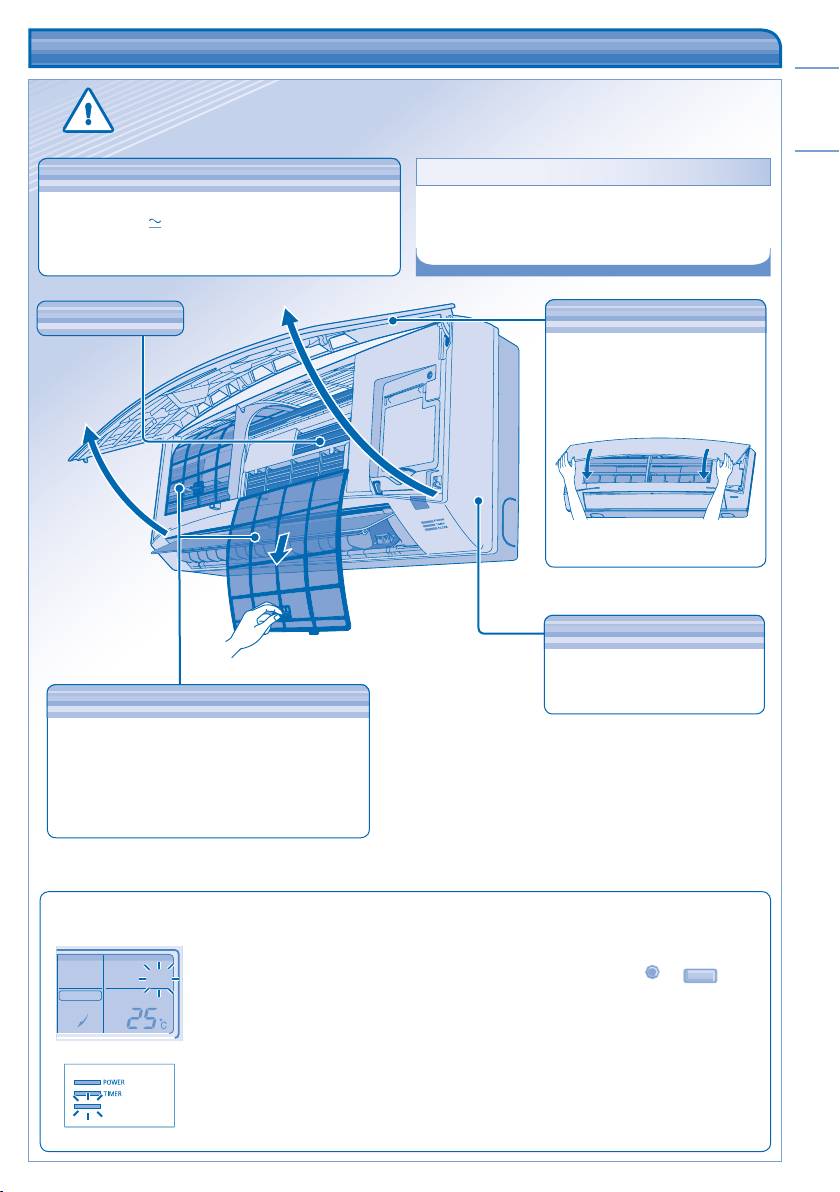
Remove Front Panel
• Raise and pull to remove the
front panel.
• Wash gently and dry.
Close Front Panel
• Press down both ends of the
front panel to close it securely.
Wipe the unit gently with a soft,
dry cloth.
INDOOR UNIT
INDOOR UNIT
AIR FILTERS
AIR FILTERS
• Air fi lters cleaning is needed every two weeks.
• Wash/rinse the fi lters gently with water to avoid
damage to the fi lter surface.
• Dry the fi lters thoroughly under the shade, away
from fi re or direct sunlight.
• Replace any damage fi lter.
Table of contents
- Operating Instructions FS Multi Air Conditioner
- SAFETY PRECAUTIONS SAFETY PRECAUTIONS
- INFORMATION INFORMATION
- MULTI AIR CONDITIONER FUNCTION MULTI AIR CONDITIONER FUNCTION
- PRODUCT OVERVIEW & OPERATIONS PRODUCT OVERVIEW & OPERATIONS (WIRELESS REMOTE CONTROL) (WIRELESS REMOTE CONTROL)
- PRODUCT OVERVIEW & OPERATIONS PRODUCT OVERVIEW & OPERATIONS (WIRED REMOTE CONTROL) (WIRED REMOTE CONTROL)
- CARE & CLEANING CARE & CLEANING
- TROUBLESHOOTING TROUBLESHOOTING
- PERINGATAN KESELAMATAN PERINGATAN KESELAMATAN
- MAKLUMAT MAKLUMAT
- FUNGSI ALAT PENYAMAN UDARA BERBILANG FUNGSI ALAT PENYAMAN UDARA BERBILANG
- GAMBARAN KESELURUHAN PRODUK & OPERASI GAMBARAN KESELURUHAN PRODUK & OPERASI (ALAT KAWALAN JAUH TANPA DAWAI) (ALAT KAWALAN JAUH TANPA DAWAI)
- GAMBARAN KESELURUHAN PRODUK & OPERASI (ALAT KAWALAN JAUH TERDAWAI)
- PENJAGAAN & PEMBERSIHAN PENJAGAAN & PEMBERSIHAN
- MENGESAN MASALAH MENGESAN MASALAH
- 安全措施 安全措施
- 信息 信息
- 一對多空調器功能 一對多空調器功能
- 產品概觀與操作(無線遙控器) 產品概觀與操作(無線遙控器)
- 產品概觀與操作(有線遙控器) 產品概觀與操作(有線遙控器)
- 保養與清洗 保養與清洗
- 故障檢修故障檢修
- ขอกําหนดเพื่อความปลอดภัย ขอกําหนดเพื่อความปลอดภัย
- ขอมูลทั่วไป ขอมูลทั่วไป
- การทํางานของเครื่องปรับอากาศแบบมัลติ การทํางานของเครื่องปรับอากาศแบบมัลติิ
- ภาพรวมผลิตภัณฑและการใชงาน ภาพรวมผลิตภัณฑและการใชงาน (รีโมทคอนโทรลไรสาย) (รีโมทคอนโทรลไรสาย)
- ภาพรวมผลิตภัณฑและการใชงาน (รีโมทคอนโทรลมีสาย) ภาพรวมผลิตภัณฑและการใชงาน (รีโมทคอนโทรลมีสาย)
- การดูแลและการทําความสะอาด การดูแลและการทําความสะอาด
- การแกไขปญหา การแกไขปญหา
- MEMO MEMO
- Petunjuk Pengoperasian Pendingin Ruangan Multi Sistem
- LANGKAH KESELAMATAN LANGKAH KESELAMATAN
- INFORMASI INFORMASI
- FUNGSI MULTI PENDINGIN RUANGAN FUNGSI MULTI PENDINGIN RUANGAN
- GAMBARAN & PENGOPERASIAN PRODUK GAMBARAN & PENGOPERASIAN PRODUK (REMOT KONTROL NIRKABEL) (REMOT KONTROL NIRKABEL)
- GAMBARAN & PENGOPERASIAN PRODUK GAMBARAN & PENGOPERASIAN PRODUK (REMOT KONTROL BERKABEL) (REMOT KONTROL BERKABEL)
- PERAWATAN & PEMBERSIHAN PERAWATAN & PEMBERSIHAN
- MENCARI DAN MENGATASI MASALAH
- MEMO MEMO
- PRECAUCIONES DE SEGURIDAD PRECAUCIONES DE SEGURIDAD
- INFORMACIÓN INFORMACIÓN
- FUNCIÓN DE AIRE ACONDICIONADO MÚLTIPLE FUNCIÓN DE AIRE ACONDICIONADO MÚLTI PLE
- DESCRIPCIÓN DEL PRODUCTO Y OPERACIÓN DESCRIPCIÓN DEL PRODUCTO Y OPERACIÓN (CONTROL REMOTO INALÁMBRICO) (CONTROL REMOTO INALÁMBRICO)
- DESCRIPCIÓN DEL PRODUCTO Y OPERACIÓN DESCRIPCIÓN DEL PRODUCTO Y OPERACIÓN (CONTROL REMOTO CON CABLE) (CONTROL REMOTO CON CABLE)
- CUIDADO Y LIMPIEZA CUIDADO Y LIMPIEZA
- DIAGNÓSTICO DE FALLAS DIAGNÓSTICO DE FALLAS
- MEMO MEMO
- Инструкции по эксплуатации FS Система многозонного кондиционирования воздуха
- МЕРЫ ПРЕДОСТОРОЖНОСТИ МЕРЫ ПРЕДОСТОРОЖНОСТИ
- ИНФОРМАЦИЯ ИНФОРМАЦИЯ
- ФУНКЦИЯ МНОГОЗОННОГО КОНДИЦИОНИРОВАНИЯ ВОЗДУХА ФУНКЦИЯ МНОГОЗОННОГО КОНДИЦИОНИРОВАНИЯ ВОЗДУХА
- ОПИСАНИЕ ПРОДУКТА И УПРАВЛЕНИЕ ОПИСАНИЕ ПРОДУКТА И УПРАВЛЕНИЕ (БЕСПРОВОДНОЙ ПУЛЬТ ДИСТАНЦИОННОГО УПРАВЛЕНИЯ) (БЕСПРОВОДНОЙ ПУЛЬТ ДИСТАНЦИОННОГО УПРАВЛЕНИЯ)
- ОПИСАНИЕ ПРОДУКТА И УПРАВЛЕНИЕ ОПИСАНИЕ ПРОДУКТА И УПРАВЛЕНИЕ (ПРОВОДНОЙ ПУЛЬТ ДИСТАНЦИОННОГО УПРАВЛЕНИЯ) (ПРОВОДНОЙ ПУЛЬТ ДИСТАНЦИОННОГО УПРАВЛЕНИЯ)
- УХОД И ОЧИСТКА УХОД И ОЧИСТКА
- ПОИСК И УСТРАНЕНИЕ НЕИСПРАВНОСТЕЙ ПОИСК И УСТРАНЕНИЕ НЕИСПРАВНОСТЕЙ
- Інструкція з експлуатації Мультиспліт кондиціонер FS
- ЗАХОДИ БЕЗПЕКИ ЗАХОДИ БЕЗПЕКИ
- ІНФОРМАЦІЯ ІНФОРМАЦІЯ
- СИСТЕМА МУЛЬТИ КОНДИ ЦІЮВАННЯ СИСТЕМА МУЛЬТИ КОНДИ ЦІЮВАННЯ
- ОГЛЯД ПРОДУКТУ ТА ФУНКЦІОНУВАННЯ ОГЛЯД ПРОДУКТУ ТА ФУНКЦІОНУВАННЯ (БЕЗДРОТОВИЙ ПУЛЬТ ДИСТАНЦІЙНОГО УПРАВЛІННЯ) (БЕЗДРОТОВИЙ ПУЛЬТ ДИСТАНЦІЙНОГО УПРАВЛІННЯ)
- ОГЛЯД ПРОДУКТУ ТА ФУНКЦІОНУВАННЯ ОГЛЯД ПРОДУКТУ ТА ФУНКЦІОНУВАННЯ (ДРОТОВИЙ ПУЛЬТ ДИСТАНЦІЙНОГО УПРАВЛІННЯ) (ДРОТОВИЙ ПУЛЬТ ДИСТАНЦІЙНОГО УПРАВЛІННЯ)
- ДОГЛЯД ТА ОЧИЩЕННЯ ДОГЛЯД ТА ОЧИЩЕННЯ
- УСУНЕННЯ НЕСПРАВНОСТЕЙ УСУНЕННЯ НЕСПРАВНОСТЕЙ
- MEMO MEMO
- QUICK GUIDE/PANDUAN SEGERA/ 簡易指南 /คู่มือการใช้งานอย่างย่อ/PEDOMAN CEPAT/GUÍA RÁPIDA/КОРОТКА ІНСТРУКЦІЯ/ШВИДКИЙ ПОСІБНИК
