
Olympus STYLUS 1030 SW: Turn the camera on
Turn the camera on: Olympus STYLUS 1030 SW
d4354_basic_e_00.book Page 6 Tuesday, December 18, 2007 5:26 PM
Turn the camera on
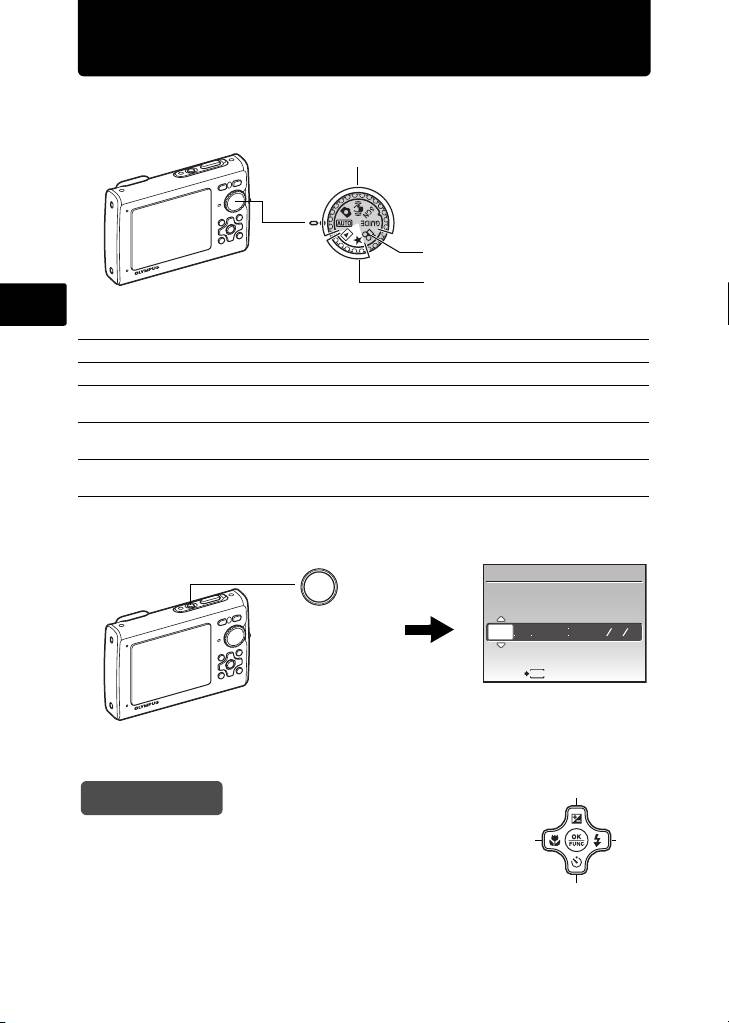
This explains how to turn on the camera in shooting mode.
a. Set the mode dial to h.
When shooting still pictures (shooting mode)
When shooting movies
(shooting mode)
When viewing pictures
(playback mode)
En
Still picture shooting modes
h This function allows you to shoot with the camera’s automatic settings.
K The camera automatically sets the optimum aperture value and shutter speed.
h This function reduces the blur incurred by a moving subject, or camera shake
when taking pictures.
s This function allows you to shoot pictures by selecting a scene according to the
shooting condition.
g This function allows you to set the target items by following the shooting guide
displayed on the screen.
b. Press the o button.
X
YM
D TIME
o Button
---- -- -- -- --
YMD
CANCEL
MENU
• When the date and time have
not yet been set, this screen will
appear.
( To turn off the camera, press the o button once again.
1
Hint
The directions of the arrow pad (1243) are indicated
4
3
with 1243 in this manual.
2
6
Table of contents
- Table of Contents
- Gather these items (box contents)
- Prepare the camera
- Turn the camera on
- Set date and time
- Select a language
- Take a picture
- View pictures
- Basic operation
- Menus and settings
- Connecting the camera
- Transfer images
- OLYMPUS Master Software
- Specifications
- Safety precautions
- Table des matières
- Sélectionnez une langue
- Fonctionnement de base
- Menus et réglages
- Connexion de l’appareil photo
- Transférez des images
- Logiciel OLYMPUS Master
- Caractéristiques
- Précautions de sécurité
- Contenidos
- Seleccionar un idioma
- Ver fotografias
- Funcionamiento básico
- Menús y ajustes
- Conexión de la cámara
- Transferencia de imágenes
- Software OLYMPUS Master
- Especificaciones
- Precauciones de seguridad
- Inhaltsverzeichnis
- Überprüfen Sie, ob die folgenden Komponenten (Verpackungsinhalt) vorhanden sind
- Vorbereiten der Kamera
- Die Kamera einschalten
- Stellen Sie das Datum und die Zeit ein
- Eine Sprache auswählen
- Ein Bild aufnehmen
- Bilder anzeigen
- Grundlegende Bedienung
- Menüs und Einstellungen
- Die Kamera anschließen
- Bilder übertragen
- OLYMPUS Master-Software
- Technische Daten
- Sicherheitshinweise
- Содержание
- Выньте из коробки эти предметы
- Подготовьте фотокамеру
- Включите фотокамеру
- Установите дату и время
- Выберите язык
- Съемка
- Просмотр снимков
- Основные операции
- Меню и настройки
- Подсоединение фотокамеры
- Перенос изображений
- Программное обеспечение OLYMPUS Master
- Технические характеристики
- Меры предосторожности


