
Olympus STYLUS 1030 SW: Menús y ajustes
Menús y ajustes: Olympus STYLUS 1030 SW
Menús y ajustes
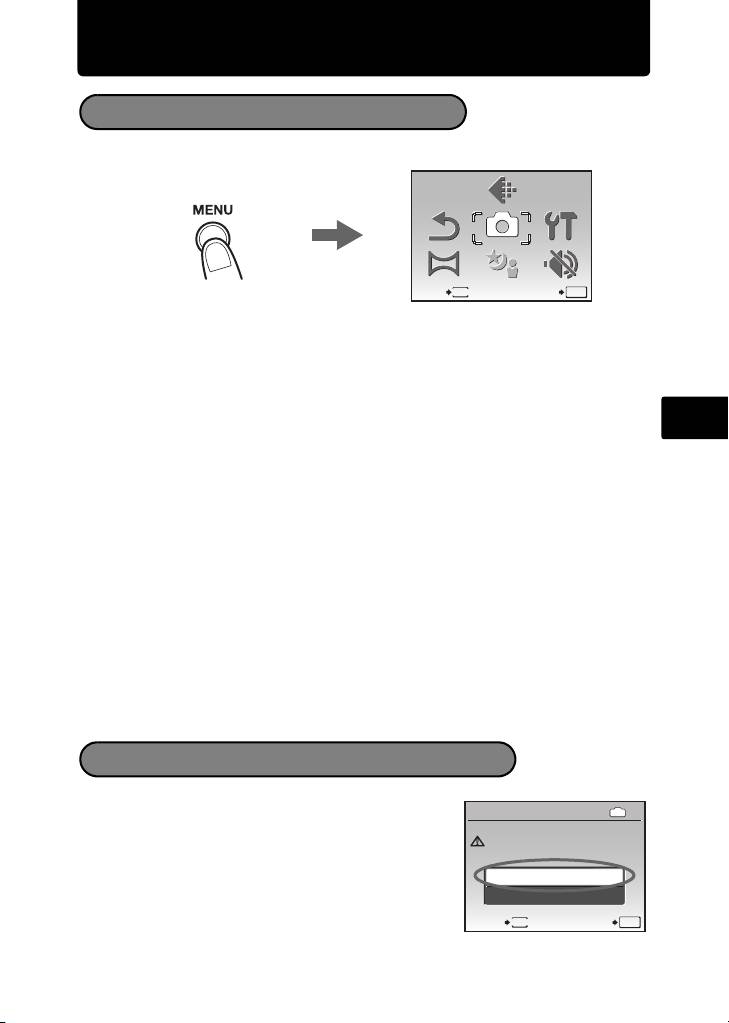
Menú superior
1 Presione m para abrir el menú superior.
2 Utilice las teclas de control (1243) para seleccionar elementos de menú
y presione o para ajustarlos.
CALIDAD IMAGEN
Ajuste la calidad de imagen de la fotografía que vaya a tomar en función del uso que desee darle.
Es
RESTAURAR
Devuelve las funciones de fotografía modificadas a los ajustes predeterminados.
MENÚ CÁMARA
Ajusta varias opciones de fotografía.
CONFIGURAC.
Ajusta la fecha, la hora, el idioma, el sonido de funcionamiento, etc.
PANORAMA
Toma y combinación de fotografías panorámicas. Para tomar fotografías
panorámicas hace falta una tarjeta Olympus xD-Picture Card.
SCN (escena)
Selecciona la escena en función del sujeto y de las condiciones fotográficas
cuando se selecciona el modo s.
MODO SILENC.
Desactiva los sonidos operativos que se producen al fotografiar y reproducir,
los sonidos de advertencia, los sonidos del botón disparador, etc.
1 En el menú superior del modo de reproducción,
seleccione [BORRAR] -> [BORRAR TODO] y
presione o.
2 Seleccione [SI] y presione o.
Se eliminarán todas las fotografías.
71
SCN
SCN
RE-
STAURAR
RE-
STAURAR
PANORAMA
PANORAMA
MENÚ
CÁ
MARA
MENÚ
CÁMARA
MODO
SILENC.
MODO
SILENC.
SALIR ACEPT.
MENU
OK
CALIDAD
IMAGEN
CALIDAD
IMAGEN
CONFI-
GURAC.
CONFI-
GURAC.
Menú superior del modo de fotografía
Borrar todas las fotogorafias
IN
ATRÁS
MENU
ACEPT.
OK
SI
PRECAUC. BORR. TODO
SI
NO
PRECAUC. BORR. TODO
BORRAR TODO
BORRAR TODO
d4354_basic_s_00.book Page 71 Tuesday, December 18, 2007 5:36 PM
Table of contents
- Table of Contents
- Gather these items (box contents)
- Prepare the camera
- Turn the camera on
- Set date and time
- Select a language
- Take a picture
- View pictures
- Basic operation
- Menus and settings
- Connecting the camera
- Transfer images
- OLYMPUS Master Software
- Specifications
- Safety precautions
- Table des matières
- Sélectionnez une langue
- Fonctionnement de base
- Menus et réglages
- Connexion de l’appareil photo
- Transférez des images
- Logiciel OLYMPUS Master
- Caractéristiques
- Précautions de sécurité
- Contenidos
- Seleccionar un idioma
- Ver fotografias
- Funcionamiento básico
- Menús y ajustes
- Conexión de la cámara
- Transferencia de imágenes
- Software OLYMPUS Master
- Especificaciones
- Precauciones de seguridad
- Inhaltsverzeichnis
- Überprüfen Sie, ob die folgenden Komponenten (Verpackungsinhalt) vorhanden sind
- Vorbereiten der Kamera
- Die Kamera einschalten
- Stellen Sie das Datum und die Zeit ein
- Eine Sprache auswählen
- Ein Bild aufnehmen
- Bilder anzeigen
- Grundlegende Bedienung
- Menüs und Einstellungen
- Die Kamera anschließen
- Bilder übertragen
- OLYMPUS Master-Software
- Technische Daten
- Sicherheitshinweise
- Содержание
- Выньте из коробки эти предметы
- Подготовьте фотокамеру
- Включите фотокамеру
- Установите дату и время
- Выберите язык
- Съемка
- Просмотр снимков
- Основные операции
- Меню и настройки
- Подсоединение фотокамеры
- Перенос изображений
- Программное обеспечение OLYMPUS Master
- Технические характеристики
- Меры предосторожности


