
Olympus STYLUS 1030 SW: Prepare the camera
Prepare the camera: Olympus STYLUS 1030 SW
d4354_basic_e_00.book Page 4 Tuesday, December 18, 2007 5:26 PM
Prepare the camera
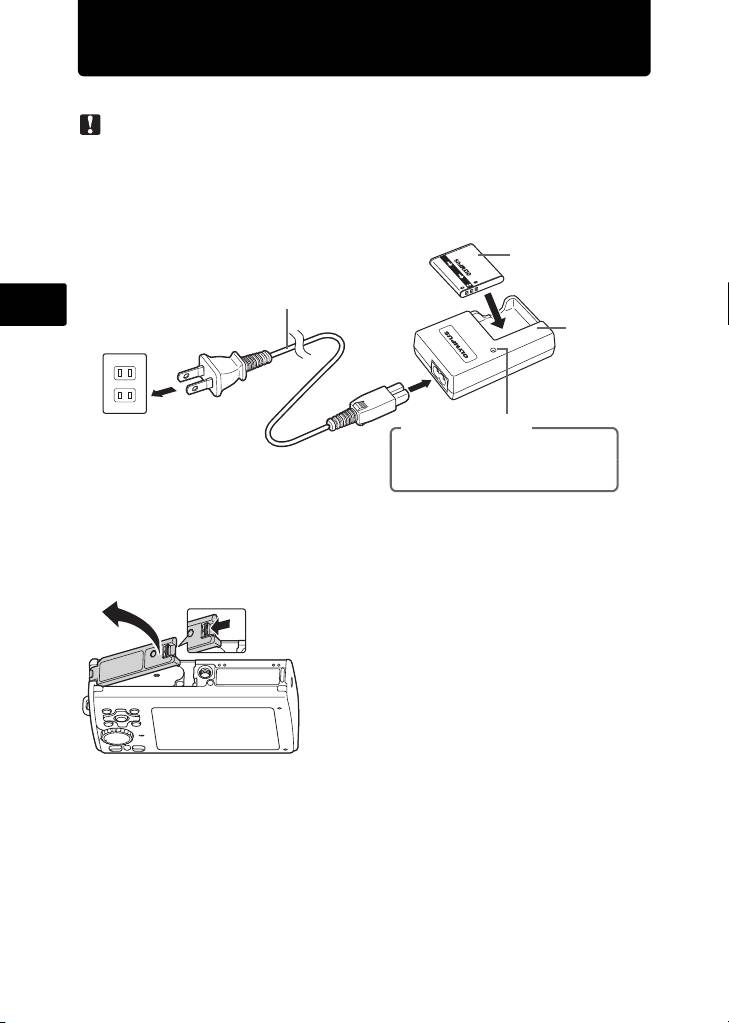
a. Charge the battery.
Note
( There are two types of the LI-50C battery charger, one is “AC cable type” and
the other is “plug-in type”. Depending on the region where you purchased the
camera, the included battery charger type differs. We explain here how to use
the AC cable type battery charger as an example. If you received the plug-in
type battery charger, plug it directly into an AC outlet.
Lithium Ion Battery
3
Power Cable
En
Battery
Charger
1
2
AC Wall Outlet
Charging Indicator
Light On: Charging
Light Off: Charging complete
(Charging time: Approx. 2 hours)
( Battery comes partially charged.
b.
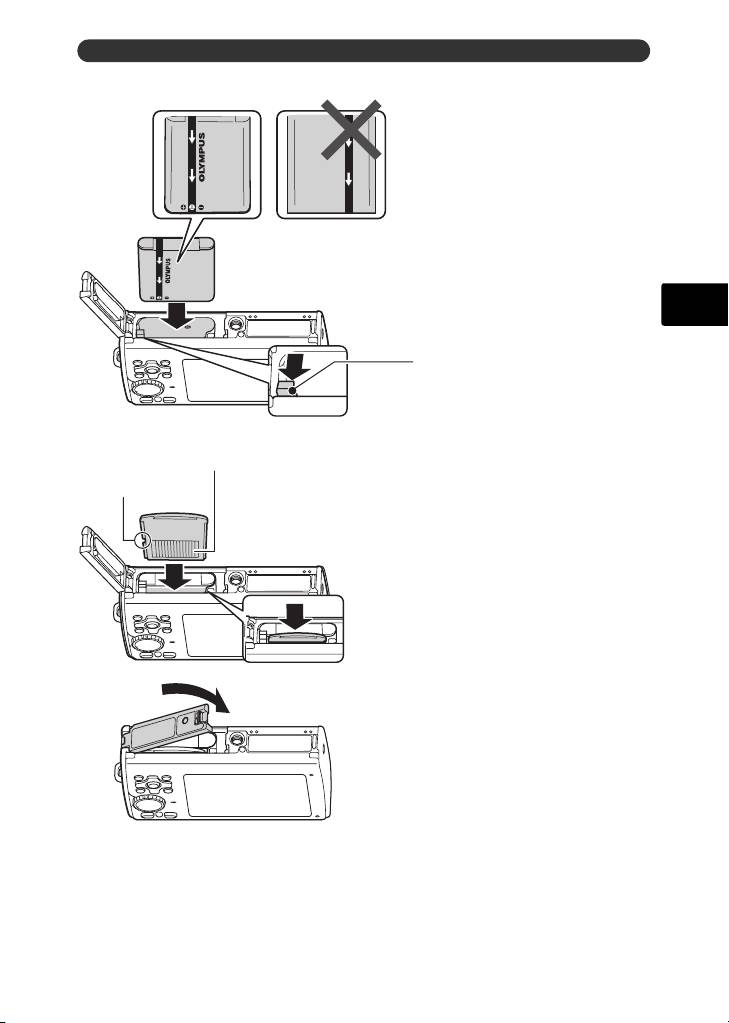
Insert the battery and an xD-Picture Card (optional) in the camera.
1
2
4
d4354_basic_e_00.book Page 5 Tuesday, December 18, 2007 5:26 PM
Prepare the camera
( Insert the battery in the
orientation shown in the
illustration.
If you insert the battery reversely,
the camera will not turn on even if
the o button pressed.
3
En
Battery lock knob
To remove the battery, slide the battery
lock knob in the direction of the arrow.
Contact area
Notch
( Orient the card as shown in the
illustration and insert it straight into
the card slot.
Insert the card until it clicks into place.
4
To remove the card, push it all the way in and
release it slowly. Then grasp the card and
remove.
5
( You can shoot pictures with this camera even without using an optional
xD-Picture Card™ (hereinafter referred to as “the card”). If an xD-Picture Card
is not inserted, your pictures will be saved to the internal memory.
For details on the card, please refer to the Advanced Manual.
5
Table of contents
- Table of Contents
- Gather these items (box contents)
- Prepare the camera
- Turn the camera on
- Set date and time
- Select a language
- Take a picture
- View pictures
- Basic operation
- Menus and settings
- Connecting the camera
- Transfer images
- OLYMPUS Master Software
- Specifications
- Safety precautions
- Table des matières
- Sélectionnez une langue
- Fonctionnement de base
- Menus et réglages
- Connexion de l’appareil photo
- Transférez des images
- Logiciel OLYMPUS Master
- Caractéristiques
- Précautions de sécurité
- Contenidos
- Seleccionar un idioma
- Ver fotografias
- Funcionamiento básico
- Menús y ajustes
- Conexión de la cámara
- Transferencia de imágenes
- Software OLYMPUS Master
- Especificaciones
- Precauciones de seguridad
- Inhaltsverzeichnis
- Überprüfen Sie, ob die folgenden Komponenten (Verpackungsinhalt) vorhanden sind
- Vorbereiten der Kamera
- Die Kamera einschalten
- Stellen Sie das Datum und die Zeit ein
- Eine Sprache auswählen
- Ein Bild aufnehmen
- Bilder anzeigen
- Grundlegende Bedienung
- Menüs und Einstellungen
- Die Kamera anschließen
- Bilder übertragen
- OLYMPUS Master-Software
- Technische Daten
- Sicherheitshinweise
- Содержание
- Выньте из коробки эти предметы
- Подготовьте фотокамеру
- Включите фотокамеру
- Установите дату и время
- Выберите язык
- Съемка
- Просмотр снимков
- Основные операции
- Меню и настройки
- Подсоединение фотокамеры
- Перенос изображений
- Программное обеспечение OLYMPUS Master
- Технические характеристики
- Меры предосторожности


