
Olympus STYLUS 1030 SW: Safety precautions
Safety precautions: Olympus STYLUS 1030 SW

d4354_basic_e_00.book Page 23 Tuesday, December 18, 2007 5:26 PM
Safety precautions
Important Information About Water And Shock Resistant Features
*1
Water resistance: The waterproof feature is warranted
to operate at depths up to
10 m (32.8 feet) for up to one hour. The waterproof feature may be compromised if the
camera is subject to substantial or excessive impact.
*2
Shock resistance: The anti-shock feature warrants
the operation of the camera
against accidental impact incurred from everyday use of your digital compact camera.
The anti-shock feature does not unconditionally warrant all defective operation or
cosmetic damage. Cosmetic damage, such as scratches and dents, are not covered
under the warranty.
As with any electronic device, proper care and maintenance are required to preserve
En
the integrity and operation of your camera. To maintain camera performance, please
take your camera to the nearest Olympus Authorized Service Center to have it
inspected after any major impact. In the event the camera is damaged as a result of
negligence or misuse, the warranty will not cover costs associated with the service or
repair of your camera. For additional information on our warranty, please visit to the
Olympus website for your local area.
Please observe the following care instructions for your camera.
Before Use:
• Check the camera for foreign material including dirt, dust or sand.
• Be sure to close the battery/card compartment cover and connector cover firmly so
that each lock makes clicking sound.
• Do not open the battery/card compartment cover and connector cover with wet hands,
while under water, or in a damp or dusty environment (e.g. beach).
After Use:
• Be sure to wipe off any excess water or debris after using the camera under water.
• After the camera is used under sea water, immerse the camera in a bucket
containing fresh water for about 10 minutes (with the battery/card compartment
cover and connector cover firmly closed). After that, dry the camera in a shade
with good ventilation.
• Water drops may be observed on the inner surface of the battery/card
compartment cover or connector cover after you open each cover. If any water
drops are found, be sure to wipe them off before using the camera.
Notes after use
• Any foreign material may be adhered to the periphery of the lens cover, after you use
the camera in an environment containing foreign material including dirt, dust or sand,
or when the lens cover won’t move smoothly.
If you continue to use the camera in such a condition, the lens may be damaged or the
lens cover may become stuck, causing a failure. To avoid such a failure, wash the
camera using the following method.
23
d4354_basic_e_00.book Page 24 Tuesday, December 18, 2007 5:26 PM
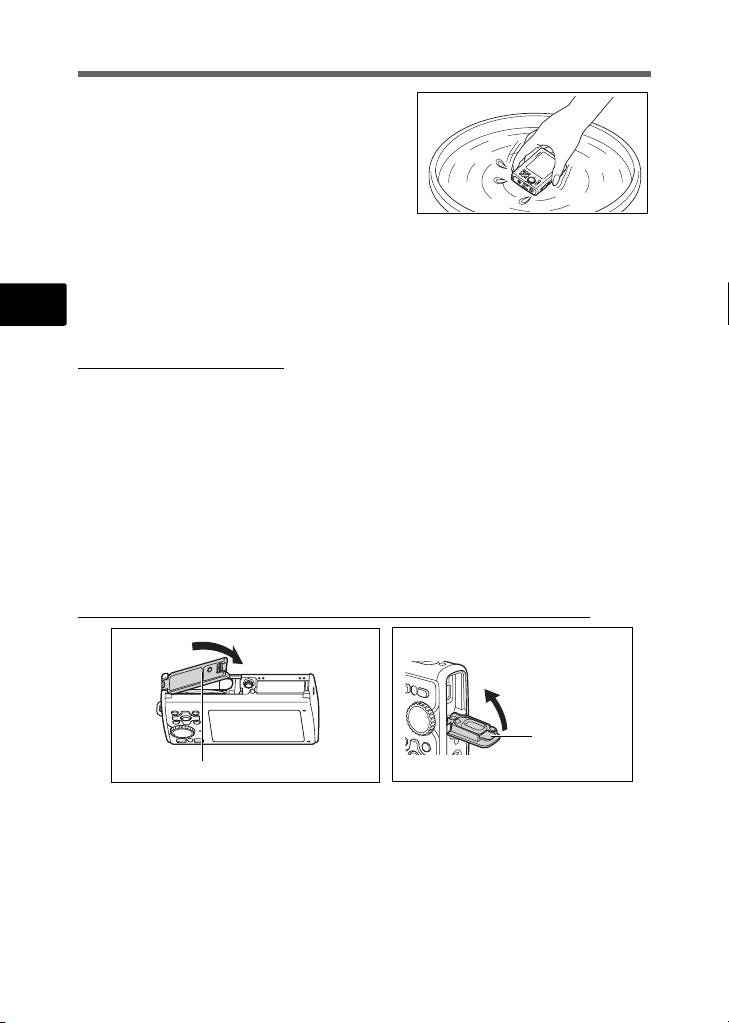
1 Insert the battery and close the battery/card
compartment cover and connector cover firmly
so that each lock makes the clicking sound.
2 Fill a bucket with fresh water, immerse the
camera in the bucket with the lens surface
downward and shake the camera thoroughly.
3 Press the o button several times in the
water and close/open the lens cover
repeatedly.
4 Furthermore, shake the camera further with the cover opened.
Follow the steps 1 to 4, then check if the lens cover moves smoothly.
En
If the lens cover does not move smoothly, rinse the lens face by placing it directly under
a strong stream of tap water and pressing the o button repeatedly.
Storage and Maintenance
• Do not leave the camera in an environment at high temperature (40°C (104°F) or
more) or at low temperature (-10°C (14°F) or less). Failure to do so may break down
water resistance.
• Do not use chemicals for cleaning, rust prevention, anti-fogging, repairing, etc. Failure
to do so may break down water resistance.
• Do not leave the camera in water for a long time. Failure to do so will cause
damage to the camera’s appearance and/or deteriorate water resistance.
• In addition do not pour water over the camera directly from the water faucet.
•
In order to preserve the water resistant feature, as with any underwater housing,
it is recommended that the waterproof packing (and seals) are replaced annually.
For the Olympus distributors or service stations where the waterproof packing
can be replaced, visit Olympus website for your local area.
Closing Battery/Card Compartment Cover and Connector cover
Connector cover
Battery/card compartment cover
Note: The included accessories (e.g. charger) do not offer shock or water resistance.
*1 as determined by Olympus pressure testing equipment in accordance to IEC
Standard Publication 529 IPX8 - This means that the camera can be used normally
under water at a specified water pressure.
*2 This anti-shock performance is confirmed by Olympus’ testing conditions in
accordance with MIL-STD-810F, Method 516.5, Procedure IV (Transit Drop Test).
For more details of Olympus’ testing conditions, please refer to the Olympus website
for your local area.
24
d4354_basic_e_00.book Page 25 Tuesday, December 18, 2007 5:26 PM
CAUTION
RISK OF ELECTRIC SHOCK
DO NOT OPEN
CAUTION: TO REDUCE THE RISK OF ELECTRICAL SHOCK, DO NOT
REMOVE COVER (OR BACK). NO USER-SERVICEABLE PARTS INSIDE.
REFER SERVICING TO QUALIFIED OLYMPUS SERVICE PERSONNEL.
An exclamation mark enclosed in a triangle alerts you to important operating and
maintenance instructions in the documentation provided with the product.
If the product is used without observing the information given under this symbol, serious
DANGER
injury or death may result.
En
If the product is used without observing the information given under this symbol, injury or
WARNING
death may result.
If the product is used without observing the information given under this symbol, minor
CAUTION
personal injury, damage to the equipment, or loss of valuable data may result.
WARNING!
TO AVOID THE RISK OF FIRE OR ELECTRICAL SHOCK, NEVER DISASSEMBLE, EXPOSE THIS PRODUCT
TO WATER OR OPERATE IN A HIGH HUMIDITY ENVIRONMENT.
General Precautions
Read All Instructions — Before you use the product, read all operating
instructions. Save all manuals and documentation for future reference.
Cleaning — Always unplug this product from the wall outlet before cleaning. Use
only a damp cloth for cleaning. Never use any type of liquid or aerosol cleaner,
or any type of organic solvent to clean this product.
Attachments — For your safety, and to avoid damaging the product, use only
accessories recommended by Olympus.
Water and Moisture — For precautions on products with weatherproof designs,
read the weatherproofing sections.
Location — To avoid damage to the product, mount the product securely on a
stable tripod, stand, or bracket.
Power Source — Connect this product only to the power source described on the
product label.
Lightning — If a lightning storm occurs while using an AC adapter, remove it from
the wall outlet immediately.
Foreign Objects — To avoid personal injury, never insert a metal object into the
product.
Heat — Never use or store this product near any heat source such as a radiator,
heat register, stove, or any type of equipment or appliance that generates heat,
including stereo amplifiers.
25

d4354_basic_e_00.book Page 26 Tuesday, December 18, 2007 5:26 PM
Handling the Camera
WARNING
( Do not use the camera near flammable or explosive gases.
( Do not use the flash and LED on people (infants, small children, etc.)
at close range.
• You must be at least 1 m (3 ft.) away from the faces of your subjects. Firing the
flash too close to the subject’s eyes could cause a momentary loss of vision.
( Keep young children and infants away from the camera.
• Always use and store the camera out of the reach of young children and infants
En
to prevent the following dangerous situations which could cause serious injury:
• Becoming entangled in the camera strap, causing strangulation.
• Accidentally swallowing the battery, cards or other small parts.
• Accidentally firing the flash into their own eyes or those of another child.
• Accidentally being injured by the moving parts of the camera.
( Do not look at the sun or strong lights with the camera.
( Do not use or store the camera in dusty or humid places.
( Do not cover the flash with a hand while firing.
CAUTION
( Stop using the camera immediately if you notice any unusual odors,
noise, or smoke around it.
• Never remove the batteries with bare hands, which may cause a fire or burn your
hands.
( Do not leave the camera in places where it may be subject to
extremely high temperatures.
• Doing so may cause parts to deteriorate and, in some circumstances, cause the
camera to catch fire. Do not use the charger or AC adapter if it is covered (such
as a blanket). This could cause overheating, resulting in fire.
( Handle the camera with care to avoid getting a low-temperature
burn.
• When the camera contains metal parts, overheating can result in a low-
temperature burn. Pay attention to the following:
• When used for a long period, the camera will get hot. If you hold on to the
camera in this state, a low-temperature burn may be caused.
• In places subject to extremely cold temperatures, the temperature of the
camera’s body may be lower than the environmental temperature. If possible,
wear gloves when handling the camera in cold temperatures.
( Be careful with the strap.
• Be careful with the strap when you carry the camera. It could easily catch on stray
objects - and cause serious damage.
( Do not touch the metallic parts of the camera for a long period of
time at low temperatures.
• This may damage your skin. At low temperatures, handle the camera while
wearing gloves.
26

d4354_basic_e_00.book Page 27 Tuesday, December 18, 2007 5:26 PM
Battery Handling Precautions
Follow these important guidelines to prevent batteries from leaking,
overheating, burning, exploding, or causing electrical shocks or burns.
DANGER
• The camera uses a lithium ion battery specified by Olympus. Charge the battery
with the specified charger. Do not use any other chargers.
• Never heat or incinerate batteries.
En
• Take precautions when carrying or storing batteries to prevent them from
coming into contact with any metal objects such as jewelry, pins, fasteners, etc.
• Never store batteries where they will be exposed to direct sunlight, or subjected
to high temperatures in a hot vehicle, near a heat source, etc.
• To prevent causing battery leaks or damaging their terminals, carefully follow all
instructions regarding the use of batteries. Never attempt to disassemble a
battery or modify it in any way, by soldering, etc.
• If battery fluid gets into your eyes, flush your eyes immediately with clear, cold
running water and seek medical attention immediately.
• Always store batteries out of the reach of small children. If a child accidentally
swallows a battery, seek medical attention immediately.
WARNING
• Keep batteries dry at all times.
• To prevent batteries from leaking, overheating, or causing a fire or explosion,
use only batteries recommended for use with this product.
• Insert the battery carefully as described in the operating instructions.
• If rechargeable batteries have not been recharged within the specified time,
stop charging them and do not use them.
• Do not use a battery if it is cracked or broken.
• If a battery leaks, becomes discolored or deformed, or becomes abnormal in
any other way during operation, stop using the camera.
• If a battery leaks fluid onto your clothing or skin, remove the clothing and flush
the affected area with clean, running cold water immediately. If the fluid burns
your skin, seek medical attention immediately.
• Never subject batteries to strong shocks or continuous vibration.
CAUTION
• Before loading, always inspect the battery carefully for leaks, discoloration,
warping, or any other abnormality.
• The battery may become hot during prolonged use. To avoid minor burns, do
not remove it immediately after using the camera.
• Always unload the battery from the camera before storing the camera for a long
period.
27

d4354_basic_e_00.book Page 28 Tuesday, December 18, 2007 5:26 PM
For customers in Europe
“CE” mark indicates that this product complies with the European requirements
for safety, health, environment and customer protection. “CE” mark cameras
are intended for sales in Europe.
This symbol [crossed-out wheeled bin WEEE Annex IV] indicates separate
collection of waste electrical and electronic equipment in the EU countries.
Please do not throw the equipment into the domestic refuse.
Please use the return and collection systems available in your country for the
disposal of this product.
En
Use Only Dedicated Rechargeable Battery and Battery Charger
We strongly recommend that you use only the genuine Olympus dedicated
rechargeable battery and battery charger with this camera.
Using a non-genuine rechargeable battery and/or battery charger may result in fire
or personal injury due to leakage, heating, ignition or damage to the battery.
Olympus does not assume any liability for accidents or damage that may result
from the use of a battery and/or battery charger that are not genuine Olympus
accessories.
Trademarks
• IBM is a registered trademark of International Business Machines Corporation.
• Microsoft and Windows are registered trademarks of Microsoft Corporation.
• Macintosh is a trademark of Apple Inc.
• xD-Picture Card™ is a trademark.
• All other company and product names are registered trademarks and/or
trademarks of their respective owners.
• The standards for camera file systems referred to in this manual are the “Design
Rule for Camera File System/DCF” standards stipulated by the Japan
Electronics and Information Technology Industries Association (JEITA).
28

d4354_basic_e_00.book Page 29 Tuesday, December 18, 2007 5:26 PM
Provisions of warranty
1. If this product proves to be defective, although it has been used properly (in accordance with the
written Handling Care and Operating instructions supplied with it), during a period of two years
from the date of purchase from an authorized Olympus distributor within the business area of
Olympus Imaging Europa GmbH as stipulated on the website: http://www.olympus.com this
product will be repaired, or at Olympus’s option replaced, free of charge. To claim under this
warranty the customer must take the product and this Warranty Certificate before the end of the
two year warranty period to the dealer where the product was purchased or any other Olympus
service station within the business area of Olympus Imaging Europa GmbH as stipulated on the
website: http://www.olympus.com. During the one year period of the World Wide Warranty the
customer may turn the product in at any Olympus service station. Please notice that not in all
countries such Olympus service station exists.
2. The customer shall transport the product to the dealer or Olympus authorized service station at his
own risk and shall be responsible for any costs incurred in transporting the product.
3. This warranty does not cover the following and the customer will be required to pay repair charge,
even for defects occurring within the warranty period referred to above.
En
(a) Any defect that occurs due to mishandling (such as an operation performed that is not
mentioned in the Handling Care or other sections of the instructions, etc.)
(b) Any defect that occurs due to repair, modification, cleaning, etc. performed by anyone other
than Olympus or an Olympus authorized service station.
(c) Any defect or damage that occurs due to transport, a fall, shock, etc. after purchase of the
product.
(d) Any defect or damage that occurs due to fire, earthquake, flood damage, thunderbolt, other
natural disasters, environmental pollution and irregular voltage sources.
(e) Any defect that occurs due to careless or improper storage (such as keeping the product under
conditions of high temperature and humidity, near insect repellents such as naphthalene or
harmful drugs, etc.), improper maintenance, etc.
(f) Any defect that occurs due to exhausted batteries, etc.
(g) Any defect that occurs due to sand, mud, etc. entering the inside of the product casing.
(h) When this Warranty Certificate is not returned with the product.
(i) When any alterations whatsoever are made to the Warranty Certificate regarding the year,
month and date of purchase, the customer’s name, the dealer’s name, and the serial number.
(j) When proof of purchase is not presented with this Warranty Certificate.
4. This Warranty applies to the product only; the Warranty does not apply to any other accessory
equipment, such as the case, strap, lens cap and batteries.
5. Olympus’s sole liability under this warranty shall be limited to repairing or replacing the product.
Any liability for indirect or consequential loss or damage of any kind incurred or suffered by the
customer due to a defect of the product, and in particular any loss or damage caused to any lenses,
films, other equipment or accessories used with the product or for any loss resulting from a delay
in repair or loss of data, is excluded. Compelling regulations by law remain unaffected by this.
Notes regarding warranty maintenance
1. This warranty will only be valid if the Warranty Certificate is duly completed by Olympus or an
authorized dealer or other documents contain sufficient proof. Therefore, please make sure that
your name, the name of the dealer, the serial number and the year, month and date of purchase
are all completed or the original invoice or the sales receipt (indicating the dealer’s name, the date
of purchase and product type) is attached to this Warranty Certificate. Olympus reserves the right
to refuse free-of-charge service if neither Warranty Certificate is completed nor the above
document is attached or if the information contained in it is incomplete or illegible.
2. Since this Warranty Certificate will not be re-issued, keep it in a safe place.
* Please refer to the list on the web site: http://www.olympus.com for the authorized international
Olympus service network.
Disclaimer of Warranty
Olympus makes no representations or warranties, either expressed or implied, by or concerning any
content of these written materials or software, and in no event shall be liable for any impelled warranty
purchase are all completed or the original invoice or the sales receipt of merchantability or fitness for
any particular purpose or for any consequential, incidental or indirect damages (including but not
limited to damages for loss of business profits, business interruption and loss of business information)
arising from the use of inability to use these written materials or software. Some states do not allow
the exclusion or limitation of liability for consequential or incidental damages, so the above limitations
may not apply to you.
29
Table of contents
- Table of Contents
- Gather these items (box contents)
- Prepare the camera
- Turn the camera on
- Set date and time
- Select a language
- Take a picture
- View pictures
- Basic operation
- Menus and settings
- Connecting the camera
- Transfer images
- OLYMPUS Master Software
- Specifications
- Safety precautions
- Table des matières
- Sélectionnez une langue
- Fonctionnement de base
- Menus et réglages
- Connexion de l’appareil photo
- Transférez des images
- Logiciel OLYMPUS Master
- Caractéristiques
- Précautions de sécurité
- Contenidos
- Seleccionar un idioma
- Ver fotografias
- Funcionamiento básico
- Menús y ajustes
- Conexión de la cámara
- Transferencia de imágenes
- Software OLYMPUS Master
- Especificaciones
- Precauciones de seguridad
- Inhaltsverzeichnis
- Überprüfen Sie, ob die folgenden Komponenten (Verpackungsinhalt) vorhanden sind
- Vorbereiten der Kamera
- Die Kamera einschalten
- Stellen Sie das Datum und die Zeit ein
- Eine Sprache auswählen
- Ein Bild aufnehmen
- Bilder anzeigen
- Grundlegende Bedienung
- Menüs und Einstellungen
- Die Kamera anschließen
- Bilder übertragen
- OLYMPUS Master-Software
- Technische Daten
- Sicherheitshinweise
- Содержание
- Выньте из коробки эти предметы
- Подготовьте фотокамеру
- Включите фотокамеру
- Установите дату и время
- Выберите язык
- Съемка
- Просмотр снимков
- Основные операции
- Меню и настройки
- Подсоединение фотокамеры
- Перенос изображений
- Программное обеспечение OLYMPUS Master
- Технические характеристики
- Меры предосторожности


