
Nikon SB-400: Usable batteries Replacing/recharging the batteries Standby function to conserve battery power
Usable batteries Replacing/recharging the batteries Standby function to conserve battery power: Nikon SB-400
Table of contents
- Preparation For your safety 2 Never attempt to disassemble or repair the flash unit by yourself, as this
- 10 Do not fire the unit while the flash head is touching a person or object.
- Preparation
- CAUTIONS for Speedlights WARNINGS for Batteries 1 Never heat or throw batteries into a fire, as this could cause the batteries to
- Preparation 8 Always follow the warnings and instructions printed on the batteries to
- 17 Non-rechargeable batteries should never be charged in a battery charger CAUTION for Batteries Symbol for separate collection applicable in European countries
- Preparation Foreword Confirm receipt Confirm receipt of contents in your kit Using your Speedlight correctly
- Take trial shots Have Nikon regularly spot-check your Speedlight Life-long learning
- Preparation Compatible cameras Speedlight parts Installing the batteriesL
- Usable batteries Replacing/recharging the batteries Standby function to conserve battery power
- Basic operation 1 Attach the SB-400 to the camera 2 Adjust the flash head
- 3 Setting the camera's mode Flash shooting distance range
- Available flash modes
- Effective usage of Speedlight Bounce flash
- Effective usage of Speedlight Notes on bounce flash
- When the subject has a mottled appearance with the flash light, raise the tilting degree of the flash head. In case the light is not enough
- Reference information Optional accessories Tips on Speedlight care Cleaning Storage
- Operating location Notes on handling batteries
- Notes on continuous flash shooting
- Troubleshooting
- Specifications
- Batteries Min. recycling
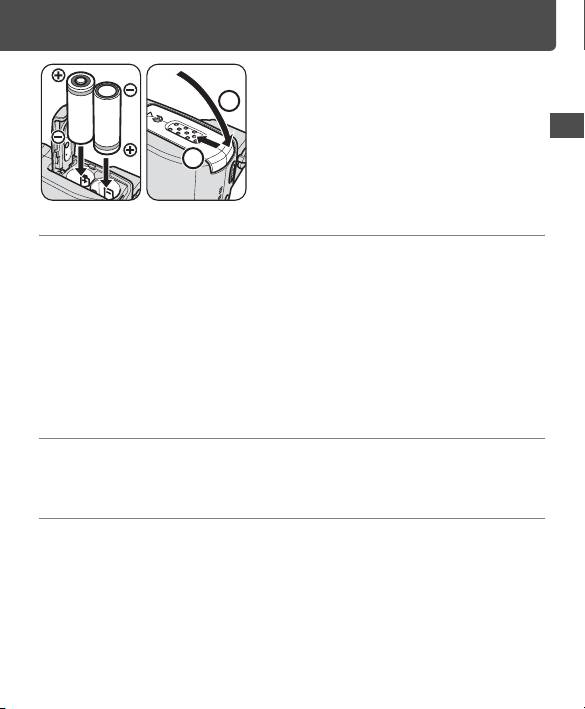
Install the batteries following
2
the i and j marks as
shown. Then close the
battery chamber lid by
En
sliding it into place while
pressing down.
Usable batteries
Install two AA-type penlight batteries (1.5 V or lower) of any of these types:
Alkaline-manganese (1.5 V), Lithium (1.5 V), Oxyride (1.5 V), Ni-MH
[Nickel Metal Hydride (rechargeable), (1.2 V)]
• When replacing batteries, replace both with fresh ones of the same brand.
• Carbon-zinc batteries are not recommended for use with the SB-400.
• Depending on battery specifications, when the Lithium batteries become hot, the
safety circuits are activated, cutting off power. This often occurs when the flash
unit is operated in the repeating flash mode. Battery power will recover when the
temperature returns to normal.
Replacing/recharging the batteries
When the battery power becomes low, the Ready-light blinks at 2 Hz
(twice in a second) for approx. 40 seconds. Replace or recharge batteries.
Standby function to conserve battery power
• If the SB-400 and the camera are not used for more than 40 seconds, the standby
function activates and automatically turns the SB-400 off to conserve battery
power (it goes into the standby mode).
• When the SB-400 is mounted on a camera, the SB-400 automatically turns off
when the camera goes into standby mode after the camera’s exposure meter is
switched off.
• When in the standby mode, the SB-400 turns back on again when the [ON/OFF]
switch is [ON], or the camera's shutter release button is lightly pressed.
11
1
2


