
Nikon SB-400: Troubleshooting
Troubleshooting: Nikon SB-400
Table of contents
- Preparation For your safety 2 Never attempt to disassemble or repair the flash unit by yourself, as this
- 10 Do not fire the unit while the flash head is touching a person or object.
- Preparation
- CAUTIONS for Speedlights WARNINGS for Batteries 1 Never heat or throw batteries into a fire, as this could cause the batteries to
- Preparation 8 Always follow the warnings and instructions printed on the batteries to
- 17 Non-rechargeable batteries should never be charged in a battery charger CAUTION for Batteries Symbol for separate collection applicable in European countries
- Preparation Foreword Confirm receipt Confirm receipt of contents in your kit Using your Speedlight correctly
- Take trial shots Have Nikon regularly spot-check your Speedlight Life-long learning
- Preparation Compatible cameras Speedlight parts Installing the batteriesL
- Usable batteries Replacing/recharging the batteries Standby function to conserve battery power
- Basic operation 1 Attach the SB-400 to the camera 2 Adjust the flash head
- 3 Setting the camera's mode Flash shooting distance range
- Available flash modes
- Effective usage of Speedlight Bounce flash
- Effective usage of Speedlight Notes on bounce flash
- When the subject has a mottled appearance with the flash light, raise the tilting degree of the flash head. In case the light is not enough
- Reference information Optional accessories Tips on Speedlight care Cleaning Storage
- Operating location Notes on handling batteries
- Notes on continuous flash shooting
- Troubleshooting
- Specifications
- Batteries Min. recycling
Troubleshooting
If a warning indication appears on the SB-400's ready-light or inside the
camera's viewfinder, use the following chart to determine the cause of the
En
problem before you take your Speedlight to a Nikon service center for repair.
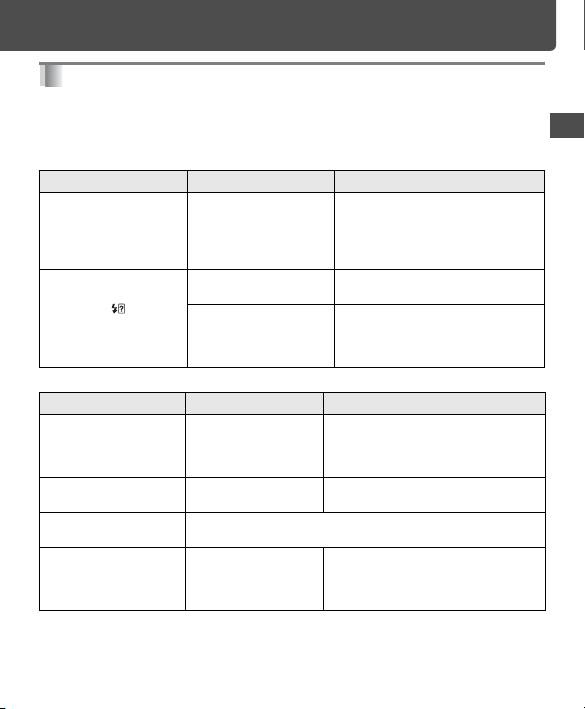
Warning indication inside the camera's viewfinder
Warning indication Cause Procedure
The ready-light in the
Underexposure may
• Shorten the shooting distance.
viewfinder blinks for 3
have occurred.
• Set camera’s aperture to a larger
sec. after firing.
(f/3.5, f/4.5 or f/5.6).
• Set the camera's ISO sensitivity
higher.
When mounted to the
Lens' focal length is set
• Set the focal length longer than
D5000, D3000, D60 or
shorter than 18mm.
18mm.
D40-Series, blinks in
The flash head of the
• For bounce flash shooting, take
the camera's viewfinder.
SB-400 is not set to the
the picture without any change.
horizontal position.
• For standard flash shooting, tilt the
flash head to the horizontal position.
When the ready-light on the SB-400 blinks
Ready-light blinks Cause Procedure
The ready-light blinks
Underexposure may
• Shorten the shooting distance.
for 3 sec. at 4 Hz.
have occurred.
• Set camera’s aperture to a larger
(f/3.5, f/4.5 or f/5.6).
• Set camera's the ISO sensitivity higher.
The ready-light blinks
Battery power is not
• Replace or recharge batteries.
for 40 sec. at 2 Hz.
enough.
The ready-light blinks at
The SB-400 is mounted to a camera which is not compatible with
interval of 0.5 sec. at 8 Hz.
CLS (SB-400 is usable only with cameras compatible with CLS).
The ready-light blinks at
The body temperature
• Wait until the body temperature
1 Hz.
becomes high because
drops and ready-light turns on
of repeating flash or
again.
other cause.
• Hz (frequency) is blinking time per second.
21


