
Nikon PC-E NIKKOR 24mm f-3.5D ED: The shift function The tilt function
The shift function The tilt function: Nikon PC-E NIKKOR 24mm f-3.5D ED
Table of contents
- Notes on Safety Operations
- 1. Nomenclature
- 2. Major features
- 3. Usable cameras and available functions
- Aperture stop-down button (one-touch preset aperture operation)
- 4. Mounting lens
- 5. Using bayonet hood HB-41 6. Determining exposure When using the Nikon D3 or D300 camera
- When using other Nikon cameras Determining exposure (with an external exposure meter) 7. The shift/tilt function Important
- The shift function The tilt function
- Revolving
- 8. Focusing
- 9. Depth of field 10. Taking flash pictures using cameras with a built-in flash
- 11. Recommended focusing screens
- 12. Lens care 13. Standard accessories 14. Optional accessories
- 15. Specifications
- Weight: Approx. 730 g (25.7 oz)
• Determining correct exposure with shift and/or tilt use requires
experience. We recommend that you take a series of test shots
until you feel comfortable with the operation.
• When the lens is mounted to a camera other than the D3, shift
En
and/or tilt the lens with care. Failure to do so, may result in your
fingers being nipped between the lens and the camera body, or
the lens scratching the camera body.
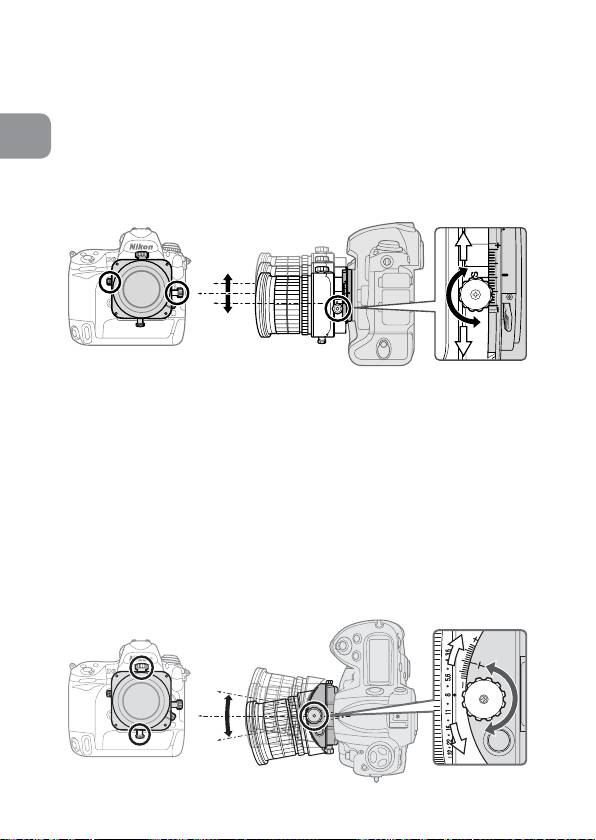
The shift function
Fig. 7
When the shift knob is rotated, the lens is shifted horizontally (or vertically,
when the lens is revolved) parallel to the camera body (±11.5 mm).
By shifting, you can recompose the frame of the shot without
moving the camera.
This lets you correct the perspective distortion of the subject
or exclude unwanted objects from appearing in front of the main
subject (p. 195).
• After shifting, tighten the shift lock release knob to fix the lens’
shift position.
Note: When shifting the lens, be careful not to pinch your fingers
between the lens and the grip of the camera body.
The tilt function
Fig. 8
26
