
Nikon PC-E NIKKOR 24mm f-3.5D ED: 4. Mounting lens
4. Mounting lens: Nikon PC-E NIKKOR 24mm f-3.5D ED
Table of contents
- Notes on Safety Operations
- 1. Nomenclature
- 2. Major features
- 3. Usable cameras and available functions
- Aperture stop-down button (one-touch preset aperture operation)
- 4. Mounting lens
- 5. Using bayonet hood HB-41 6. Determining exposure When using the Nikon D3 or D300 camera
- When using other Nikon cameras Determining exposure (with an external exposure meter) 7. The shift/tilt function Important
- The shift function The tilt function
- Revolving
- 8. Focusing
- 9. Depth of field 10. Taking flash pictures using cameras with a built-in flash
- 11. Recommended focusing screens
- 12. Lens care 13. Standard accessories 14. Optional accessories
- 15. Specifications
- Weight: Approx. 730 g (25.7 oz)
Important!
• When the lens is mounted to a camera other than the D3, shift,
tilt and/or revolve the lens with care. Failure to do so, may result
in the lens scratching the camera body.
• This lens is a manual focus lens, and autofocus is not possible
En
even when the camera's focus mode is set to AF mode.
•
Use of tilt/shift function can cause some vignetting or slight color
change. (Vignetting is the darkening of the corners around the image.)
• When mounted on Nikon digital SLR (Nikon DX format) cameras,
such as the D2-Series and D300, the lens’ picture angle becomes
61° and its 35 mm equivalent focal length is approx. 36 mm.
• Be careful not to soil or damage the CPU contacts.
• If the lens mount rubber gasket is damaged, be sure to visit your
nearest Nikon authorized dealer or service center for repair.
• In low temperatures, new or fully charged batteries should be
used in the camera.
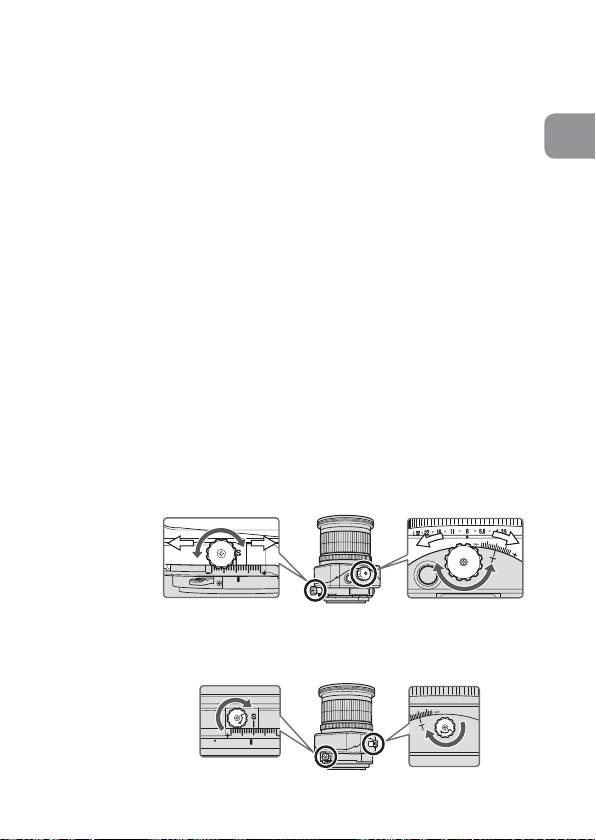
4. Mounting lens
a
Set the shift amount and tilt amount to 0 by rotating the shift
and tilt knobs (Fig. 2).
Note: Avoid attaching/detaching the lens to/from the camera
while using tilt, shift and/or revolving, and without locking
each knob. Failure to do so can lead to you pinching your
fingers between the lens and the camera body, or the lens
scratching the camera body.
Fig. 2
b
Set the tilt and shift knobs. (Fig. 3)
Note: Turning either knob too tightly may damage the knob.
Fig. 3
23
