
Nikon 70-200mm-f-28G-ED-AF-S-VR-II-Zoom-Nikko: Vibration reduction mode
Vibration reduction mode: Nikon 70-200mm-f-28G-ED-AF-S-VR-II-Zoom-Nikko
Table of contents
- Notes on Safety Operations
- Nomenclature
- Major features
- Usable cameras and available functions Focusing
- Vibration reduction mode
- Setting the vibration reduction ON/OFF switch Setting the vibration reduction mode switch Notes on using vibration reduction
- Focusing, zooming, and depth of field Setting the aperture Using a tripod
- The built-in flash and vignetting Using the lens hood
- Recommended focusing screens
- Lens care Standard accessories Optional accessory
- Specifications
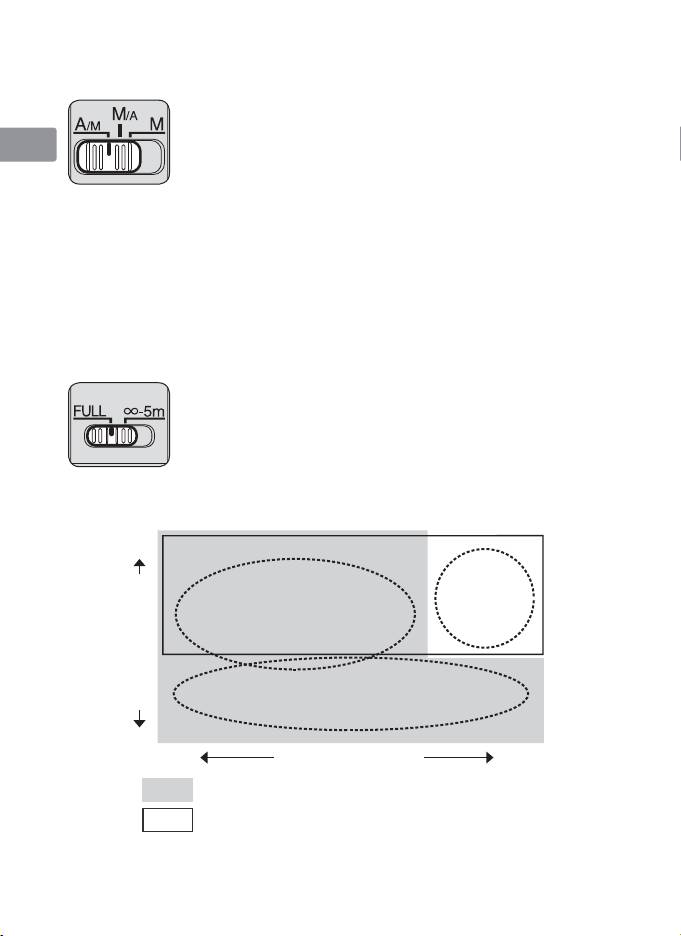
A/M (Autofocus with manual override. AF priority) mode and M/A
(Autofocus with manual override. MF priority) mode
Jp
M/A: Autofocus can be overridden by manually focusing with
the focus ring.
A/M: Autofocus can be overridden by manually focusing with
En
the focus ring, but focus ring detection sensitivity is lower
than in M/A mode. Use this mode to avoid canceling the
De
AF setting by unintentionally moving the focus ring.
a
Set the focus mode switch to A/M or M/A.
Fr
b
You can manually override autofocus by operating the focus ring while
pressing the shutter release button halfway down or the AF-ON button on
the camera.
Es
c
Pressing the shutter release button halfway down or pressing the AF-ON
button on the camera again will cancel manual override and return to
Se
autofocus mode.
To limit the range of autofocus
Ru
This function is only available with autofocus.
• With AF operation, if the subject is always more than 5 m
Nl
(16.4 ft.) away, set the focusing limit switch to
–5m to
∞
reduce focusing time.
• If the subject is sometimes 5 m (16.4 ft.) or closer, set it to
It
FULL.
Ck
Vibration reduction mode
Basic concept of vibration reduction
Ch
Kr
18
High
Strong
camera shake
when taking
pictures
Camera shake
from a moving
vehicle
Panning shots
Number of vibrations
Low
Weak
Strength of vibrations
Strong
Set the vibration reduction mode switch to NORMAL.
Set the vibration reduction mode switch to ACTIVE.
