
Nikon 70-200mm-f-28G-ED-AF-S-VR-II-Zoom-Nikko: The built-in flash and vignetting Using the lens hood
The built-in flash and vignetting Using the lens hood: Nikon 70-200mm-f-28G-ED-AF-S-VR-II-Zoom-Nikko
Table of contents
- Notes on Safety Operations
- Nomenclature
- Major features
- Usable cameras and available functions Focusing
- Vibration reduction mode
- Setting the vibration reduction ON/OFF switch Setting the vibration reduction mode switch Notes on using vibration reduction
- Focusing, zooming, and depth of field Setting the aperture Using a tripod
- The built-in flash and vignetting Using the lens hood
- Recommended focusing screens
- Lens care Standard accessories Optional accessory
- Specifications
The built-in flash and vignetting
To prevent vignetting, do not use the lens hood.
Jp
Cameras Supported focal length/Shooting distance
F70-Series/N70* • 85 mm/2 m (6.6 ft.) or greater
• 105 mm or longer/No restriction
En
F60-Series/N60* • 105 mm/2.5 m (8.2 ft.) or greater
• 135 mm or longer/No restriction
De
F50-Series/N50* • 135 mm/2.5 m (8.2 ft.) or greater
• 200 mm/No restriction
Fr
F65-Series/N65-Series*,
• 105 mm/3 m (9.8 ft.) or greater
F55-Series/N55-Series*
• 135 mm or longer/No restriction
Es
F75-Series/N75-Series*,
• 85 mm/2.5 m (8.2 ft.) or greater
Pronea 600i/6i*
• 105 mm or longer/No restriction
Se
Pronea S • 200 mm/2 m (6.6 ft.) or greater
*Sold exclusively in the U.S.A.
Ru
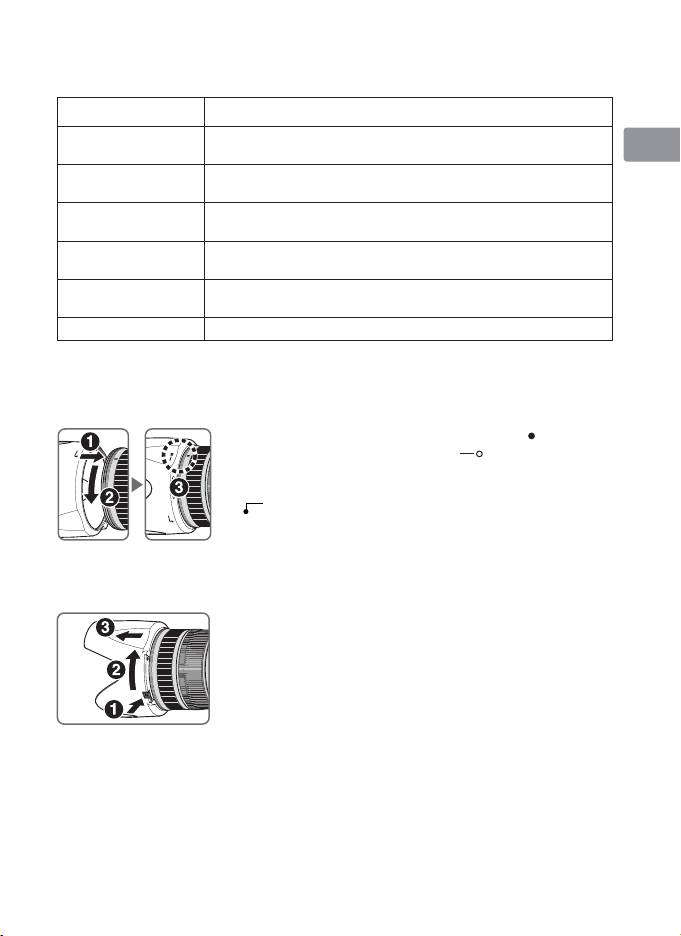
Using the lens hood
Lens hoods minimise stray light and protect the lens.
Nl
Attaching the hood
• Be sure that the lens hood mounting index ( ) is aligned
It
with the lens hood setting index ( ) (3).
• To facilitate attachment or removal of the hood, hold
it by the base (near the lens hood attachment index
Ck
(
))
rather than its outer edge.
• If the lens hood is not correctly attached, vignetting
Ch
may occur.
• To store the lens hood, attach it in the reverse
position.
Kr
Detaching the hood
While holding down the lens hood lock release button
(1), turn the hood clockwise (as viewed from the
camera side) (2, 3).
21
