
JVC KD-G441: Sound adjustments
Sound adjustments: JVC KD-G441
13
ENGLISH
Indication, [Range]
BASS
*
2
, [–06 to +06]
Adjust the bass.
MIDDLE
*
2
(mid-range), [–06 to +06]
Adjust the mid-range frequencies sound level.
TREBLE
*
2
, [–06 to +06]
Adjust the treble.
FADER
*
3
, [R06 to F06]
Adjust the front and rear speaker balance.
BALANCE
*
4
, [L06 to R06]
Adjust the left and right speaker balance.
LOUD
*
5
(loudness), [LOUD ON or LOUD OFF]
Boost low and high frequencies to produce a
well-balanced sound at a low volume level.
SUB.W
*
1
, [00 to 08, initial: 04]
Adjust the subwoofer output level.
VOL ADJ
(volume adjust), [–05 to +05, initial: 00]
Adjust the volume level of each source (except FM), in
relation to the FM volume level. The volume level will
automatically increase or decrease when you change
the source.
• Before making an adjustment, select the source you
want to adjust.
VOLUME
, [00 to 50 or 00 to 30] *
6
Adjust the volume.
*
1
For KD-G441: Displayed only when “L/O MODE” is set
to “SUB.W” (see page 15).
*
2
When you adjust the bass, mid-range, or treble, the
adjustment you have made is stored for the currently
selected sound mode (iEQ) including “USER.”
*
3
If you are using a two-speaker system, set the fader
level to “00.”
*
4
This adjustment will not affect the subwoofer output.
*
5
The adjustment made (LOUD ON/LOUD OFF) will be
applied to all sound modes.
*
6
Depending on the amplifier gain control setting. (See
page 16 for details.)
Sound adjustments
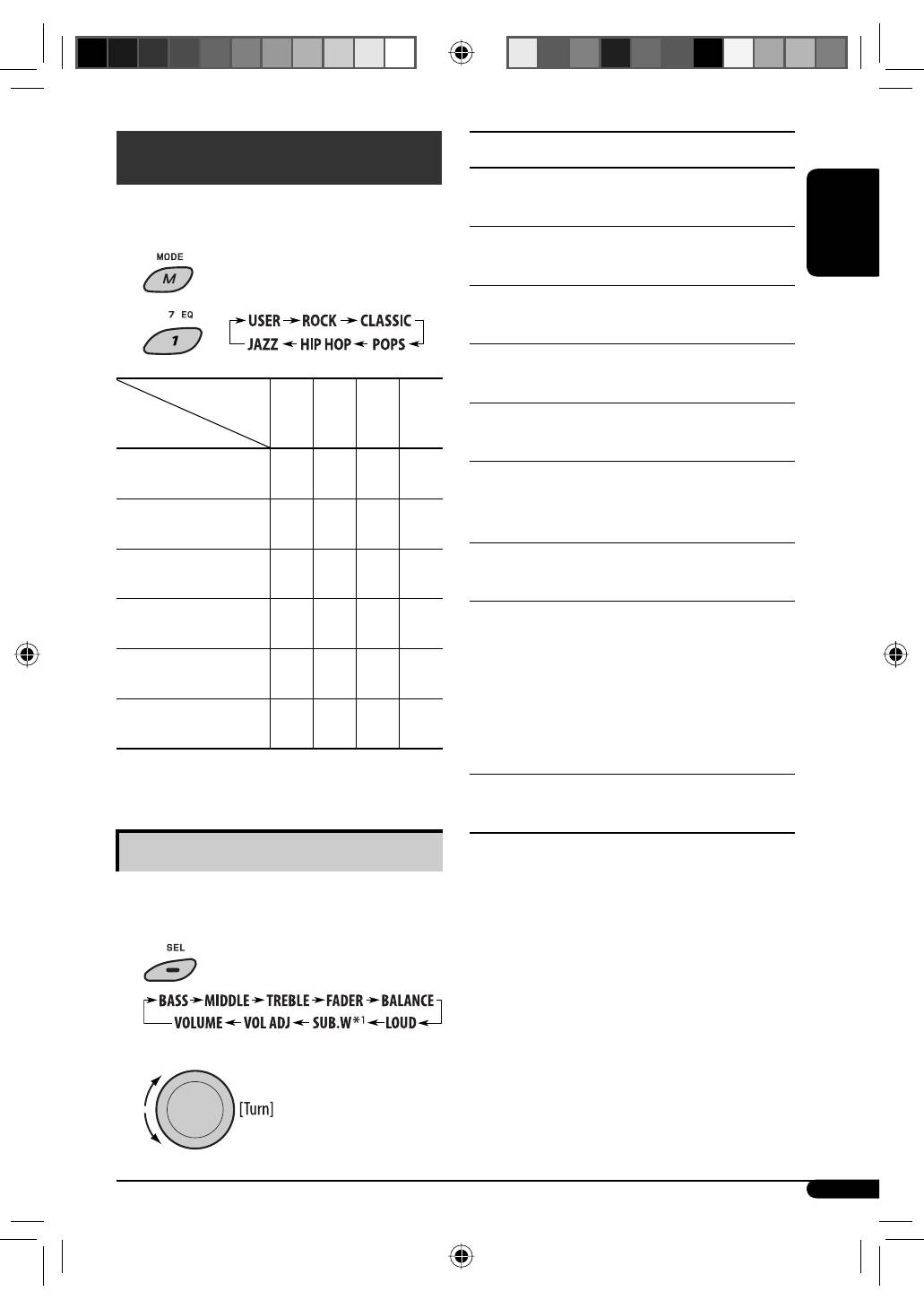
You can select a preset sound mode suitable to the
music genre (iEQ: intelligent equalizer).
1
2
Indication (For)
BAS
MID
TRE LOUD
USER
(Flat sound)
00
00
00
OFF
ROCK
(Rock or disco music)
+03
00
+02
OFF
CLASSIC
(Classical music)
+01
00
+03
OFF
POPS
(Light music)
+02
+01
+02
OFF
HIP HOP
(Funk or rap music)
+04
–02
+01
OFF
JAZZ
(Jazz music)
+03
00
+03
OFF
BAS: Bass MID: Mid-range TRE: Treble LOUD: Loudness
Adjusting the sound
You can adjust the sound characteristics to your
preference.
1
2
Preset values
EN08-17_KD-G441_003A_4.indd 13
EN08-17_KD-G441_003A_4.indd 13
10/26/07 5:49:07 PM
10/26/07 5:49:07 PM
Table of contents
- CONTENTS
- Control panel —
- Getting started
- Radio operations ~Ÿ!
- FM RDS operations
- !
- Disc / USB device operations
- Sound adjustments
- General settings — PSM
- ~
- Remote controller —
- More about this unit
- Maintenance
- Troubleshooting
- Specifications
- INHALT
- Bedienfeld —
- Erste Schritte
- Bedienung des Tuners ~Ÿ!
- UKW-RDS-Funktionen
- !
- Disc/USB-Gerätebetrieb
- Klangeinstellungen
- Allgemeine Einstellungen — PSM
- ~
- Fernbedienung —
- Weitere Informationen zu Ihrem Receiver
- Wartung
- Störungssuche
- Technische Daten
- CОДЕРЖАНИЕ
- Панель управления —
- Начало работы
- Операции с радиоприемником ~Ÿ!
- Операции с FM RDS
- !
- Операции с дисками или устройством USB
- Настройки звучания
- Общие настройки — PSM
- ~
- Пульт дистанционного управления —
- Дополнительная информация о приемнике
- Обслуживание
- Устранение проблем
- Технические характеристики


