
JVC KD-G441: Getting started
Getting started: JVC KD-G441
ENGLISH
5
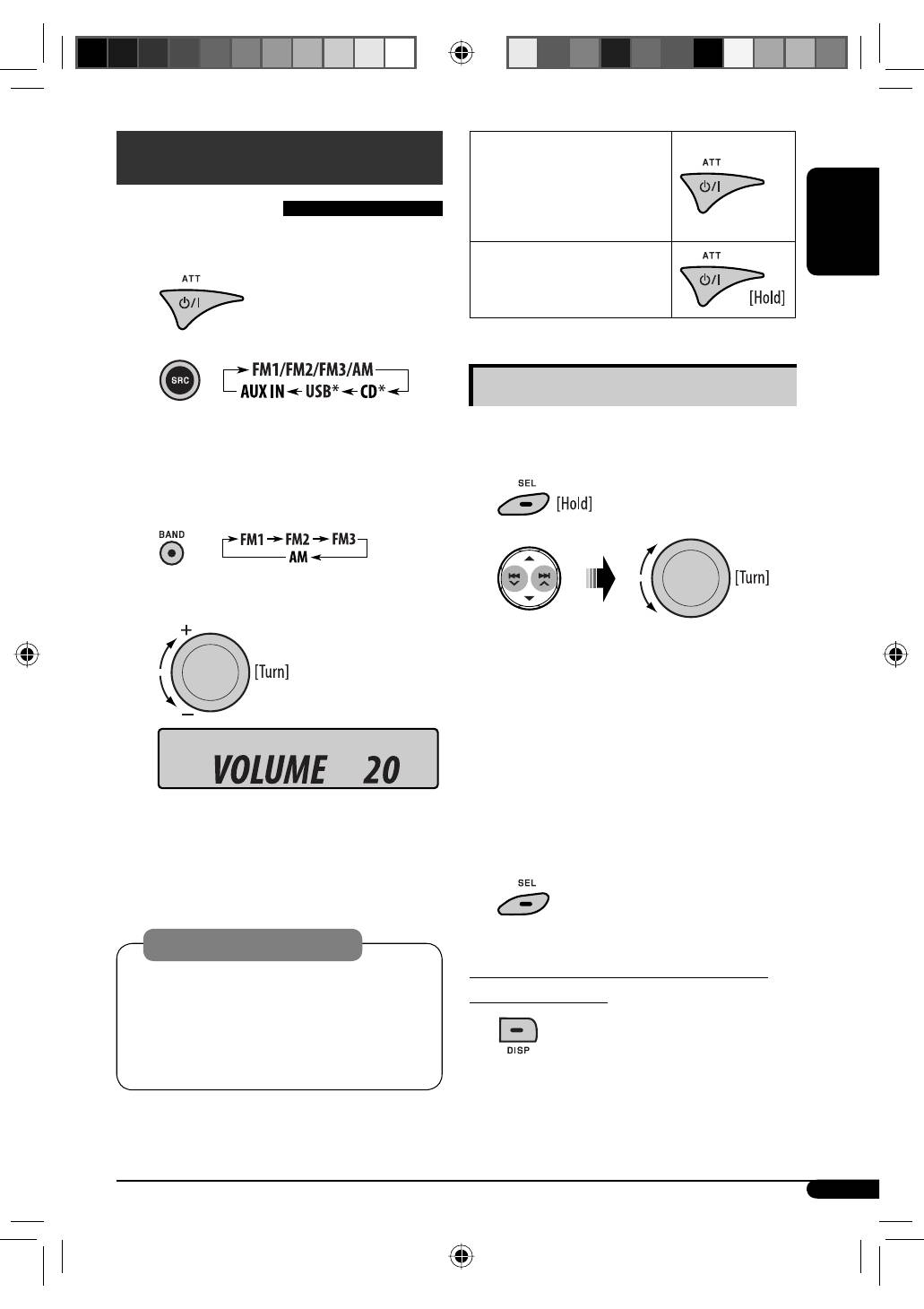
To drop the volume in a
moment (ATT)
To restore the sound, press the
button again.
To turn off the power
Basic settings
• See also “General settings — PSM” on pages
14 – 16.
1
2
1
Canceling the display demonstrations
Select “DEMO,” then “DEMO OFF.”
2
Setting the clock
Select “CLOCK HOUR”, then adjust the hour.
Select “CLOCK MIN” (minute), then adjust the
minute.
Select “24H/12H,” then “24 HOUR” or
“12 HOUR”.
3
Finish the procedure.
To check the current clock time while the
power is turned off
Clock time is shown on the display for
about 5 seconds. See also page 14.
Getting started
Basic operations
~
Turn on the power.
Ÿ
*
You cannot select these sources if they are not
ready or not connected.
!
For FM/AM tuner
⁄
Adjust the volume.
@
Adjust the sound as you want. (See
page 13.)
Caution on volume setting:
Digital devices (CD/USB) produce very little noise
compared with other sources. Lower the volume
before playing these digital sources to avoid
damaging the speakers by sudden increase of the
output level.
Volume level appears.
EN02-07_KD-G441_003A_4.indd 5
EN02-07_KD-G441_003A_4.indd 5
10/24/07 10:05:11 AM
10/24/07 10:05:11 AM
Table of contents
- CONTENTS
- Control panel —
- Getting started
- Radio operations ~Ÿ!
- FM RDS operations
- !
- Disc / USB device operations
- Sound adjustments
- General settings — PSM
- ~
- Remote controller —
- More about this unit
- Maintenance
- Troubleshooting
- Specifications
- INHALT
- Bedienfeld —
- Erste Schritte
- Bedienung des Tuners ~Ÿ!
- UKW-RDS-Funktionen
- !
- Disc/USB-Gerätebetrieb
- Klangeinstellungen
- Allgemeine Einstellungen — PSM
- ~
- Fernbedienung —
- Weitere Informationen zu Ihrem Receiver
- Wartung
- Störungssuche
- Technische Daten
- CОДЕРЖАНИЕ
- Панель управления —
- Начало работы
- Операции с радиоприемником ~Ÿ!
- Операции с FM RDS
- !
- Операции с дисками или устройством USB
- Настройки звучания
- Общие настройки — PSM
- ~
- Пульт дистанционного управления —
- Дополнительная информация о приемнике
- Обслуживание
- Устранение проблем
- Технические характеристики


