
Garmin GLO: инструкция
Раздел: Системы безопасности
Тип: Датчик
Инструкция к Датчику Garmin GLO
™
GLO
GLONASS and GPS Sensor Instructions ��������������������������������������������������������������2
™
Instructions pour le capteur GLONASS et GPS GLO
����������������������������������������������������8
™
Istruzioni del sensore GLO
GLONASS e GPS �������������������������������������������������������������14
™
GLO
-GLONASS- und GPS-Sensor – Anweisungen ����������������������������������������������������19
™
Instrucciones del sensor de GPS y GLONASS GLO
���������������������������������������������������25
™
Instruções do GLO
GLONASS e do Sensor GPS ��������������������������������������������������������31
™
Instructies voor GLO
GLONASS en GPS-sensor ��������������������������������������������������������37
™
Vejledning til GLO
GLONASS og GPS-sensor �������������������������������������������������������������42
™
GLO
- GLONASS- ja GPS-antureiden ohjeet ����������������������������������������������������������������48
™
Instruksjoner for GLO
GLONASS- og GPS-sensor ������������������������������������������������������53
™
GLO
GLONASS- och GPS-sensorinstruktioner �����������������������������������������������������������58
™
Instrukcja obsługi czujnika GLO
GLONASS i GPS ������������������������������������������������������63
™
Инструкция по эксплуатации датчика GLO
для систем ГЛОНАСС и GPS �������������69
December 2012 190-01492-91_0B Printed in Taiwan
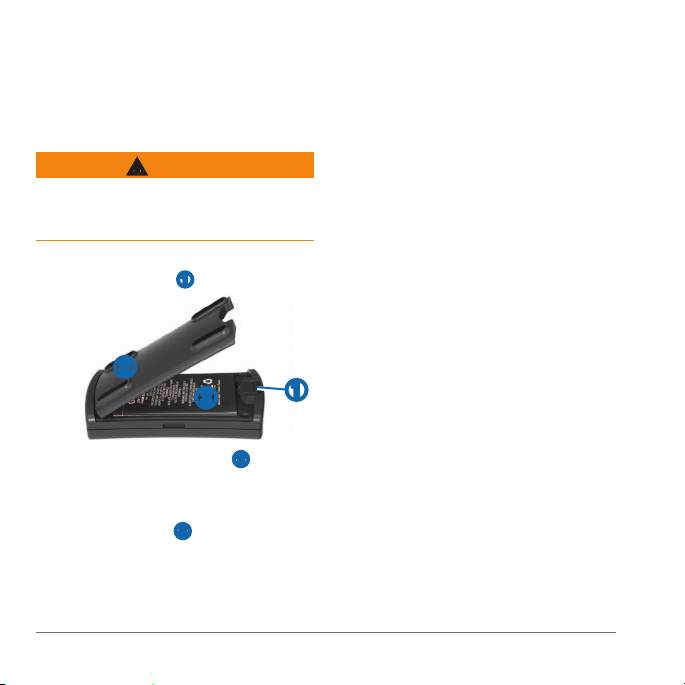
Insert the battery cover into the
notches and press down�
The release tab locks the cover in
place�
You can purchase a replacement battery
This product contains a lithium-ion battery�
(010-10840-00) at http://buy�garmin�com�
See page 5 for important battery safety
information�
You can use the sensor while you are
With your thumbnail, slide the battery
charging it�
cover release tab
➊�
Plug the small end of the power cable
into the mini-USB connector on the
end of the sensor�
➋
Plug the other end of the power cable
into an appropriate source of power for
➊
➌
the cable type�
It takes about three hours to charge the
battery� A fully charged battery lasts about
Remove the battery cover ➋�
12 hours�
Locate the metal contacts on the end
: If the battery has not been charged
of the lithium-ion battery�
for a long period of time, remove the
Insert the battery ➌ so the metal
battery, connect the cable to the device
contacts on the battery align with
and a power source, and then replace the
the metal contacts inside the battery
battery� The battery will charge as usual�
compartment�
Press the battery down into place�
2
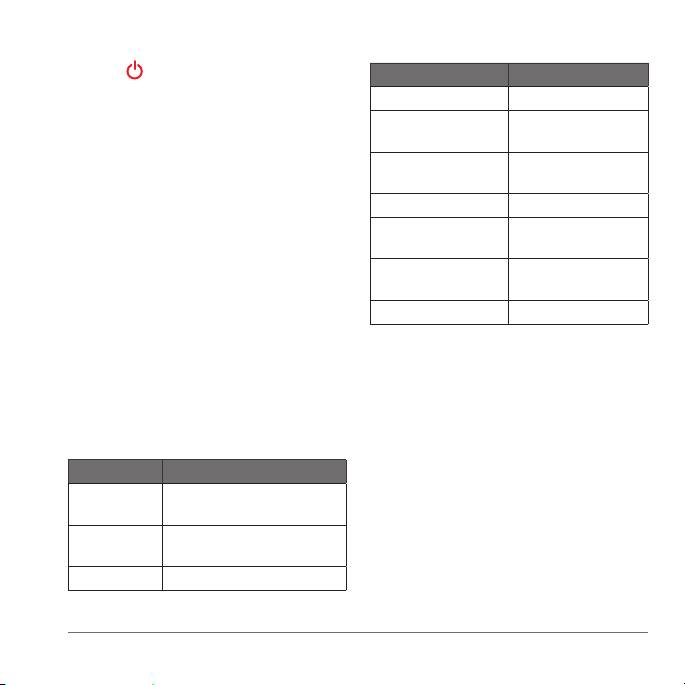
Hold to turn on the sensor�
Turn on the other device and enable
Slow ashing orange Charging
the Bluetooth component�
Solid orange Battery charged,
power connected�
You can refer to the device’s
documentation for specic instructions
Orange off Battery charged,
power disconnected�
about enabling Bluetooth wireless
technology�
Rapid ashing orange Low battery
Bring the sensor within 30 feet (10
Alternating orange
Faulty battery or
and green
system error
meters) of the mobile device�
Flashing green Searching for GPS
Using the mobile device, pair the
satellites
sensor with the mobile device�
Solid green GPS satellite x
The blue LED is solid blue when the
sensor is connected to the other device�
If the sensor has not established a
Verify that the blue LED on the sensor
Bluetooth connection for several minutes,
is solid blue, indicating a wireless
it turns off automatically�
connection�
Place the sensor where it has a clear
view of the sky�
Slow ashing
Searching for mobile devices
Acquiring satellite signals may take a
blue
few minutes� The Status LED ashes
green while searching for satellites and
Rapid ashing
Pairing
blue
establishing your location� The Status LED
is solid green when it has established a x
Solid blue Connected to mobile device
on your location�
3

not responsible for the operation of this
device or its compliance with safety and
regulatory standards� Please note that the
The portable friction mount comes in
use of this accessory with iPod, iPhone, or
some GLO packages and is available as
iPad may affect wireless performance�
an optional accessory�
The GLO sensor is also compatible with
Wipe the mounting surface and the
®
®
®
many Android
, Windows
or Blackberry
back of the mount with a wet cloth to
smartphones, tablets and notebook
remove dust and debris�
computers�
Insert the sensor in the mount so the
When using the GLO GPS/GLONASS
LEDs face up and the mini-USB port is
sensor with an Android device, you
accessible�
may need to use an application to allow
Place on a at surface�
the sensor to properly communicate
with the Android system over Bluetooth
Periodically, you should wipe the surface
technology� The application will allow the
and the mount with a wet cloth to remove
Android system to accept non-system (or
dust and debris to help prevent the mount
mock) GPS/GLONASS signals�
from sliding�
®
• Go to http://my�garmin�com�
Made for iPod
touch (4th generation),
®
iPod touch (3rd generation), iPhone
4S,
• Keep the original sales receipt, or a
®
iPhone 4, iPhone 3GS, iPad
2, and iPad�
photocopy, in a safe place�
"Made for iPod, iPhone, iPad” means
that an electronic accessory has been
designed to connect specically to iPod,
: Rugged, but not water-resistant
iPhone, or iPad, respectively, and has
: Rechargeable lithium-ion
been certied by the developer to meet
battery, 12 hours (typical use)
Apple performance standards� Apple is
4
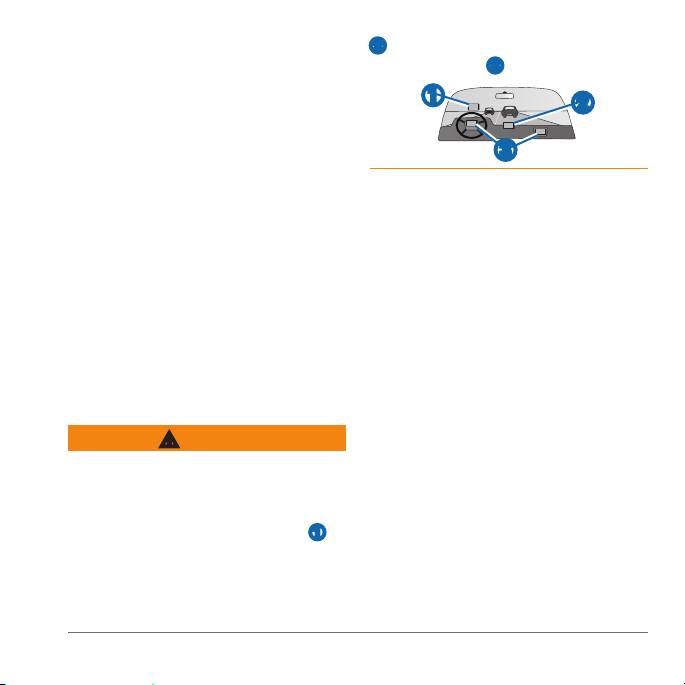
: 10 Hz, but not all mobile
➋� Do not place the device in front of or
devices support a 10 Hz update rate�
above any airbag
➌�
:
➊
12–28 Vdc (*available in some packages)
➋
: -4°F to 140°F
(-20°C to 60°C)
➌
: 32°F to 113°F
(0°C to 45°C)
If these guidelines are not followed, the
battery may experience a shortened life
: -4°F to 122°F (-20°C to
span or may present a risk of damage to
50°C)
the sensor, re, chemical burn, electrolyte
leak, and/or injury�
: -4°F to 68°F (-20°C to
• Do not leave the sensor exposed to a
20°C)
heat source or in a high temperature
location, such as in the sun in an
unattended vehicle� To prevent the
possibility of damage, remove the
device from the vehicle or store it out
of direct sunlight, such as in the glove
box�
When installing the device in a vehicle,
• Do not use a sharp object to remove
place the device securely so it does not
the battery�
obstruct the driver’s view of the road
➊ or
• Do not disassemble, puncture,
interfere with vehicle operating controls,
incinerate, or damage the battery�
such as the steering wheel, foot pedals,
• Keep the battery away from children�
or transmission levers� Do not place
unsecured on the vehicle dashboard
5

• If using an external battery charger,
used to determine ground proximity for
only use the Garmin accessory
aircraft navigation�
approved for your product�
• Only replace the battery with the
correct replacement battery� Using
Information about Garmin’s product
another battery presents a risk of
recycling program and WEEE, RoHS,
re or explosion� To purchase a
REACH, and other compliance programs
replacement battery, see your Garmin
can be found at www�garmin�com
dealer or the Garmin website�
/aboutGarmin/environment�
• When storing the device for an
extended time, store within the
Hereby, Garmin, declares that this
following temperature range: from -4°F
product is in compliance with the
to 68°F (-20°C to 20°C)�
essential requirements and other relevant
• Do not operate the device outside of
provisions of Directive 1999/5/EC� To view
the following temperature range: from
the full Declaration of Conformity, go to
-4°F to 140°F (-20°C to 60°C)�
www�garmin�com/compliance�
• Contact your local waste disposal
department to dispose of the device/
This device complies with part 15 of the
battery in accordance with applicable
FCC Rules� Operation is subject to the
local laws and regulations�
following two conditions: (1) this device
may not cause harmful interference,
Use this sensor only as a navigational aid�
and (2) this device must accept any
Do not attempt to use the sensor for any
interference received, including
purpose requiring precise measurement
interference that may cause undesired
of direction, distance, location, or
operation�
topography� This product should not be
This equipment has been tested and
found to comply with the limits for a
6

Class B digital device, pursuant to
This product does not contain any user-
part 15 of the FCC rules� These limits
serviceable parts� Repairs should only be
are designed to provide reasonable
made by an authorized service center�
protection against harmful interference in
Unauthorized repairs or modications
a residential installation� This equipment
could result in permanent damage to the
generates, uses, and can radiate radio
equipment, and void your warranty and
frequency energy and may cause harmful
your authority to operate this device under
interference to radio communications if
Part 15 regulations�
not installed and used in accordance with
the instructions� However, there is no
guarantee that interference will not occur
Category I radiocommunication devices
in a particular installation� If this equipment
comply with Industry Canada Standard
does cause harmful interference to radio
RSS-210� Category II radiocommunication
or television reception, which can be
devices comply with Industry Canada
determined by turning the equipment off
Standard RSS-310� This device complies
and on, the user is encouraged to try to
with Industry Canada license-exempt RSS
correct the interference by one of the
standard(s)� Operation is subject to the
following measures:
following two conditions: (1) this device
may not cause interference, and (2) this
• Reorient or relocate the receiving
device must accept any interference,
antenna�
including interference that may cause
• Increase the separation between the
undesired operation of the device�
equipment and the receiver�
• Connect the equipment into an outlet
that is on a different circuit from the
Garmin’s standard limited warranty applies
GPS unit�
to this accessory� For more information,
go to www�garmin�com/support/warranty
• Consult the dealer or an experienced
�html�
radio/TV technician for help�
7
