
ASRock FM2A55M-DGS: I/O Panel
I/O Panel: ASRock FM2A55M-DGS
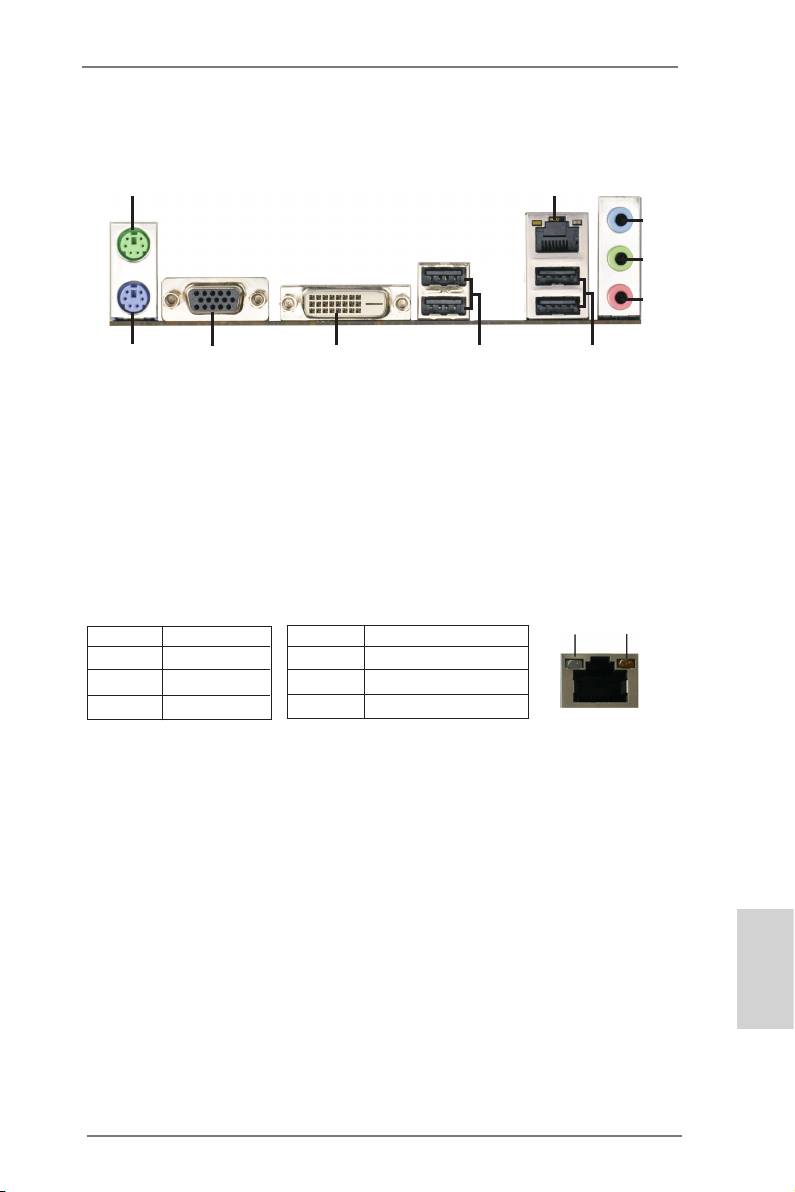
I/O Panel
1
2
3
4
5
910
8
7
6
1 PS/2 Mouse Port (Green) 6 USB 2.0 Ports (USB23)
* 2 LAN RJ-45 Port 7 USB 2.0 Ports (USB01)
3 Line In (Light Blue) 8 DVI-D Port (DVI1)
** 4 Front Speaker (Lime) 9 D-Sub Port (VGA1)
5 Microphone (Pink) 10 PS/2 Keyboard Port (Purple)
* There are two LED next to the LAN port. Please refer to the table below for the LAN port LED
indications.
LAN Port LED Indications
ACT/LINK
SPEED
Activity/Link LED SPEED LED
LED
LED
Status Description Status Description
Off No Link Off 10Mbps connection
Blinking Data Activity Orange 100Mbps connection
On Link Green 1Gbps connection
LAN Port
** To enable Multi-Streaming function, you need to connect a front panel audio cable to the front
panel audio header. Please refer to below steps for the software setting of Multi-Streaming.
®
TM
For Windows
7 / Vista
:
After restarting your computer, please double-click “Realtek HD Audio Manager” on the
system tray. Set “Speaker Conguration” to “Quadraphonic” or “Stereo”. Click “Device
advanced settings”, choose “Make front and rear output devices playbacks two different audio
streams simultaneously”, and click “ok”. Then reboot your system.
English
3
ASRock FM2A55M-DGS Motherboard
Оглавление
- Motherboard Layout
- I/O Panel
- 1. Introduction
- 2. Installation
- 3. BIOS Information
- 1. Einführung
- 2. BIOS-Information
- 1. Introduction
- 2. Informations sur le BIOS
- 1. Introduzione
- 2. Informazioni sul BIOS
- 1. Introducción
- 2. BIOS Información
- 1. Введение
- 2. Информация о BIOS
- 1. Giriş
- 2. BIOS Bilgileri
- 1. 제품소개
- 2. 시스템 바이오스 정보
- 1. 主板簡介
- 2. BIOS 信息
- 1. 主機板簡介
- 2. BIOS 訊息
- 1. Penjelasan
