
Yamaha CD-S300: Remote control
Remote control: Yamaha CD-S300
Table of contents
- CAUTION: READ THIS BEFORE OPERATING YOUR UNIT.
- CONTROLS AND FUNCTIONS Front panel
- Rear panel connections
- Remote control
- Program playback
- PLAYING BACK iPod/USB DEVICE Connecting iPod/USB devices Playing back iPod Playing back USB devices
- Disconnecting iPod/USB devices Supported iPod/USB devices
- PLAYABLE DISC AND FILE FORMAT
- PLAYABLE DISC AND FILE FORMAT USING THE ADVANCED SETUP
- TROUBLESHOOTING Problems Possible Causes Solutions
- Problems Possible Causes Solutions SPECIFICATIONS
CONTROLS AND FUNCTIONS
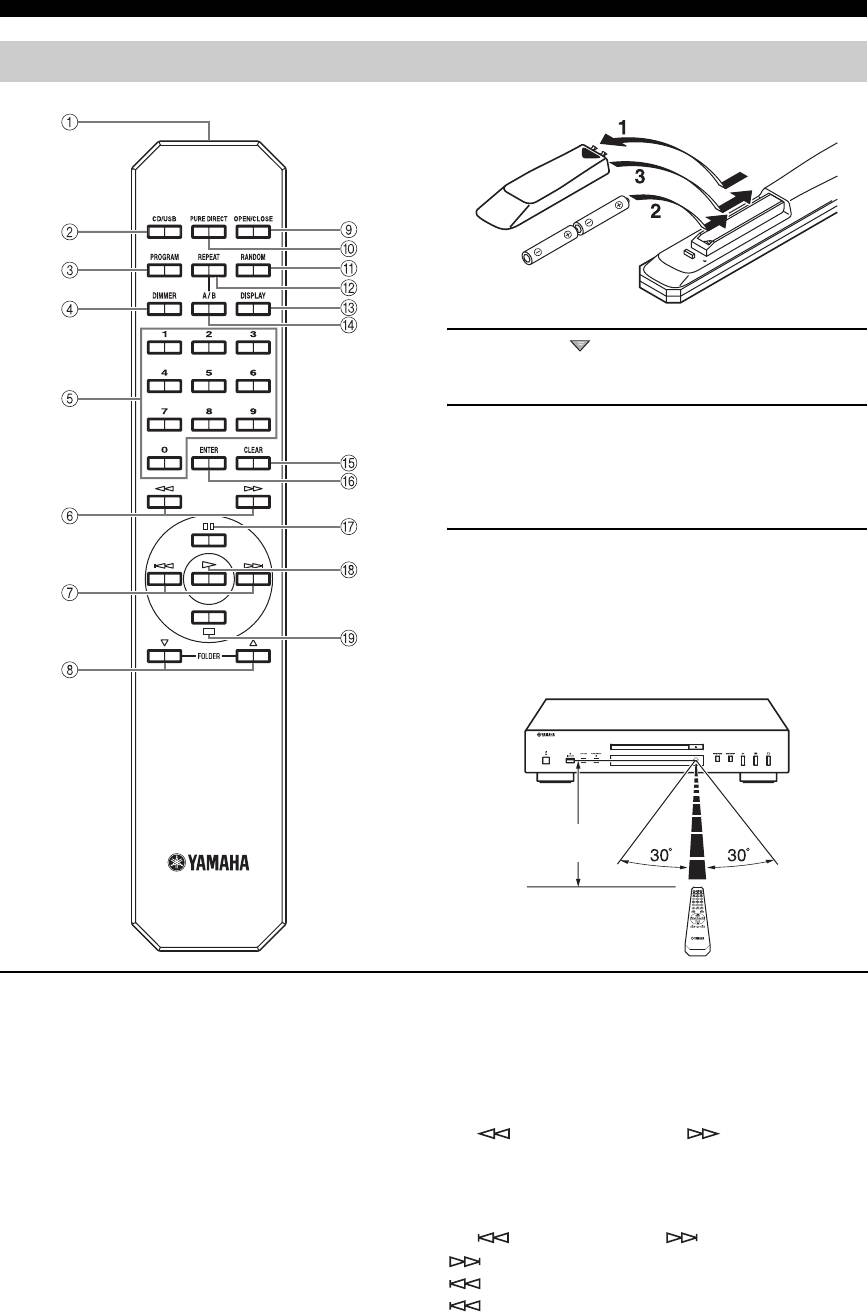
Remote control
■ Installing batteries in the remote control
1 Press the part and slide the battery
compartment cover off.
2 Insert the two supplied batteries (AA, R6,
UM-3) according to the polarity markings (+
and –) on the inside of the battery
compartment.
3 Slide the cover back until it snaps into place.
■ Using the remote control
The remote control transmits a directional infrared beam.
Be sure to aim the remote control directly at the remote
control sensor on the front panel of this unit during
operation.
Within 6 m
(20 ft)
1 Infrared signal transmitter
y
Sends infrared signals to this unit.
This setting is retained even if you turn off this unit.
2 CD/USB
5 Numeric buttons
Switches between CD mode and iPod/USB mode (see
Use to select directly a track on the disc or a file in the
page 6).
current folder.
y
6 (Search backward), (Search
This setting is retained even if you turn off this unit.
forward)
Searches tracks backward/forward while the key is
3 PROGRAM
pressed.
Turns on or off the program playback mode. See
“Program playback” on the next page.
7 (Skip backward), (Skip forward)
: Skips to the next track.
4 DIMMER
: Skips back to the beginning of the current track.
Each time you press DIMMER, the brightness level
(twice): Skips to the previous track.
changes by 4 levels.
4 En
