
Yamaha CD-S300: PLAYABLE DISC AND FILE FORMAT USING THE ADVANCED SETUP
PLAYABLE DISC AND FILE FORMAT USING THE ADVANCED SETUP: Yamaha CD-S300
Table of contents
- CAUTION: READ THIS BEFORE OPERATING YOUR UNIT.
- CONTROLS AND FUNCTIONS Front panel
- Rear panel connections
- Remote control
- Program playback
- PLAYING BACK iPod/USB DEVICE Connecting iPod/USB devices Playing back iPod Playing back USB devices
- Disconnecting iPod/USB devices Supported iPod/USB devices
- PLAYABLE DISC AND FILE FORMAT
- PLAYABLE DISC AND FILE FORMAT USING THE ADVANCED SETUP
- TROUBLESHOOTING Problems Possible Causes Solutions
- Problems Possible Causes Solutions SPECIFICATIONS
PLAYABLE DISC AND FILE FORMAT
■ Handling compact discs
• Use a soft-tipped pen when writing on the label side of
• Always handle with care so that the playing surface is
the disc.
not scratched. Do not warp discs.
• When a disc is not being used, remove it from this unit
and store in an appropriate case.
• Do not expose discs to direct sunlight, high
temperature or high humidity for a long time.
• To keep clean the playing surface, wipe with a clean,
Note: Do not use any lens cleaners as they may be a
cause of malfunction.
dry cloth. Do not use any type of disc cleaner, spray, or
any other chemical-based liquid.
• Do not wipe with a circular motion; wipe straight
outward from the center.
INFORMATION
ADDITIONAL
USING THE ADVANCED SETUP
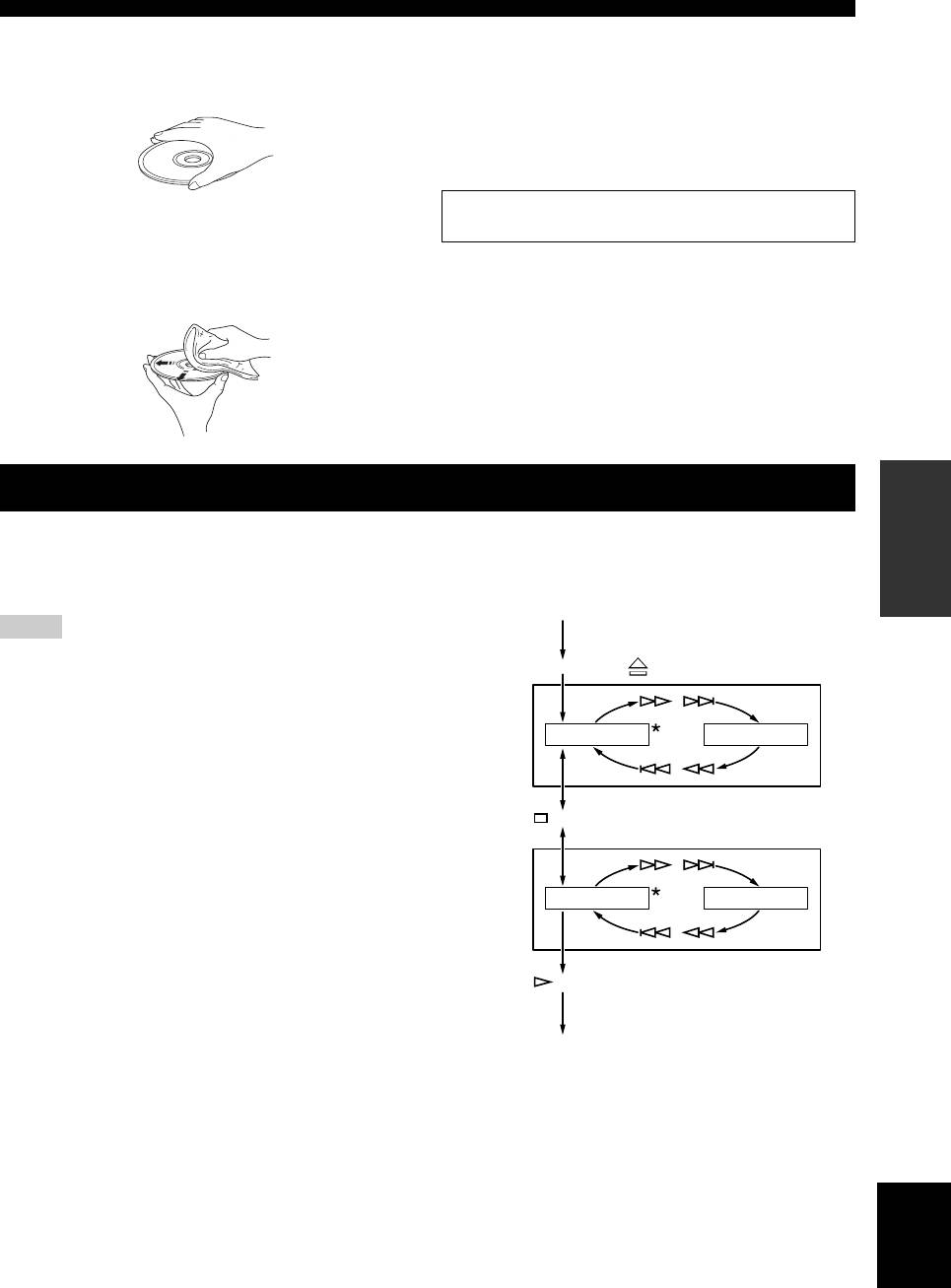
This unit is equipped with the following two special
To activate and configure Advanced setup, follow the
modes, which may be useful for special purposes at stores
steps below. Use the buttons on the front panel.
or offices.
POWER OFF
Note
Activate
Advanced
The special mode functions are incompatible with iPod.
setup
PURE DIRECT + (Open/Close) + POWER ON
Play mode
Play mode memory
memory
/
Retains the current playback mode (REPEAT and
RANDOM) after turning off the power, saving the time of
PLAY MEM OFF PLAY MEM ON
setting the playback mode again each time you turn on the
/
power.
The RESUM indicator in the front panel display lights up
(Stop)
when enabled.
Ready
Ready mode
mode
/
Pauses playback after each track, allowing you to start the
RDY MODE OFF RDY MODE ON
next track at any desired timing.
The RDY indicator in the front panel display lights up
/
when enabled.
Store
(Play)
settings
POWER OFF
*: Default Setting
Next time you turn on the power, the unit turns on with
the settings that you specified above.
English
9 En
