
Yamaha CD-S300: CONTROLS AND FUNCTIONS Front panel
CONTROLS AND FUNCTIONS Front panel: Yamaha CD-S300
Table of contents
- CAUTION: READ THIS BEFORE OPERATING YOUR UNIT.
- CONTROLS AND FUNCTIONS Front panel
- Rear panel connections
- Remote control
- Program playback
- PLAYING BACK iPod/USB DEVICE Connecting iPod/USB devices Playing back iPod Playing back USB devices
- Disconnecting iPod/USB devices Supported iPod/USB devices
- PLAYABLE DISC AND FILE FORMAT
- PLAYABLE DISC AND FILE FORMAT USING THE ADVANCED SETUP
- TROUBLESHOOTING Problems Possible Causes Solutions
- Problems Possible Causes Solutions SPECIFICATIONS
INTRODUCTION
CONTROLS AND FUNCTIONS
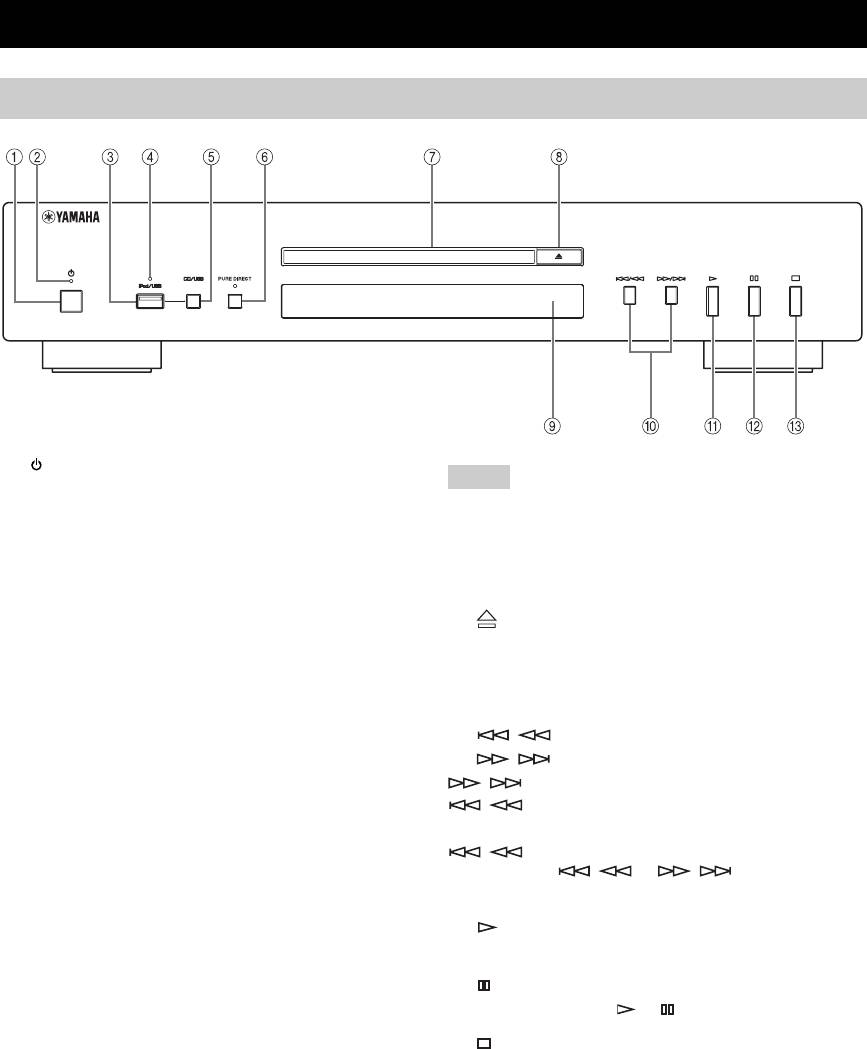
Front panel
1 (Power)
Note
Press to turn the power on/off.
Connect using the ANALOG OUT terminals when you use
y
PURE DIRECT mode (refer to page 3).
• The power indicator above lights up when this unit is turned on.
• Playback starts automatically if the power is turned on while a
7 Disc tray
disc is set in the disc tray.
Loads a disc.
2 Power indicator
8 (Open/Close)
Lights up as follows:
Opens or closes the disc tray.
ON: Bright
OFF: Off
9 Remote control sensor
Receives signals from the remote control.
3 iPod/USB port
Connect your iPod or USB device. See page 6 for details.
0 / (Skip/Search backward),
/ (Skip/Search forward)
4 iPod/USB indicator
/ : Skips to the next track.
Off: CD mode is selected.
/ : Skips back to the beginning of the current
Orange: Connection ready.
track.
Green: iPod/USB is connected and playable files have
/ (twice): Skips to the previous track.
been detected (playback ready).
Press and hold / or / to search
5 CD/USB
backward/forward.
Swithes between CD mode and iPod/USB mode (see
A (Play)
page 6).
Starts playback.
y
B (Pause)
When the iPod/USB indicator is not lit, this unit is in the CD
mode.
Pauses playback. Press or to resume playback.
6 PURE DIRECT
C (Stop)
Turns on or off the PURE DIRECT mode to improve
Stops playback.
audio quality.
y
• The PURE DIRECT indicator lights up.
• The digital output is turned off.
• The front panel display is turned off during playback and only
the minimum required indicators and messages are displayed
during in the operation.
2 En
