
Yamaha CD-S300: Program playback
Program playback: Yamaha CD-S300
Table of contents
- CAUTION: READ THIS BEFORE OPERATING YOUR UNIT.
- CONTROLS AND FUNCTIONS Front panel
- Rear panel connections
- Remote control
- Program playback
- PLAYING BACK iPod/USB DEVICE Connecting iPod/USB devices Playing back iPod Playing back USB devices
- Disconnecting iPod/USB devices Supported iPod/USB devices
- PLAYABLE DISC AND FILE FORMAT
- PLAYABLE DISC AND FILE FORMAT USING THE ADVANCED SETUP
- TROUBLESHOOTING Problems Possible Causes Solutions
- Problems Possible Causes Solutions SPECIFICATIONS
CONTROLS AND FUNCTIONS
8 FOLDER (Folder down), (Folder up)
D A/B
Audio CD
Data Disc USB
Repeats playback of a specified section of a track. To set
: Skips to the previous folder.
the starting and end points (A and B), press A/B twice
: Skips to the next folder.
during playback.
INTRODUCTION
Refer to page 6 for details.
To cancel repeat A-B, press A/B again.
9 OPEN/CLOSE
Notes
Opens or closes the disc tray.
• You cannot set repeat A-B from one track to another track.
0 PURE DIRECT
• You cannot set repeat A-B for Data Disc and USB.
• If you stop playback by pressing (Stop), repeat A-B is canceled.
Turns on or off the PURE DIRECT mode to improve
• You cannot use repeat A-B when this unit is in the PURE
audio quality. See page 2 for details.
DIRECT mode.
y
E CLEAR
This setting is retained even if you turn off this unit.
Erases the programmed track.
A RANDOM
F ENTER
Turns on or off the random sequence playback mode.
Confirms a track number entered when you are
Note
programming tracks.
The random playback mode is canceled when the disc is ejected.
G (Pause)
B REPEAT
Pauses playback. Press or to resume playback.
Repeats playback of a single track or all tracks. Each time
H (Play)
you press REPEAT during playback, the repeat playback
Starts playback.
mode changes as follows:
• REP TRACK (single repeat playback): A single track
See pages 8 for more information on MP3/WMA
is played back repeatedly.
playback.
• REP ALL (all repeat playback): All tracks (the entire
disc) are played back repeatedly.
I (Stop)
Data Disc USB
Stops playback.
• REP FOLDER (folder repeat playback): All files (the
entire folder) are played back repeatedly.
Program playback
Audio CD
y
In the program playback mode, you can play back tracks
Repeat play also works with program play and random-sequence
in a programmed sequence.
play.
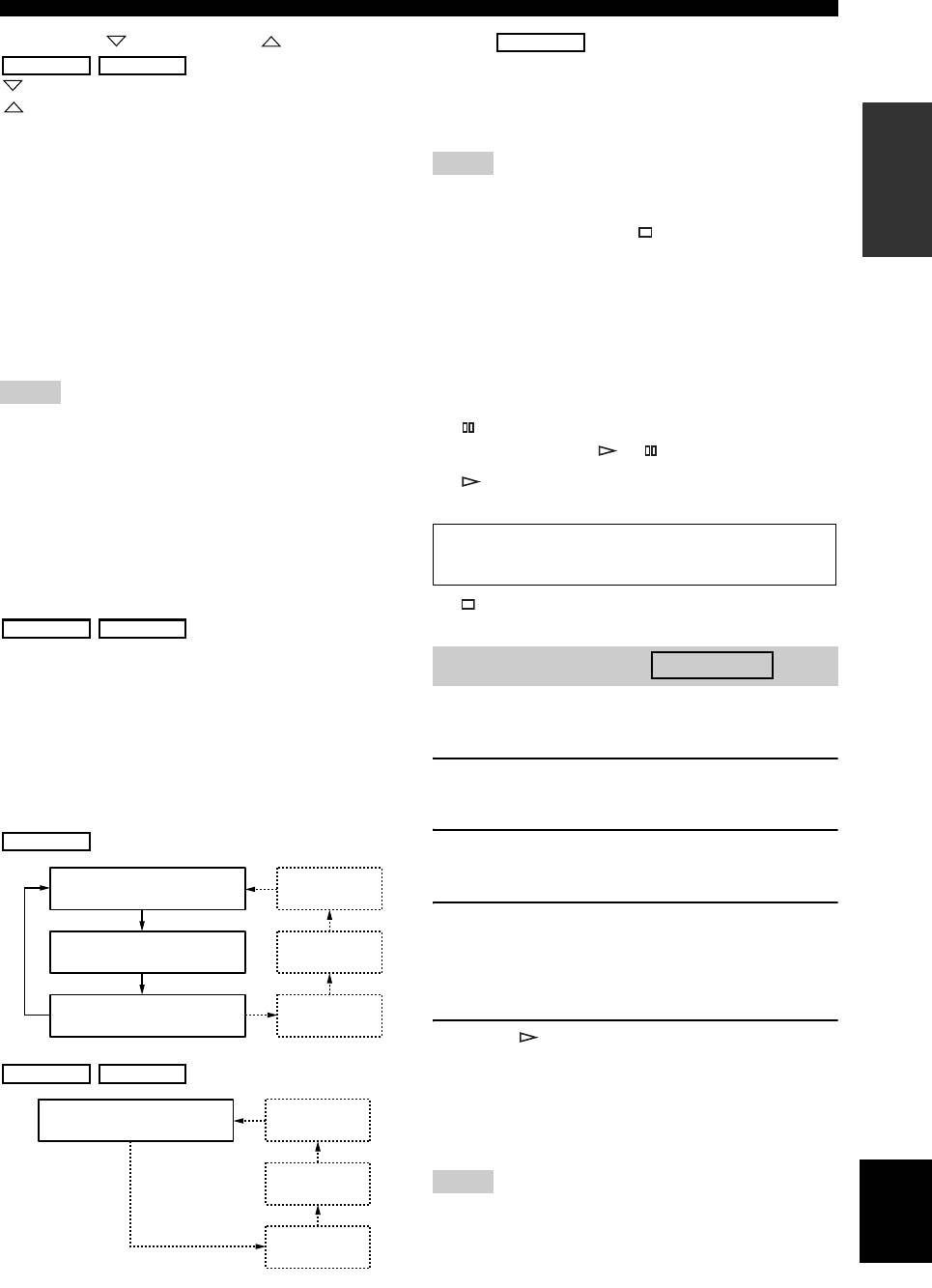
C DISPLAY
1 Press PROGRAM while playback is stopped.
Switches the time display. Each time you press DISPLAY
This unit is set to the program editing mode.
during playback, the time display changes as follows:
Audio CD
2 Select a track by using the numeric buttons
and ENTER.
Elapsed time of the current
Album name
track (default)
3 Repeat step 2 to program the next track.
Remaining time of the current
Artist name
You can program up to 24 tracks.
track
y
To cancel the programmed track, press CLEAR.
Total remaining time of the
Track name
disc
4 Press .
(CD TEXT disc only)
Playback starts from the beginning of the
Data Disc USB
programmed sequence.
Elapsed time of the current
Album name
y
file (default)
To erase all programmed tracks, press CLEAR when the
playback is stopped.
Artist name
English
Note
The programmed tracks are erased when the disc is ejected or this
Title
unit is turned off.
(Files including tag
information only)
5 En
