
Panasonic TYST65PV500: 3 Remove the cable cover set screws on the
3 Remove the cable cover set screws on the : Panasonic TYST65PV500
4
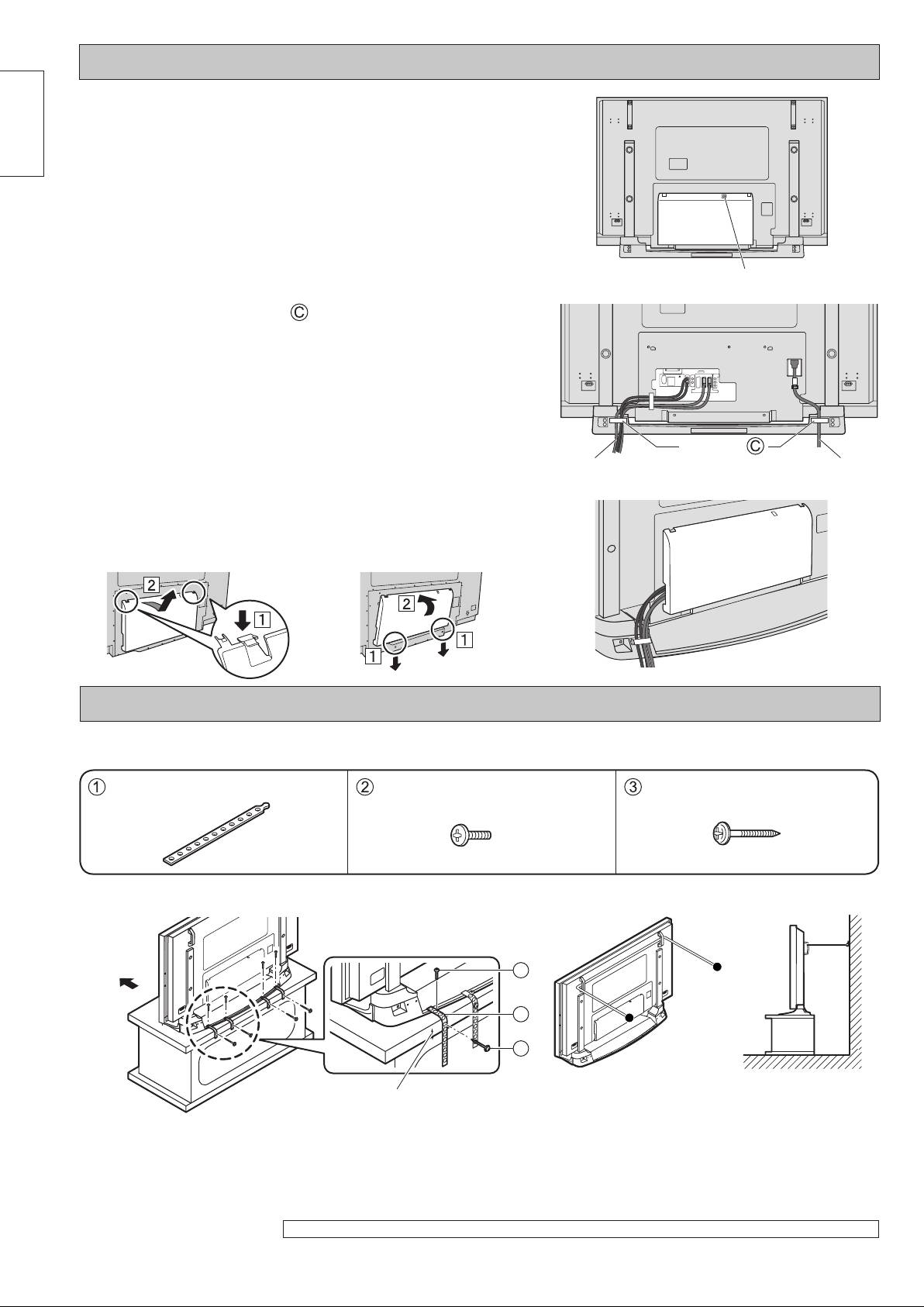
Cable binding instructions
Preventing the plasma television from failing over
Tip-prevention parts
Tap screws (4) Wood screws (4) Bands (4)
Attaching to a TV stand Attaching to a wall
2
1
3
3 Remove the cable cover set screws on the
plasma television (used for transport).
English
4 Remove the cable cover from the plasma
television.
Press the two hooks (right and left) at the cover top, and then
pull the cover forward to remove it.
5 Attach the clampers to the fl oor-mounted
Cable cover set screws
stand.
Attach the stand clampers (right and left).
6 Connect the cable and power cord.
7 Use the clampers to bind the cable and
power cord.
8 Reattach the cable cover to the plasma
Clampers
television.
Cable Power cord
Insert the two clips into the cover bottom, and then insert the
top hooks.
■ Attaching and removing the cable cover
Removal Fitting
Front face
Notes:
Locate the wood screw at the
• Securely attach to a wall, pillar or similarly solid
centre of the material width.
structural feature using separately- obtained
products such as cords or chains of adequate
Note:
strength.
There are four holes in the base for the screws holding the
• Secure in the side at two locations each on the
bands.
left and right.
The picture shown is illustrative purposely only and may differ slightly from the actual product.
TY-ST65PV500689.indb4TY-ST65PV500689.indb4 2005/09/1310:47:002005/09/1310:47:00
Table of contents
- Precautions with regard to setting up
- 1 Place the base so that it is fl at.
- 3 Remove the cable cover set screws on the
- Vorsichtsmaßnahmen für die Aufstellung
- 1 Stellen Sie den Sockel gerade auf.
- 3 Lösen Sie die (für den Transport verwendete)
- Voorzorgsmaatregelen bij opstelling
- 1 Plaats het voetstuk op een vlakke
- 4 Verwijder de kabelklep van de
- Precauzioni da adottare per l’installazione
- 1 Sistemare la base in modo che sia
- 4 Rimuovere lo sportello dei cavi dal televisore
- Précautions pour l’installation
- 1 Poser la base de sorte qu’elle soit à
- 4 Retirez le cache-câbles du téléviseur au
- Precauciones para la instalación
- 1 Coloque la base de modo que quede
- 4 Retire la cubierta para cables del televisor de
- Försiktighetsåtgärder vid montering
- 1 Placera bottenplattan på ett jämnt och
- 3 Ta bort alla skruvar i kabelskyddet på
- Sikkerhed i forbindelse med brug af plasma-tv
- 1 Placer foden, så den ligger lige.
- 3 Fjern skruerne til kabeldækslet på plasma-
- Меры предосторожности относительно установки
- 1 Поставьте основание ровно.
- 3 Выверните монтажные винты крышки
- Застереження щодо встановлення п’єдесталу
- 1 Розташуйте підставку на рівній
- 3 Викрутіть гвинти кабельної кришки на
-
