
Panasonic HPS45175E: Supplied Accessories Attaching/Detaching the Lens
Supplied Accessories Attaching/Detaching the Lens: Panasonic HPS45175E
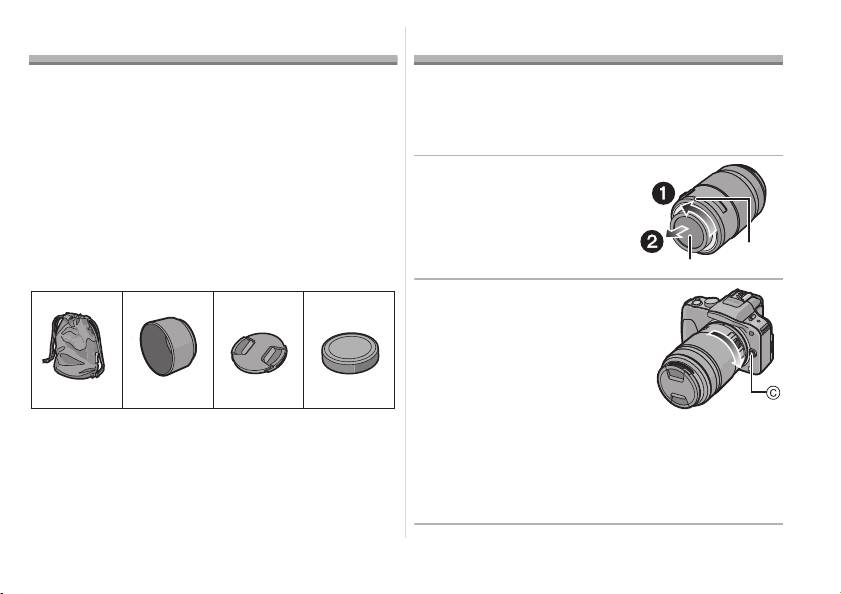
Supplied Accessories
Attaching/Detaching the Lens
[Inspection to be performed when you unpack
≥ Refer also to the camera’s operating instructions
the unit]
for attaching and detaching the lens.
When removing the unit from its packing box, check
∫ Attaching the Lens
that the main unit and the supplied accessories are
≥ Check that the camera is turned off.
there and also check their external appearance and
functions to verify that they have not sustained any
1 Turn the lens rear
damage during distribution and transportation.
cap to detach it.
If you discover any trouble, contact your vendor
A: Lens Rear Cap
before using the product.
Product numbers correct as of August 2011. These
may be subject to change.
2 Align the lens fitting
123
4
marks B (red marks) on
the camera body and the
lens and then rotate the
lens in the direction of
the arrow until it clicks.
VFC4430 VFC4697 VYF3463
VFC4605
• Do not press the lens
release button C when you
1 Lens Storage Bag
attach a lens.
2 Lens Hood
• Do not try to attach the lens when holding it at an
3 Lens Cap
angle to the camera body as the lens mount may
4 Lens Rear Cap
get scratched.
(The lens rear cap and lens cap are attached to
• Check that the lens is attached correctly.
the interchangeable lens at the time of purchase.)
5
VQT3R90
VQT3R90_E.book 5 ページ 2011年8月3日 水曜日 午後3時13分
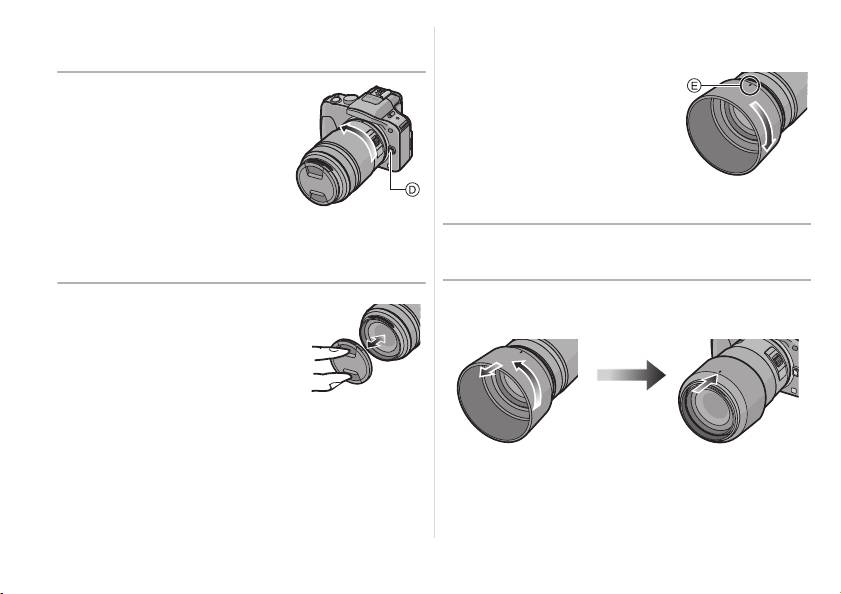
∫ Detaching the Lens
∫ Attaching the Lens Hood
≥ Check that the camera is turned off.
(Supplied Accessory)
While pressing on the
Insert the lens hood into
lens release button D,
the lens, and turn in the
rotate the lens toward
direction of the arrow
the arrow until it stops
until it stops.
and then remove.
E: Fit to the mark
• Attach the lens rear cap so
that the lens contact point
∫ Temporarily Storing the Lens Hood
does not get scratched.
1 Turn the lens hood in the direction of the
• Attach the body cap to the camera so no dirt or
arrow to detach it.
dust will get inside the main unit.
2 Reverse the lens hood and then attach it
∫ Attaching and Detaching
in the same way as shown previously.
the Lens Cap
Pinch the lens cap as
shown in the figure to
attach or detach.
• Be careful not to lose the lens cap.
6
VQT3R90
VQT3R90_E.book 6 ページ 2011年8月3日 水曜日 午後3時13分
Table of contents
- Operating Instructions
- Information for Your Safety
- Supplied Accessories Attaching/Detaching the Lens
- Names and Functions of
- Cautions for Use
- Specifications
- Informationen für Ihre Sicherheit
- Beiliegendes Zubehör Objektiv ansetzen/abnehmen
- Bezeichnungen und
- Vorsichtsmaßnahmen
- Spezifikationen
- Précautions à prendre
- Accessoires fournis Fixation/Retrait de l’objectif
- Noms et fonctions des
- Précautions d’utilisation
- Spécifications
- Información para su
- Accesorios suministrados Unir y quitar el objetivo
- Nombres y funciones de
- Precauciones para el uso
- Especificaciones
- Informazioni per la sua
- Accessori in dotazione Installazione/ Rimozione dell’obiettivo
- Nomi e funzioni dei
- Precauzioni per l’uso
- Specifiche
- 安全注意事項
- 提供的附件
- 安裝 / 取下鏡頭
- 元件的名稱及功能
- 使用時的注意事項
- 規格
- Информация для вашей
- Принадлежности, Установка/Снятие объектива входящие в комплект
- Названия и функции
- Предосторожности при
- Технические характеристики
