
Panasonic HFS014045: Names and Functions of
Names and Functions of: Panasonic HFS014045
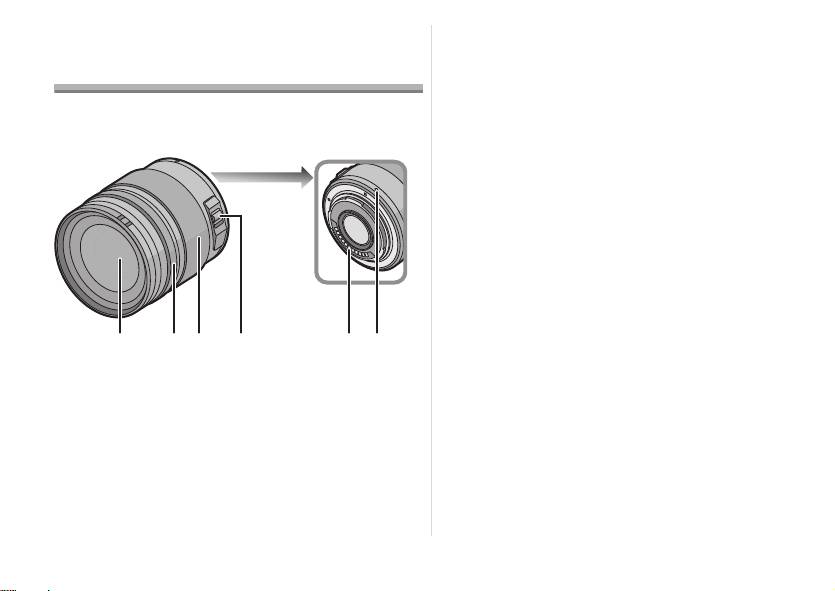
3 Zoom ring
Names and Functions of
Rotate the zoom ring when you wish to take large
Components
(tele) or wide (wide angle) pictures. (35 mm film
camera equivalent: 28 mm to 90 mm)
∫ Lens
4 [O.I.S.] switch
When the lens is attached to the camera the
stabilizer function is set to activate if the [O.I.S.]
switch is set to [ON].
≥ We recommend setting the [O.I.S.] switch to [OFF]
when using a tripod.
≥ The stabilizer function may not be effective in the
following cases.
– When there is a lot of jitter.
– When the zoom magnification is high.
– When using the digital zoom.
– When taking pictures while following a moving
subject.
– When the shutter speed becomes slower to take
pictures indoors or in dark places.
1 Lens surface
5 Contact point
2 Focus ring
6 Lens fitting mark
Rotate to focus when taking pictures with manual
focus.
8
VQT2A13
1
2 3 456
VQT2A13_E.book 8 ページ 2009年2月10日 火曜日 午後4時32分
Table of contents
- Operating Instructions
- Information for Your Safety
- Supplied Accessories Attaching/Detaching the Lens
- Names and Functions of
- Cautions for Use
- Specifications
- Informationen für Ihre
- Beiliegendes Zubehör
- Objektiv ansetzen/abnehmen
- Bezeichnungen und
- Vorsichtsmaßnahmen
- Spezifikationen
- Précautions à prendre
- Accessoires fournis Fixation/Retrait de l’objectif
- Noms et fonctions des
- Précautions d’utilisation
- Spécifications
- Información para su
- Accesorios suministrados Unir y quitar el objetivo
- Nombres y funciones de
- Precauciones para el uso
- Especificaciones
- Informazioni per la sua
- Accessori in dotazione
- Installazione/Rimozione
- Nomi e funzioni dei
- Precauzioni per l’uso
- Specifiche
- 安全注意事項
- 提供的附件
- 安裝 / 取下鏡頭
- 元件的名稱及功能
- 使用時的注意事項
- 規格
- Информация для вашей
- Принадлежности,
- Установка/Снятие
- Названия и функции
- Предосторожности при
- Технические характеристики
