
Panasonic H-F007014: Supplied Accessories Attaching/Detaching the Lens
Supplied Accessories Attaching/Detaching the Lens: Panasonic H-F007014
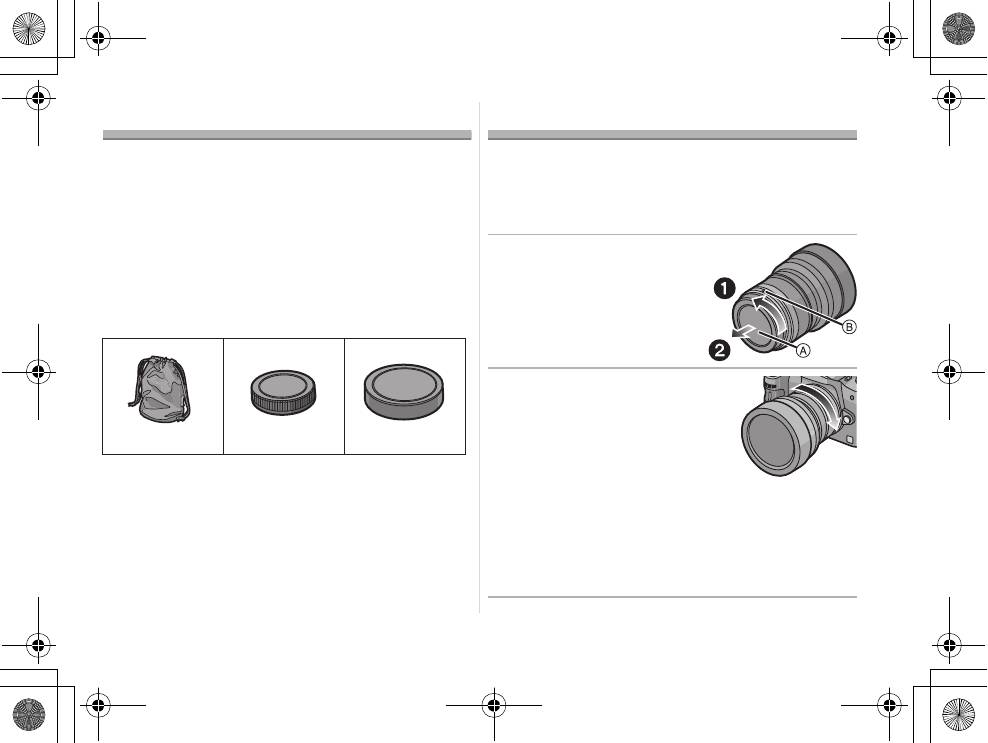
Supplied Accessories
Attaching/Detaching the Lens
[Inspection to be performed when you unpack
≥ Refer also to the camera’s operating instructions
the unit]
for attaching and detaching the lens.
When removing the unit from its packing box, check
∫ Attaching the Lens
that the main unit and the supplied accessories are
≥ Check that the camera is turned off.
there and also check their external appearance and
1 Turn the lens rear cap
functions to verify that they have not sustained any
damage during distribution and transportation.
to detach it.
If you discover any trouble, contact your vendor
A: Lens Rear Cap
before using the product.
2 Align the lens fitting
marks B (red marks) on
the camera body and the
lens and then rotate the
lens in the direction of
1 Lens Storage Bag
the arrow until it clicks.
2 Lens Rear Cap
• Do not press the lens release
(The lens rear cap and lens hood cover are
button when you attach a lens.
attached to the interchangeable lens at the time
• Do not try to attach the lens when holding it at an
angle to the camera body as the lens mount may
of purchase.)
get scratched.
3 Lens Hood Cover
• Check that the lens is attached correctly.
5
VQT2B42
312
VFC4430 VFC4315 VFC4412
VQT2B42_E.book 5 ページ 2009年3月24日 火曜日 午前10時51分
VQT2B42_E.book 6 ページ 2009年3月24日 火曜日 午前10時51分
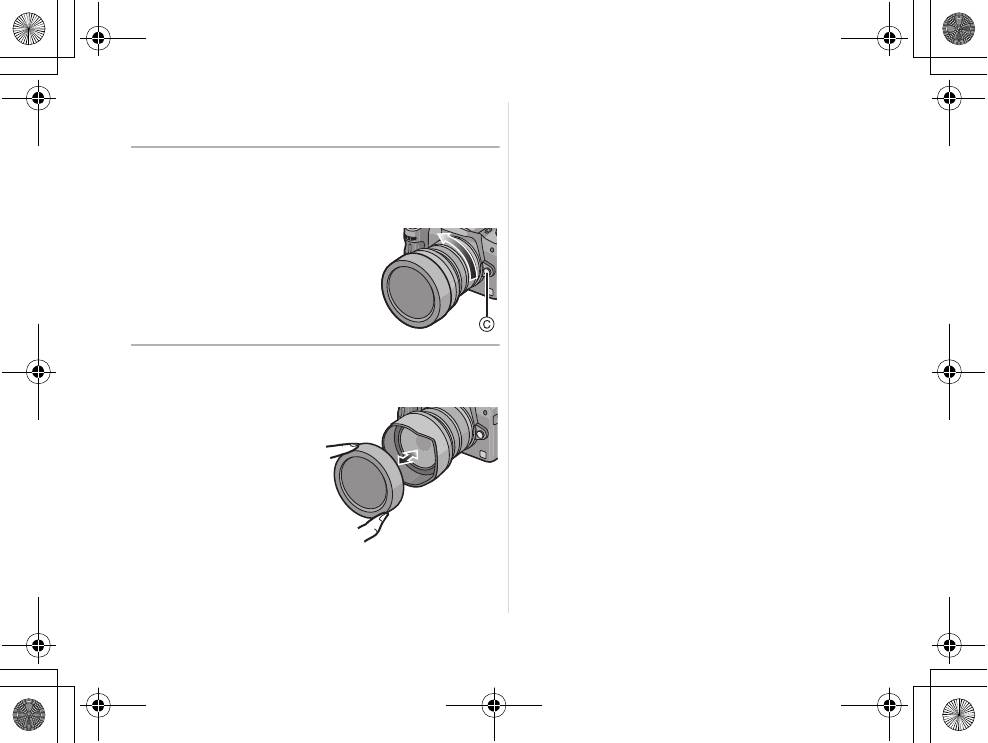
∫ Detaching the Lens
≥ Check that the camera is turned off.
Press the lens release button C while
turning the lens as far as possible in the
direction of the arrow to detach it.
• Attach the lens rear cap so
that the lens contact point
does not get scratched.
• Attach the body cap to the
camera so no dirt or dust will
get inside the main unit.
∫ Attaching and Detaching the Lens Hood
Cover
≥ Be careful not to lose
the lens hood cover.
6
VQT2B42
Table of contents
- Operating Instructions
- Information for Your Safety
- Supplied Accessories Attaching/Detaching the Lens
- Names and Functions of
- Cautions for Use
- Specifications
- Informationen für Ihre
- Beiliegendes Zubehör Objektiv ansetzen/abnehmen
- Bezeichnungen und
- Vorsichtsmaßnahmen
- Spezifikationen
- Précautions à prendre
- Accessoires fournis Fixation/Retrait de l’objectif
- Noms et fonctions des
- Précautions d’utilisation
- Spécifications
- Información para su
- Accesorios suministrados Unir y quitar el objetivo
- Nombres y funciones de
- Precauciones para el uso
- Especificaciones
- Informazioni per la sua
- Accessori in dotazione Installazione/Rimozione dell’obiettivo
- Nomi e funzioni dei
- Precauzioni per l’uso
- Specifiche
- 安全注意事項
- 提供的附件 安裝 / 取下鏡頭
- 元件的名稱及功能
- 使用時的注意事項
- 規格
- Информация для вашей
- Принадлежности,
- Установка/Снятие
- Названия и функции
- Предосторожности при
- Технические характеристики
