
Panasonic DMWMS1PP: Frequency Response and Cautions for Use Directionality Pattern Diagrams
Frequency Response and Cautions for Use Directionality Pattern Diagrams: Panasonic DMWMS1PP
Frequency Response and
Cautions for Use
Directionality Pattern Diagrams
∫ About the unit
Do not use the unit near radio transmitters or high-voltage
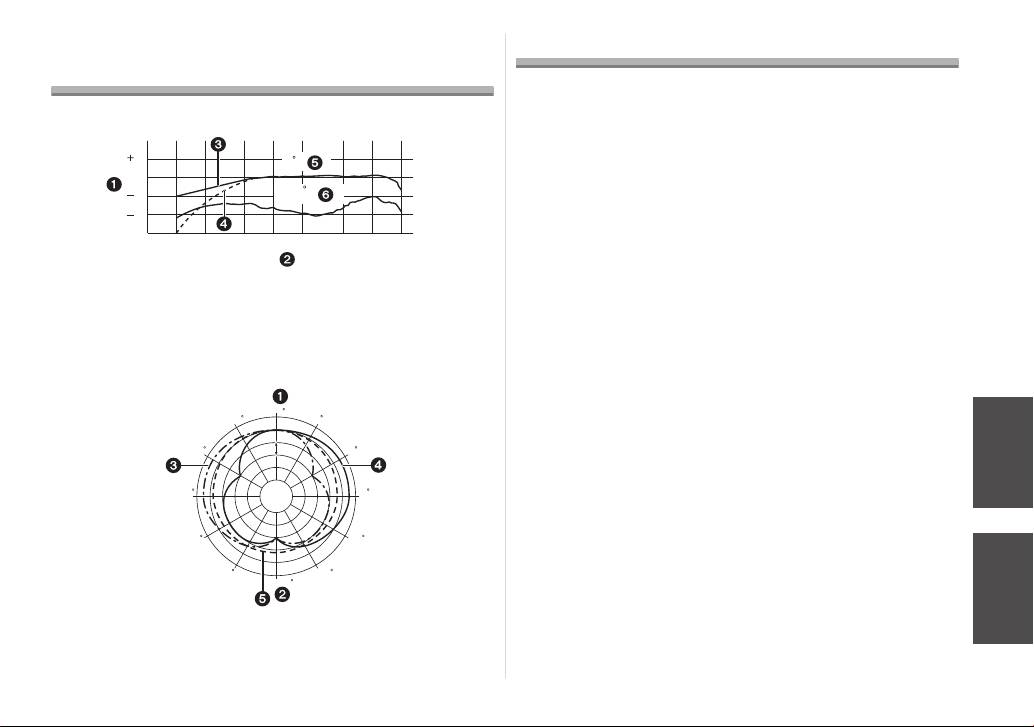
∫ Frequency Response (WIND CUT OFF/ON)
lines.
• If you record near radio transmitters or high-voltage lines, the
recorded pictures and sound may be adversely affected.
Keep the unit away from insecticide sprays and other
volatile substances.
• If the unit is exposed to these sprays or substances, its external
case may deteriorate and/or its paint may peel off.
• Do not leave the unit in contact with any items made of rubber or
1 Response 2 Frequency
PVC for prolonged periods of time.
3 Wind Cut Off 4 Wind Cut On
Do not carry the unit when it is still attached to the camera
5 Front 6 Rear
body.
∫ Directionality Pattern
• Under no circumstances should the unit be stored in any of the
following locations since doing so may cause trouble in operation
or malfunctioning.
• In direct sunlight or on a beach in summer
• In locations with high temperatures and humidity levels or
where the changes in temperature and humidity are acute
• In locations with high concentrations of sand, dust or dirt
• Where there is fire
• Near heaters, air conditioners or humidifiers
• Where water may make the unit wet
• Where there is vibration
• Inside a vehicle
• The unit cannot be used with an external flash.
• The unit cannot be used with a remote shutter.
1 Front 2 Rear
• Do not drop the unit, knock it into other objects or subject it to any
3 Stereo (left) 4 Stereo (Right)
other kind of strong impact or shock.
5 Monaural
VQT2C64
11
(dB)
10
0 (
)
0
10
180 (
)
20
100 200 500 1000 50002000 10000 20000
(Hz)
0
30
30
60
10dB
60
90
90
120
120
150
150
180
DMW-MS1PP_E-VQT2C64.book 11 ページ 2009年3月18日 水曜日 午後9時29分

DMW-MS1PP_E-VQT2C64.book 12 ページ 2009年3月18日 水曜日 午後9時29分
• A dirty plug may result in faulty contact. Be sure to wipe the plug
Dispose of unusable batteries.
with a dry soft cloth before connecting the microphone.
• Batteries have a limited life.
• Do not connect or disconnect the stereo mini-plug with the digital
• Do not throw batteries into fire because they may cause an
camera turned on.
explosion.
• When the unit is not going to be used for a prolonged period, mold
and other problems may cause failure of the unit. It is
Do not allow battery terminals to come into contact with
recommended that you check the unit’s operation prior to use.
metal objects (such as necklaces, hairpins, etc.).
• Take care to not apply excessive force to the wind shield. It may
• This can cause short circuiting or heat generation and you may be
cause malfunction.
badly burned if you touch the batteries.
∫ Cleaning
Do not attempt to recharge dry batteries.
Before cleaning the unit, remove the battery. Then wipe
the unit with a dry soft cloth.
Do not throw batteries into a fire or expose to excessive
• When the unit is soiled badly, it can be cleaned by wiping the dirt
heat such as sunlight.
off with a wrung wet cloth, and then with a dry cloth.
• Do not use solvents such as benzine, thinner, alcohol, kitchen
detergents, etc., to clean the unit, since it may deteriorate the
external case or the coating may peel off.
• When using a chemical cloth, be sure to follow the accompanying
instructions.
∫ About the batteries
Be sure to remove the battery when you will not be using
the unit for a long period of time.
• If the temperature is too high or low, the terminals may rust
causing a malfunction.
If you drop the battery accidentally, check to see if the
body of the battery or the terminals are damaged.
• Inserting a damaged battery in the unit will damage the unit.
Bring charged spare batteries when going out.
• Be aware that the operating time of the batteries becomes shorter
in low temperature conditions such as at a ski resort.
12
VQT2C64
Table of contents
- Stereo Microphone Microphone stéréo
- Contents Information for Your Safety
- Supplied accessories
- Names of the Components About the batteries
- Inserting and Removing the Unit’s
- Mounting the Unit onto the Digital Camera, and Removing it
- Using the Microphone
- Frequency Response and Cautions for Use Directionality Pattern Diagrams
- Specifications
- Table des matières Précautions à prendre
- Accessoire fourni
- Noms des composants À propos des piles
- Mise en place et retrait de la pile
- Installation et retrait du microphone sur l’appareil photo numérique
- Utilisation du microphone
- Schémas de réponse en fréquence et Précautions d’utilisation de directivité de l’antenne
- Spécifications
- Table des matières Précautions à prendre
- Accessoires fournis
- Noms des composants À propos des piles
- Insertion et retrait de la pile de
- Montage et retrait de l’élément d’un appareil photo numérique
- Pour utiliser le Microphone
- Réponse en fréquence et Diagrammes Précautions d’utilisation de modèle de directivité
- Spécifications
- Inhalt Informationen für Ihre Sicherheit
- Beiliegendes Zubehör
- Bezeichnung der Bauteile Zum Thema Batterien
- Batterie des Geräts einlegen und
- Montage des Gerätes an der Digitalkamera und Entfernen von dieser
- Verwendung des Mikrofons
- Frequenzgang und Richtcharakteristik Hinweise zur Benutzung
- Technische Daten
- Indice Información para su seguridad
- Accesorios suministrados
- Nombres de componentes Acerca de las baterías
- Insertar y quitar la batería de la unidad
- Montar la unidad en la cámara digital y quitarla
- Usar el micrófono
- Diagramas de respuesta en frecuencia Precauciones para el uso y tipo de direccionalidad
- Especificaciones
- Indice Informazioni per la sua sicurezza
- Accessori in dotazione
- Nome dei componenti Le batterie
- Inserimento e rimozione della batteria
- Installazione dell’unità sulla fotocamera digitale, e sua rimozione
- Utilizzo del microfono
- Grafici della risposta in frequenza e Precauzioni per l’uso dello schema di direzionalità
- Specifiche
- 安全注意事項
- 提供的附件
- 元件名稱 關於電池
- 裝入和取出本裝置的電池
- 安裝本裝置到數位相機上及取下本裝置
- 使用麥克風
- 頻率響應與指向性圖表 使用時的注意事項
- 規格
- Содержание Информация по безопасности
- Принадлежности, входящие в
- Названия составных частей О батареях
- Установка и извлечение батареи из
- Установка вспышки на цифровую фотокамеру и снятие с нее
- Использование микрофона
- Диаграммы частотной Предосторожности при характеристики и направленности использовании
- Технические характеристики
