
Nikon Multi-Power Battery Pack G02: The MB-D11 Control Lock
The MB-D11 Control Lock: Nikon Multi-Power Battery Pack G02
Table of contents
- Safety Precautions Precautions for Use
- D Notice for Customers in the U.S.A. Notice for Customers in Canada
- The MB-D11 and Supplied Accessories Using the Optional EH-5a AC Adapter and EP-5B Power Connector
- The MB-D11 Control Lock
- Removing the Battery Pack
- Inserting Batteries
- Battery Level Battery Info
- Removing Batteries
- Speci cations
Parts of the MB-D11 (Figure A)
q Contact cap
w Holder for camera contact cover
e Power/signal contacts
En
r AEL/AFL button
t Main command dial
y Multi selector
u Attachment wheel
i Holder power connector cover
o Battery-chamber cover
!0 Battery chamber
!1 Battery-chamber latch
!2 Mounting screw
!3 Shutter-release button
!4 Control lock
!5 Sub-command dial
!6 Tripod socket
!7 MS-D11EN holder for EN-EL15 batteries
!8 Power terminals
!9 Power terminals (MS-D11EN battery holder)
@0 MS-D11 holder for AA batteries
@1 Power terminals (MS-D11 battery holder)
5
The MB-D11 Shutter Release Button, Multi Selector, Command Dials, and AE-L/AF-L Button
The MB-D11 Shutter Release Button, Multi Selector, Command Dials, and AE-L/AF-L Button
The MB-D11 is equipped with a shutter-release button (Figure A-
!3
), multi selector (Figure
A-
y
), main command dial (Figure A-
t
), sub-command dial (Figure A-
!5
), and AEL/AFL button
(Figure A-
r
) for use when taking photographs in vertical (“tall,” or portrait) orientation.
These
controls perform the same functions as the corresponding controls on the camera and are af-
fected by changes to options in the Custom Settings menu (Group f) that a ect these camera
controls.
See the camera manual for more information.
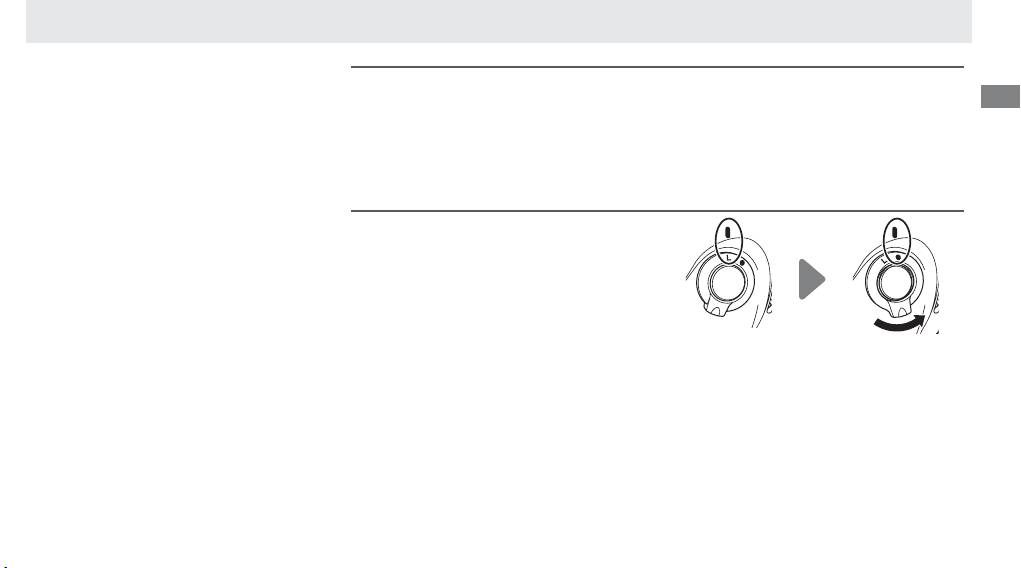
The MB-D11 Control Lock
The MB-D11 Control Lock
The control lock (Figure A-
!4
) locks the con-
trols on the MB-D11 to prevent unintended
use.
Before using these controls to take photo-
graphs in vertical (portrait) orientation, release
the lock as shown at right.
The control lock is not a power switch.
Use the
camera power switch to turn the camera on
Locked Unlocked
and o .
