
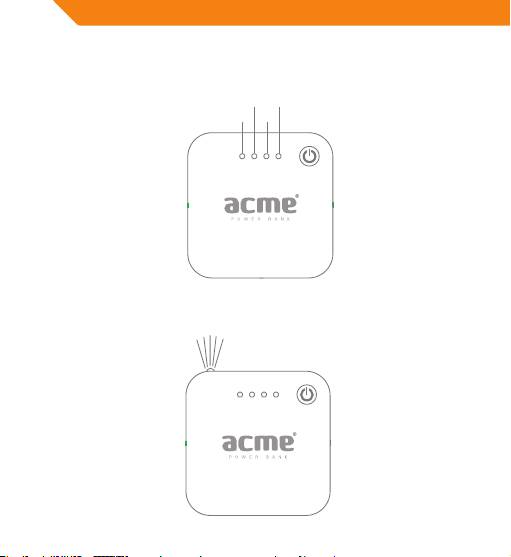
Acme PB01: 3. How to check power level of PB01: Keep pressing the switch button 4. How to turn on/o the LED lamp: Quickly double click the switch button.
3. How to check power level of PB01: Keep pressing the switch button 4. How to turn on/o the LED lamp: Quickly double click the switch button.: Acme PB01
Table of contents
- Introduction Features Specification Instruction
- 2. How to charge devices with PB01: Connect device to PB01 using
- 3. How to check power level of PB01: Keep pressing the switch button 4. How to turn on/o the LED lamp: Quickly double click the switch button.
- NOTICE: Waste Electrical and Electronic Equipment (WEEE) Symbol
GB
3. How to check power level of PB01: Keep pressing the switch button
for 1 second to turn on power indicator lights, each light that comes
on accounts for 25% power.
50%
100%
25%
75%
4. How to turn on/o the LED lamp: Quickly double click the switch
button.
6 7
Top 10 manuals
100.00
NZXT HALE90 1000W99.99
Samsung SM-R38099.97
AEG BSB 18C99.97
Dell 2700W99.97
Smeg KSEC70X99.96
Beurer HDE 4099.96
Pyramida KH 50 v.299.96
MSI CSM-H81M-P3299.96
AEG HR 562799.95
Melissa 640-048