
Acme F300: The function of playing music: LED Indicators FAQ
The function of playing music: LED Indicators FAQ: Acme F300
Table of contents
- Before using Overview Main Body Cigarette Adaptor
- Basic Operation Installing F300 Switching on/off F300
- Pairing the F300 with Bluetooth Devices
- Playing Music
- Operating the F300 The Status of Function Operation the F300 Basic function: The function of making call:
- The function of playing music: LED Indicators FAQ
- Specification
- Care and maintenance
GB
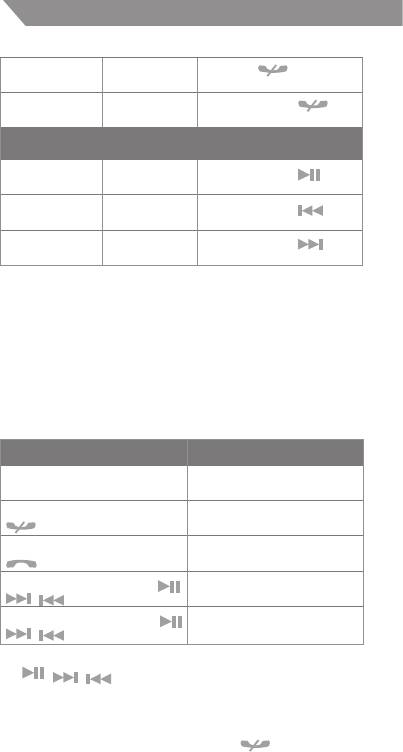
Press the
button for
Reject call Ringing
about 2 seconds
Conversation
Briey press the
End call
mode
button
The function of playing music:
Briey press the
Pause/revert Playing music
button
Briey press the
Last song Playing music
button
Briey press the
Next song Playing music
button
The Function of Line-out
If your car stereo system has stereo audio input socket, you can
also transmit stereo music to your car stereo system by cable.
This socket is often marked “AUX” or “Auxiliary”.
The methods: You have to use a 3.5mm to 3.5mm audio cable,
one end is inserted into the Line-out socket of the F300, and
the other end is inserted into the stereo audio input socket of
car stereo system.
LED Indicators
LED Indicator Light The Status of the F300
Red and blue indicator lights
Pairing mode
ash alternately
Red indicator light of the
Successful HFP connecting
button is on
Blue indicator light of the
Successful A2DP connecting
button is on
The indicator lights of the
Switched on
, buttons are on
The indicator lights of the
Adjusting volume mode
, buttons ash
Note: When the F300 is switched on, the red indicator lights of
the
, , buttons are also on. The red indicator light
only ashes in adjusting volume mode..
FAQ
1. Why is the red indicator light of the button on?
8


