
ZyXEL Communications PLA-401: инструкция
Раздел: Профоборудование
Тип: Аппарат
Инструкция к Аппарату ZyXEL Communications PLA-401

PLA-401
PowerLine Ethernet Adapter
Quick Start Guide
CONTENTS
Version 1.00
ENGLISH 1
4/2007
DEUTSCH 5
Edition 1
ESPAÑOL 9
FRANÇAIS 13
ITALIANO 17
日本語
21
РУССКИЙ 25
SVENSKA 29
繁體中文 33
Copyright © 2007. All rights reserved
ENGLISH
ENGLISH
Overview
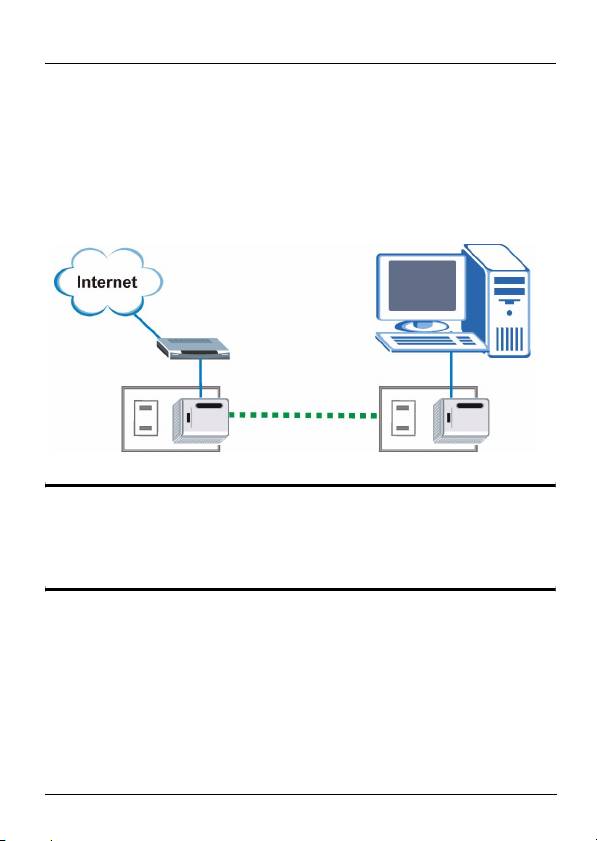
The PLA-401 allows you to extend your network (and Internet
connection) to any electrical outlet in your home. The figure
below shows your PLA-401 (B) connected to a DSL modem
(A). You can plug a second PLA-401 (C) into another outlet in
your home and connect a computer for Internet access.
A
C
B
" See the User’s Guide for information on how to
use the configuration utility to manage your
PLA-401.
Connections
This Quick Start Guide shows you how to make the following
connections:
1 PLA-401 to a Cable/DSL modem, router or switch.
2 PLA-401 to a computer in your home.
1
ENGLISH
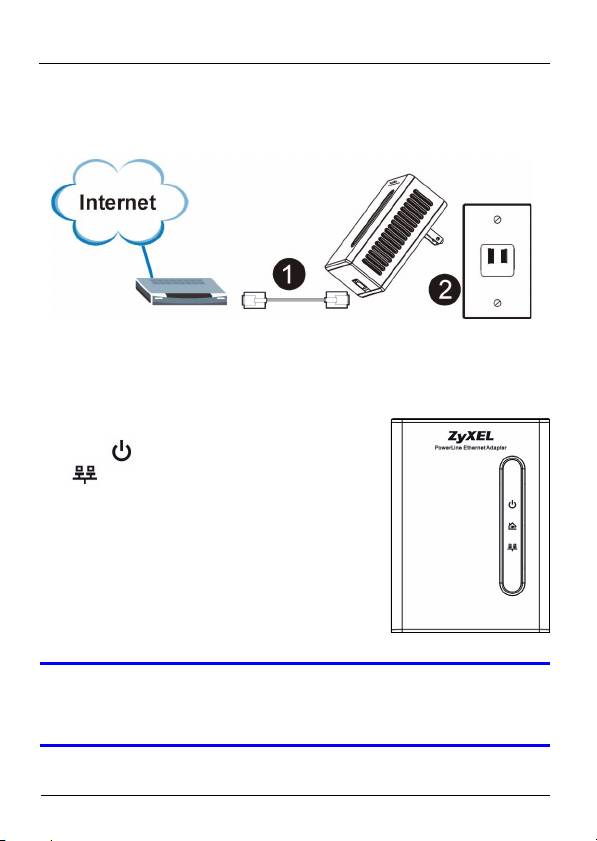
1 Connect the PLA-401 to a Cable/DSL
Modem or Router
1 Use an Ethernet cable to connect the ETHERNET port on
the PLA-401 to an available Ethernet port of your modem,
router or switch.
2 Plug the PLA-401 into a power outlet.
3 The LED should be on and the
LED should be on or blinking.
V If none of the LEDs are on, unplug your device
and recheck your hardware connections.
2
ENGLISH
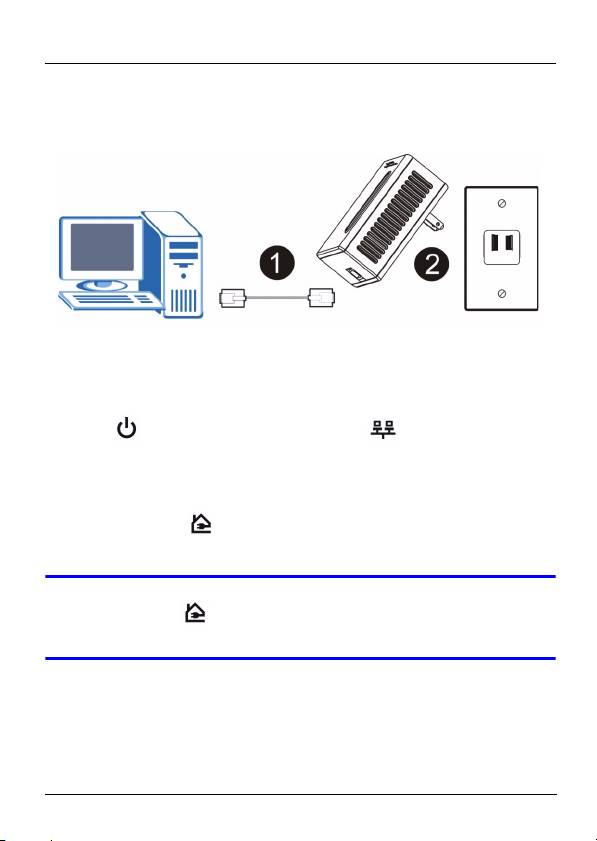
2 Connecting the PLA-401 to a
Computer
1 Use an Ethernet cable to connect the ETHERNET port on
the PLA-401 to the Ethernet port on your computer.
2 Plug the PLA-401 into a power outlet.
3 The LED should be on and the LED should be on
or blinking.
4 When the PLA-401 detects a connection to another PLA-
401 (or another HomePlug AV compatible power line
adapter), the LEDs turn on and blink when there is
traffic.
V If the LED is not on, try using another power
outlet.
3

ENGLISH
Troubleshooting
If you are having trouble setting up your connections, make
sure:
• Your outlets are working properly. Unplug the PLA-401 and
plug in another electrical appliance that you know works.
• The Ethernet cables you are using are Category 5 or higher.
Most cables are labeled with their specifications.
• All Ethernet cables are securely connected.
If the LED is off.
• Use the management utility (see the User’s Guide for details)
to detect all other HomePlug AV devices on your power line
network. Try plugging a second HomePlug AV device into an
adjacent socket (to your PLA-401) and see if the LED
lights up.
4
Оглавление
- " See the User’s Guide for information on how to
- " Informationen zum Benutzen des
- " Vea la guía del usuario para información sobre
- " Consultez le guide de l'utilisateur pour les
- " Vedere la Guida dell'utente per informazioni su
- " PLA-401 を管理するための設定ユーティリティ
- " Использование утилиты управления PLA-401
- " Se bruksanvisningen för information om hur du
- " 請參閱 《使用手冊》,了解如何使用設定公用程
