
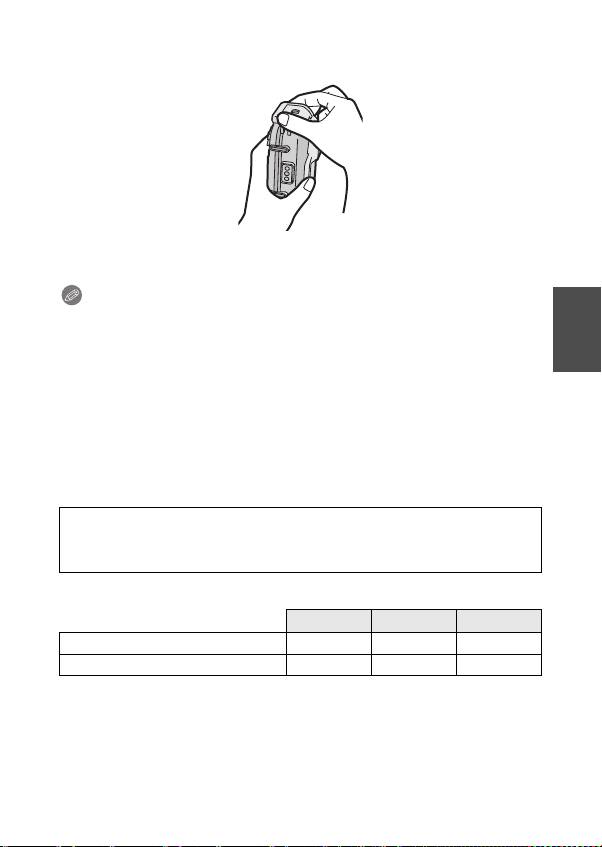
Panasonic DMWMCFT5PP: 5 After you have attached the digital camera, check one
5 After you have attached the digital camera, check one : Panasonic DMWMCFT5PP
DMW-MCFT5_PP&E-VQT4V83.book 15 ページ 2013年1月16日 水曜日 午前11時35分
• Check that the buckle is closed firmly.
Do not insert the strap etc. in the buckle.
5 After you have attached the digital camera, check one
more time that no water leaks into the Case. (P12)
Notes
• Be careful not to get the shading hood dirty with fingerprints etc.
• Check one more time that the O-ring is fitted evenly into the O-ring groove.
• Avoid opening or closing the Case where there is a lot of sand or dust and in humid
or wet places.
• If there is a sudden change of humidity caused by moist air entering the Case,
condensation may appear inside the Case.
• To prevent condensation, set the digital camera in as dry a place as possible. Also,
check that the silica gel (supplied) is sufficiently dry before inserting.
• If sunscreen or suntan oil sticks to the Case, wash it off immediately with lukewarm
water to prevent reduced waterproofness or discoloration.
• Submerge in fresh water for approximately 10 minutes after using the digital
camera at the beach or in water. Read the operating instructions for details.
When a digital camera with compass, altimeter (depth meter), and
barometer is attached to the marine case, measurements may not be
possible, or may contain major errors.
®
When using a digital camera with GPS/Wi-Fi
/NFC function
GPS Wi-Fi NFC
¢1
¢2
When the marine case is attached ±
±
—
Underwater use — — —
±: Available —: Not available
¢1 If a digital camera is attached to the marine case, failure of positioning or other
major errors may occur due to interference in the reception of radio waves from
the GPS satellite.
¢2 When connecting the digital camera to a smartphone by using the NFC function,
do so before attaching it to the marine case.
“Wi-Fi” is a registerd mark of the “Wi-Fi Alliance”.
(ENG) VQT4V83
15
Table of contents
- DMW-MCFT5
- 1 Loosen the O-ring with your fingers to remove it.
- 2 Check the O-ring.
- 4 Apply the grease (supplied).
- 6 Inspect the O-ring one last time.
- 1 Push 2 up with your finger while sliding 1 to open the
- 3 Insert the silica gel (supplied).
- 5 After you have attached the digital camera, check one
- 1 Turn the camera on. 2 Set to the [Advanced Underwater Mode]. 3 Aim the AF area on the LCD monitor at the subject you
- 1 Submerge the Case in fresh water for about 30 minutes or
- 3 Open the rear of the case to remove the digital camera.
- 1 Wash the outside of the Case with water.
- 1 Desserrez le joint torique avec vos doigts pour l’enlever.
- 2 Vérifiez le joint torique.
- 4 Appliquez la graisse (fournie).
- 6 Vérifiez le joint torique une dernière fois.
- 1 Appuyez sur 2 avec votre doigt tout en faisant glisser 1
- 3 Insérez le gel de silice (fourni).
- 5 Après avoir installé l’appareil photo, vérifiez une fois de
- 1 Mettez l’appareil photo en marche. 2 Réglez à [Mode sous-marin avancé]. 3 Dirigez la zone MPA de l’écran ACL sur le sujet que vous
- 1 Immergez le boîtier dans de l’eau douce pendant environ
- 3 Ouvrez le couvercle arrière pour retirer l’appareil photo
- 1 Lavez l’extérieur du boîtier avec de l’eau.
- 1 Den O-Ring zum Entfernen mit den Fingern lösen.
- 2 Prüfen des O-Rings.
- 4 Tragen Sie das Fett auf (beiliegend).
- 6 Letzte Überprüfung des O-Rings.
- 1 Drücken Sie 2 mit dem Finger nach oben, während 1
- 3 Legen Sie das Kieselgel ein (beiliegend).
- 1 Schalten Sie die Kamera ein. 2 Richten Sie den [Erweit. Unterwassermodus] ein. 3 Den AF-Bereich auf dem LCD-Monitor auf das
- 1 Das Gehäuse ca. 30 Minuten oder mehr in Süßwasser
- 3 Die Geräterückseite öffnen, um die Digitalkamera zu
- 1 Die Außenseite des Gehäuses mit Wasser abwaschen.
- 1 Afloje el anillo tórico con sus dedos para quitarlo.
- 2 Controle el anillo tórico.
- 4 Aplique la grasa (suministrada).
- 6 Controle el anillo tórico una última vez.
- 1 Empuje hacia arriba 2 con su dedo, mientras hace
- 3 Inserte el silicagel (suministrado).
- 5 Después de unir la cámara digital, compruebe una vez
- 1 Encienda la cámara. 2 Fije en [Modo submarino avanzado]. 3 Dirija el área AF en el monitor LCD hacia el sujeto que
- 1 Sumerja el estuche en agua fresca durante 30 minutos o
- 3 Abra la parte trasera del estuche para quitar la cámara
- 1 Lave la parte externa del estuche con agua.
- 1 Allentare l’O-ring con le dita per rimuoverlo.
- 2 Controllare l’O-ring.
- 4 Applicare il grasso (in dotazione).
- 6 Controllare un’ultima volta l’O-ring.
- 1 Spingere 2 verso l’alto con un dito, e
- 3 Inserire il silica gel (in dotazione).
- 1 Accendere la fotocamera. 2 Impostare [Modalità subacquea avanzata]. 3 Inquadrare il soggetto che si desidera mettere a fuoco
- 1 Immergere la custodia in acqua dolce per circa 30 minuti
- 3 Aprire la copertura posteriore per rimuovere la
- 1 Lavare l’esterno della custodia con acqua.
- 1 用手指將 O 形環鬆開,然後取下。
- 2 檢查 O 形環。
- 4 塗抹潤滑油(提供)。
- 6 最後檢查 O 形環。
- 1 在滑動 1 的同時,用手指上推 2 打開盒扣。 2 將數位相機裝入盒子。
- 3 插入硅膠(提供)。
- 5 裝入數位相機後,請再次檢查盒子是否漏水。 (P122)
- 1 打開相機。 2 設定為 [進階潛水模式 ]。 3 瞄準想對焦的目標,將其置於 LCD 顯示屏上的 AF 區域中。 4 固定焦點進行拍攝。
- 1 不要取出數位相機,將盒子浸沒在清水中約 30 分鐘或更長時間
- 3 打開後封蓋取出數位相機。
- 1 用水沖洗盒子的外部。
- 1 Для снятия уплотнительного кольца ослабьте его
- 2 Проверка уплотнительного кольца.
- 4 Нанесите смазку (входит в комплект поставки).
- 6 Проверьте уплотнительное кольцо еще раз.
- 1 Для открытия защелки поднимите деталь 2 пальцем,
- 3 Вставьте силикагель (входит в комплект поставки).
- 5 После установки цифровой камеры еще раз
- 1 Включите камеру.
- 1 Погрузите футляр в пресную воду не менее чем на
- 3 Чтобы вынуть цифровую камеру, откройте заднюю
- 1 Промойте наружную поверхность футляра водой.
