
Panasonic CS-C12JKD: PRODUCT OVERVIEW & OPERATIONS
PRODUCT OVERVIEW & OPERATIONS: Panasonic CS-C12JKD
PRODUCT OVERVIEW & OPERATIONS
POWE
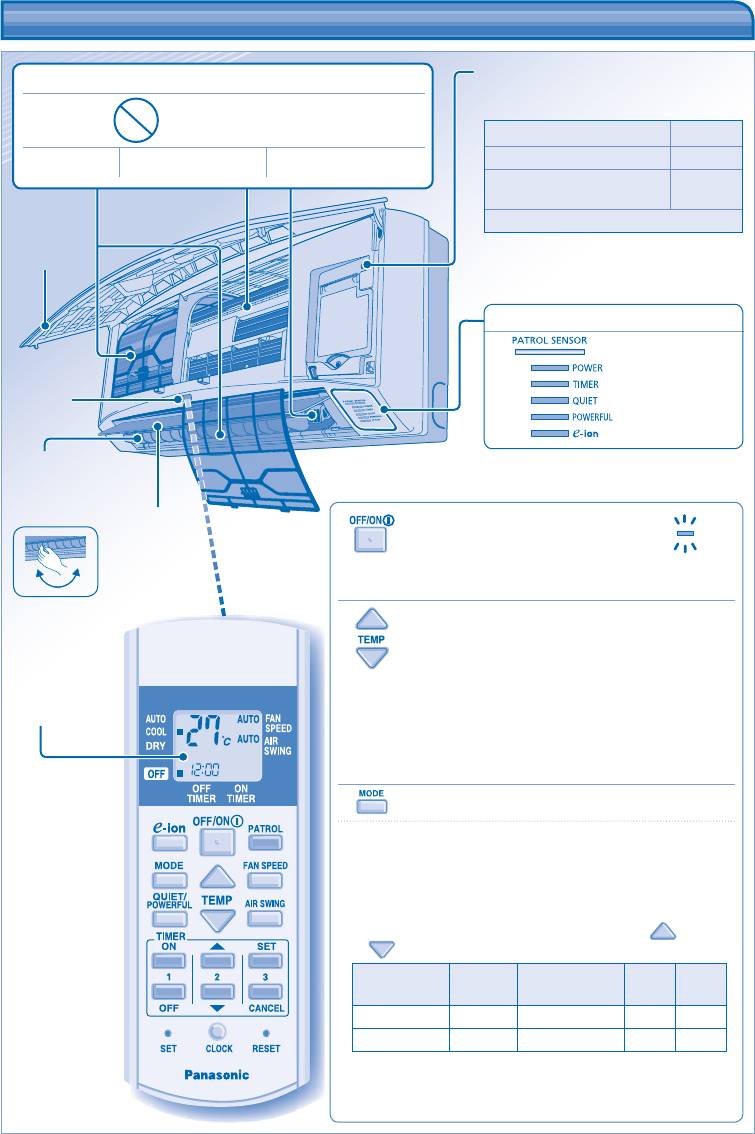
TO TURN ON OR OFF THE UNIT
4
R
PRODUCT OVERVIEW & OPERATIONS
Auto OFF/ON button
e-ion AIR PURIFYING SYSTEM
• Used when remote control is misplaced
or malfunction.
Do not touch during operation
Action Mode
Press once. Auto
e-ion fi lters e-ion charging wire Active e-ion Generator
Press and hold until 1 beep is
Cooling
heard, then release.
Press the button to turn off.
Front panel
INDICATOR
(Red/Orange/Blue)
(Green)
(Orange)
Receiver
(Orange)
(Orange)
(Blue)
Horizontal airfl ow
direction louver
• Manually
adjustable.
Vertical airfl ow
direction louver
• Do not adjust
Maximum
by hand.
• Please be aware of the OFF indication on the remote control
distances: 8m
display to prevent the unit from starting/stopping improperly.
TO SET TEMPERATURE
• For cool and dry modes, the range of temperature for selection is
Remote control
16°C ~ 30°C.
display
• Operating the unit within the recommended temperature could
induce energy saving.
COOL mode : 26˚C ~ 28˚C.
DRY mode : 1˚C ~ 2˚C lower than room temperature.
TO SELECT OPERATION MODE
AUTO mode - For your convenience
• Unit selects the operation mode according to the room
temperature.
• Once auto mode is selected, the unit will operate at the standard
setting temperature.
• To change the standard setting temperature, press
for “HI”
or for “LO”.
Room
Operation
Standard setting
HI
LO
temperature
mode
temperature
(+2°C)
(-2°C)
23°C & above Cool 25°C 27°C 23°C
Below 23°C Dry 22°C 24°C 20°C
COOL mode - To enjoy cool air
DRY mode - To dehumidify the environment
• Unit operates at low fan speed to give a gentle cooling operation.
ENGLISH
• , and can be activated in
all modes and can be cancelled by pressing the
respective button again.
•
and can not be selected at the same
time.
•
and can be activated even when the unit
is turned off. In this condition, fan speed and air swing
can not be adjusted.
5
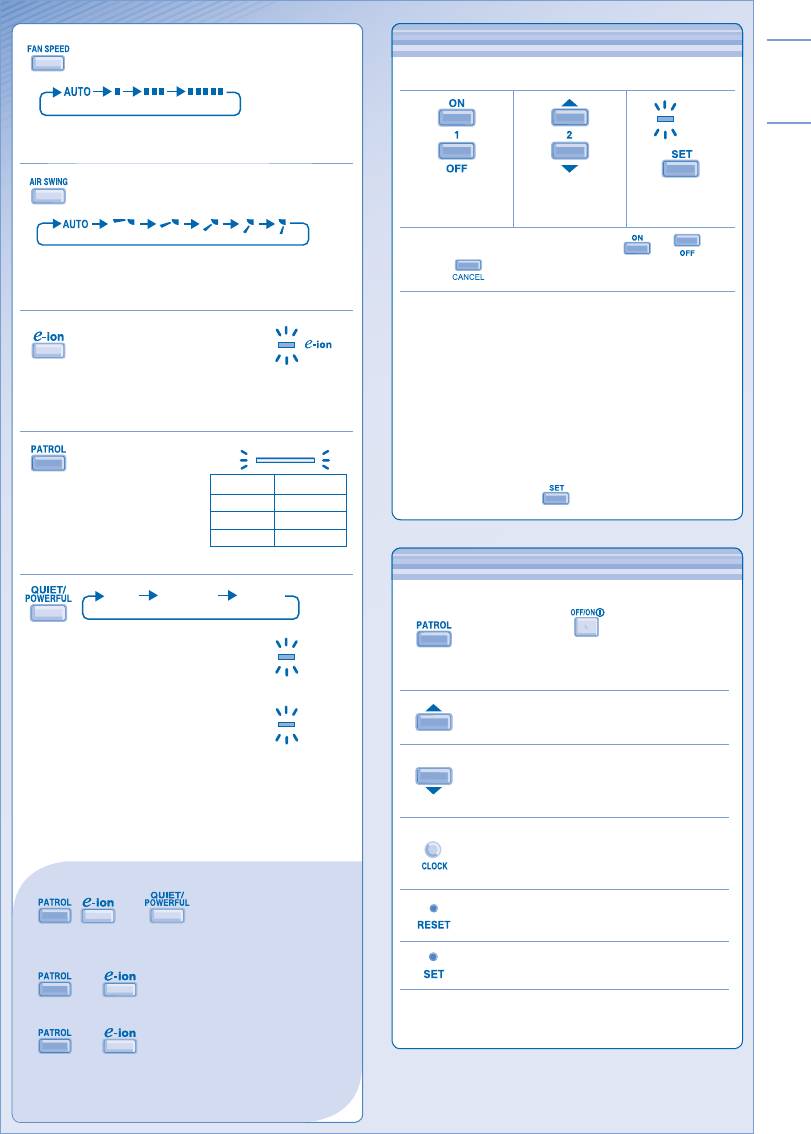
TO SET THE TIMER
TO SET THE TIMER
• To turn ON or OFF the unit at a preset time.
TIMER
Select ON or
Set the time. Confi rm.
OFF timer.
• To cancel ON or OFF timer, press or then
press .
• When ON Timer is set, the unit may start earlier (up
to 15 minutes) before the actual set time in order to
achieve the desired temperature on time.
• Timer operation is based on the clock set in the remote
control and repeats daily once set. For clock setting,
please refer to Remote Control Preparation at back
cover.
• If timer is cancelled manually or due to power failure,
you can restore the previous setting (once power is
resumed) by pressing .
OPTIONAL SETTINGS
TO SELECT FAN SPEED
(3 OPTIONS)
• For AUTO, the indoor fan speed is automatically
adjusted according to the operation mode.
TO ADJUST VERTICAL AIRFLOW
DIRECTION (5 OPTIONS)
• Keeps the room ventilated.
• If AUTO is set, the louvers swing up/down
automatically.
TO ENJOY CLEAN & FRESH
AIR
• Generates negative ions to produce fresh air effect
and attract dust which will then be captured at the
positively charged e-ion fi lters.
TO MONITOR AIR
PATROL SENSOR
QUALITY
Indicator Air Quality
• Patrol sensor detects air
Blue Clean
quality.
Orange Moderate
• When air quality is at dirty
Red Dirty
level, e-ion operation will
start automatically.
OPTIONAL SETTINGS
POWERFUL NORMALQUITE
Patrol starts automatically with the unit
switched on with .
TO ENJOY QUIET ENVIRONMENT
QUIET
Press and hold for 5 seconds, then release
• This operation reduces airfl ow noise.
to disable or restore this setting.
TO ACHIEVE TEMPERATURE
Press and hold for 5 seconds to dim or
QUICKLY
POWERFUL
restore the unit’s indicator brightness.
• This operation will stop automatically
after 15 minutes.
Press and hold for approximately 10
seconds to show temperature setting in
°C or °F.
Press and hold for approximately 5 seconds
to show 12-hour (am/pm) or 24-hour time
indication.
Press to restore the remote control’s default
setting.
Not used in normal operations.
Use curtains to screen off sunlight and outdoor heat to
reduce power consumption during cool mode.
Table of contents
- Operating Instructions Air Conditioner
- SAFETY PRECAUTIONS SAFETY PRECAUTIONS
- REGULATORY INFORMATION REGULATORY INFORMATION
- PRODUCT OVERVIEW & OPERATIONS
- CARE & CLEANING CARE & CLEANING
- TROUBLESHOOTING TROUBLESHOOTING
- CONSIGNES DE SÉCURITÉ CONSIGNES DE SÉCURITÉ
- INFORMATION RÉGLEMENTAIRE INFORMATION RÉGLEMENTAIRE
- PRÉSENTATION DU PRODUIT ET OPÉRATIONS PRÉSENTATION DU PRODUIT ET OPÉRATIONS
- ENTRETIEN ET NETTOYAGE ENTRETIEN ET NETTOYAGE
- DÉPANNAGE DÉPANNAGE
- PRECAUCIONES DE SEGURIDAD PRECAUCIONES DE SEGURIDAD
- INFORMACIÓN REGLAMENTARIA INFORMACIÓN REGLAMENTARIA
- DESCRIPCIÓN DEL PRODUCTO Y FUNCİONAMİENTO DESCRIPCIÓN DEL PRODUCTO Y FUNCİONAMİENTO
- CUIDADO Y LIMPIEZA CUIDADO Y LIMPIEZA
- LOCALIZACIÓN DE AVERÍAS LOCALIZACIÓN DE AVERÍAS
- ﺔﻣﻼﺴﻟا ﻞﺟأ ﻦﻣ تاﺮﻳﺬﲢ ﺔﻣﻼﺴﻟا ﻞﺟأ ﻦﻣ تاﺮﻳﺬﲢ
- مﺎﻈﺘﻧﻻا تﺎﻣﻮﻠﻌﻣ مﺎﻈﺘﻧﻻا تﺎﻣﻮﻠﻌﻣ
- ﻞﻴﻐﺸﺘﻟا تﺎﻴﻠﻤﻋو ﺞﺘﻨﳌا لﻮﺣ ﺔﻣﺎﻋ ةﺮﻈﻧ ﻞﻴﻐﺸﺘﻟا تﺎﻴﻠﻤﻋو ﺞﺘﻨﳌا لﻮﺣ ﺔﻣﺎﻋ ةﺮﻈﻧ
- ﺔﻧﺎﻴﺼﻟاو ﺔﻳﺎﻨﻌﻟا ﺔﻧﺎﻴﺼﻟاو ﺔﻳﺎﻨﻌﻟا
- حﻼﺻﻻاو لﺎﻄﻋﻻا ﻦﻋ ﺚﺤﺒﻟا حﻼﺻﻻاو لﺎﻄﻋﻻا ﻦﻋ ﺚﺤﺒﻟا
- MEMO MEMO
- Инструкции по эксплуатации Кондиционер
- МЕРЫ ПРЕДОСТОРОЖНОСТИ МЕРЫ ПРЕДОСТОРОЖНОСТИ
- НОРМАТИВНАЯ ИНФОРМАЦИЯ НОРМАТИВНАЯ ИНФОРМАЦИЯ
- ОБЗОР ИЗДЕЛИЯ И ФУНКЦИЙ ОБЗОР ИЗДЕЛИЯ И ФУНКЦИЙ
- УХОД И ЧИСТКА УХОД И ЧИСТКА
- УСТРАНЕНИЕ НЕИСПРАВНОСТЕЙ УСТРАНЕНИЕ НЕИСПРАВНОСТЕЙ
- Інструкція з експлуатації Кондиціонер
- ТЕХНІКА БЕЗПЕКИ ТЕХНІКА БЕЗПЕКИ
- ІНФОРМАЦІЯ З ПРАВИЛ БЕЗПЕКИ ІНФОРМАЦІЯ З ПРАВИЛ БЕЗПЕКИ
- ЗАГАЛЬНА ІНФОРМАЦІЯ ПРО ВИРІБ ТА ЙОГО ЕКСПЛУАТАЦІЮ ЗАГАЛЬНА ІНФОРМАЦІЯ ПРО ВИРІБ ТА ЙОГО ЕКСПЛУАТАЦІЮ
- ДОГЛЯД ТА ЧИСТКА ДОГЛЯД ТА ЧИСТКА
- УСУНЕННЯ НЕСПРАВНОСТЕЙ УСУНЕННЯ НЕСПРАВНОСТЕЙ
- MEMO MEMO
- QUICK GUIDE/GUIDE RAPIDE/ GUÍA RÁPIDA/ QUICK GUIDE/GUIDE RAPIDE/ GUÍA RÁPIDA/ КРАТКАЯ ИНСТРУКЦИЯ ПОЛЬЗОВАТЕЛЯ/КОРОТКА ІНСТРУКЦІЯ КРАТКАЯ ИНСТРУКЦИЯ ПОЛЬЗОВАТЕЛЯ/КОРОТКА ІНСТРУКЦІЯ
