
Nikon Multi-Power Battery Pack MB-D12: Removing Batteries
Removing Batteries: Nikon Multi-Power Battery Pack MB-D12
Table of contents
- Safety Precautions Precautions for Use
- D Notice for Customers in the U.S.A. Notice for Customers in Canada
- The MB-D12 and Supplied Accessories Using the Optional EH-5a/EH-5b AC Adapter and EP-5B
- The MB-D12 Control Lock
- Removing the Battery Pack
- Inserting Batteries
- Battery Level Battery Info
- Removing Batteries
- Specifi cations
En
9
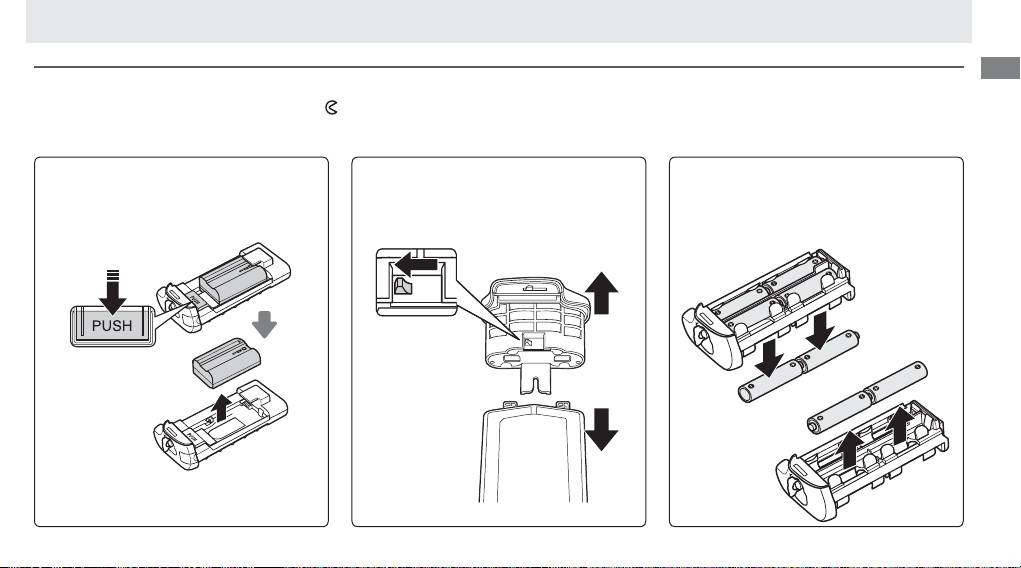
Removing Batteries
Removing Batteries
Be careful not to drop batteries or the holder.
1 Turn the MB-D12 battery-chamber latch to
and remove the battery holder (Figure E).
2 Remove the battery or batteries from the holder.
EN-EL15
EN-EL18
AA Batteries
While pressing the holder PUSH button, slide
Slide the battery release in the direction
Remove the batteries as shown.
Be careful
the battery toward the button.
The battery
indicated by the arrow (Y) and remove the
not to drop the batteries when removing
can then be removed as shown.
battery-chamber cover.
them from the holder.
The procedure for removing the EP-5B power
connector is the same as that for the EN-EL15.
Top 10 manuals
100.00
NZXT HALE90 1000W99.99
Samsung SM-R38099.97
AEG BSB 18C99.97
Dell 2700W99.97
Smeg KSEC70X99.96
Beurer HDE 4099.96
Pyramida KH 50 v.299.96
MSI CSM-H81M-P3299.96
AEG HR 562799.95
Melissa 640-048