
Kenwood DPX504U: Basic Operations
Basic Operations: Kenwood DPX504U
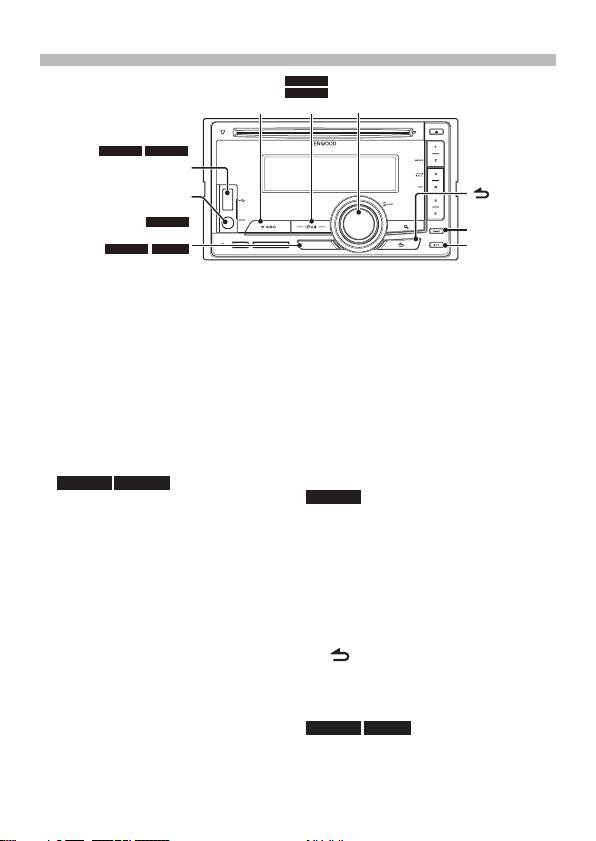
Basic Operations
DPX504U
DPX404U
[SRC]
[iPod]
[VOL]
DPX404UDPX504U
USB terminal
[ ]
Auxiliary input
DPX504U
[DISP]
[LOG]
[ATT]
DPX404U
DPX304
[B.BOOST]
Power
accessory) is recommended to connect a
Turns the power ON by pressing the
USB device or iPod.
[SRC] button.
Auxiliary input
Press the [SRC] button for at least 1
Portable audio device can be connected
second to turn the power OFF.
with the stereo mini-plug (3.5 mm ø).
Source selection
Display selection
Press the [SRC] button.
Each time you press the [DISP] button,
Tuner (“TUNER”) ➜ USB (“USB”) or iPod
another display mode will be selected.
(“iPod”) (DPX504U/ DPX404U only) ➜
Refer to <Display type select> (page
CD (“CD”) ➜ Auxiliary Input (“AUX”) ➜
36)/ <Text Display Selection> (page 40) of
Standby (“STDBY”/ “STANDBY”) ➜ Tuner...
Instruction manual
DPX504U DPX404U
Press the [iPod] button to switch the
DPX504U
source to iPod.
Log Function recall
The source “USB”/ “iPod” and “CD” can
Previously used functions are
be selected when each source is ready
automatically logged in memory and
to play.
displayed as the list.
When an optional accessory is
Press the [LOG] button.
connected, the source name for each
Turn the [VOL] knob and press it when
device appears. (DPX504U only)
the desired Log Function is displayed.
Volume
To cancel Log Function recall, press
Turn the [VOL] knob to adjust the sound
[
].
volume.
Logs can be saved or deleted. Refer to
<Log Function> (page 58) of Instruction
Attenuator
manual.
Press the [ATT] button.
Turning the volume down quickly.
DPX404U DPX304
Bass boost
USB terminal (DPX504U/ DPX404U
Each time you press the [B.Boost]
only)
button, the bass tone will be boosted in
USB device or iPod can be connected.
two steps (LV1, LV2, OFF).
CA-U1EX or KCA-iP101/iP102 (optional
English
|
5
B59-2055-00_00_2DIN_E_QSG.indb 5 11/01/19 15:00
Table of contents
- Contents Before use
- Before use
- First step
- Basic Operations
- Playing Music (CD/USB/iPod)
- Listening to the Radio
- Appendix Installation accessories
- Before installation
- Connecting Wires to Terminals ⁄
- Connecting Wires to Terminals
- Connecting Wires to Installation/Removing the Unit Terminals
- Installation/Removing the Unit
- Table des matières Avant utilisation
- Avant utilisation
- Étape 1
- Fonctionnement basique
- Reproduire de la musique (CD/USB/iPod)
- Écoute de la radio
- Annexe Accessoires pour l'installation
- Avant installation
- Connexion des câbles aux bornes ⁄
- Connexion des câbles aux bornes
- Connexion des câbles Installation/Retrait de l’appareil aux bornes
- Installation/Retrait de l’appareil
- Inhalt Vor der Verwendung
- Vor der Verwendung
- Erste Schritte
- Grundbedienung
- Musikwiedergabe (CD/USB/iPod)
- Radiowiedergabe
- Anhang Montagezubehör
- Vor dem Einbau
- Anschlussdiagramm ⁄
- Anschlussdiagramm
- Anschlussdiagramm Einbau/Entfernen des Geräts
- Einbau/Entfernen des Geräts
- Inhoud Voor de ingebruikneming
- Voor de ingebruikneming
- Eerste stap
- Basisbediening
- Muziek afspelen (CD/USB/iPod)
- Naar de radio luisteren
- Appendix Installatieaccessoires
- Voor de installatie
- Verbinden van kabels met aansluitingen ⁄
- Verbinden van kabels met aansluitingen
- Verbinden van kabels Toestel installeren/ verwijderen met aansluitingen
- Toestel installeren/ verwijderen
- Sommario Prima dell'uso
- Prima dell'uso
- Primo passo
- Funzioni di base
- Riproduzione della musica (CD/USB/iPod)
- Ascolto della radio
- Appendice Accessori di installazione
- Prima dell'installazione
- Collegamento dei cavi ai terminali ⁄
- Collegamento dei cavi ai terminali
- Collegamento dei cavi Installazione/rimozione dell’unità ai terminali
- Installazione/rimozione dell’unità
- Índice Antes de usar
- Antes de usar
- Primer paso
- Funciones básicas
- Reproducción de música (CD/USB/iPod)
- Escuchar la radio
- Apéndice Instalación de accesorios
- Antes de la instalación
- Conexión de cables a los terminales ⁄
- Conexión de cables a los terminales
- Conexión de cables a Instalación/Desmontaje de la unidad los terminales
- Instalación/Desmontaje de la unidad
- Índice Antes da utilização
- Antes da utilização
- Primeiro passo
- Operação Básica
- Reproduzir música (CD/USB/iPod)
- Ouvir rádio
- Anexo Acessórios de instalação
- Antes da instalação
- Ligar os cabos aos terminais ⁄
- Ligar os cabos aos terminais
- Ligar os cabos aos Instalação/Retirar o aparelho terminais
- Instalação/Retirar o aparelho
- Содержание Подготовка к эксплуатации
- Подготовка к эксплуатации
- Первый шаг
- Основные операции
- Воспроизведение музыки (CD/USB/iPod)
- Прослушивание радио
- Приложение Принадлежности, используемые при
- Перед установкой
- Подсоединение кабелей к гнездам для подключения ⁄
- Подсоединение кабелей к гнездам для подключения
- Подсоединение Установка/Cнятие устройства кабелей к гнездам
- Установка/Cнятие устройства
- Зміст Перед використанням
- Перед використанням
- Перший крок
- Основні операції
- Відтворення музики (CD/USB/iPod)
- Прослуховування радіо
- Додаток Додаткове приладдя, необхідне для
- Перед встановленням
- Підключення кабелів до роз'ємів ⁄
- Підключення кабелів до роз'ємів
- Підключення кабелів Установка/виймання приладу до роз'ємів
- Установка/виймання приладу


