
Canon i-SENSYS MF5940dn: English Installing the Driver/Software
English Installing the Driver/Software: Canon i-SENSYS MF5940dn
Table of contents
- Starter Guide
- Check! Check!
- English
- English Contents
- English About the Supplied Manuals
- English Navigating the Menu and Text Input Method
- English Attach the Optional Drawer to the Main Unit English
- English Connecting the Power Cord and Turning ON the Power English Specifying the Initial Settings
- English Setting a Paper Size and Type
- English Connect a telephone cable. Specifying Initial Fax Settings and Connecting a Telephone Cable
- English
- Selecting the method for connecting to the machine English
- English Connecting to Wired LAN
- English Installing the Driver/Software
- Copy Perform Useful Tasks
11
English
A
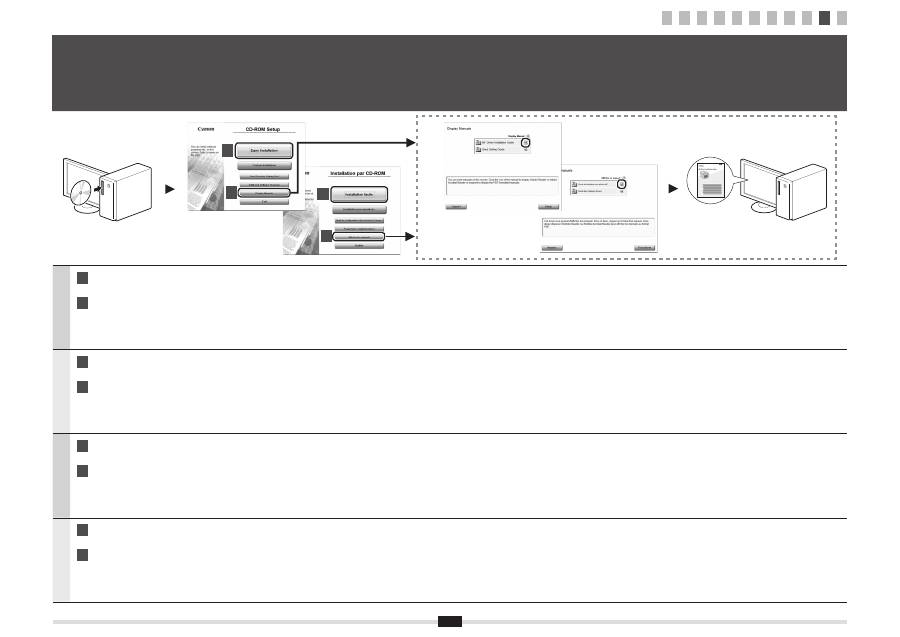
Install the driver and software using the User Software CD-ROM.
B
For details on the installation procedures, see the MF Driver Installation Guide.
Français
A
Installez le pilote et le logiciel avec le CD-ROM "User Software CD-ROM".
B
Pour en savoir plus sur les procédures d'installation, voir le Guide d'installation des pilotes MF.
Italiano
A
Installare il driver e il software dall'User Software CD-ROM.
B
Per i dettagli relativi alle procedure d'installazione, consultare la Guida di Installazione del Driver MF.
Deutsch
A
Installieren Sie den Treiber und die Software über die User Software CD-ROM.
B
Nähere Informationen zur Vorgehensweise bei der Installation
fi
nden Sie im Installationshandbuch zum MF-Treiber.
10
Installing the Driver/Software
Installation du pilote/logiciel
Installazione di driver/software
Installieren des Treibers bzw. der Software
A
B
A
B
1 2 3 4 5 6 7 8 9 10 11
