
Acme V-150: Powering Your Player Charging Your Player Turning Your Player On/Off Music Playback Controls
Powering Your Player Charging Your Player Turning Your Player On/Off Music Playback Controls: Acme V-150
Table of contents
- Thank You Package Contents Features Controls at a Glance
- Powering Your Player Charging Your Player Turning Your Player On/Off Music Playback Controls
- Connecting to a Computer Transferring/Managing Files Disconnecting from a Computer
- Troubleshooting
- Specifications
GB
Powering Your Player
Your player has an integrated rechargeable battery. Typical music playtime is up to three hours.
Upon initial use, the battery should be charged fully (for four hours) to ensure the very best performance and a long
battery life.
Music play time is an estimated value. Actual play time may vary depending on the encoding method used and
upon other factors.
Charging Your Player
Your player can be charged through a PC’s USB connection. Plug one end of the USB cable into the player’s USB Port
and plug the other end into the USB port of a computer which has been switched on.
If the player is connected to a computer through a USB hub, the hub must be self-powered in order to charge the player’s
battery.
Carrying out le transfers will extend the charging time.
The battery used in this device may pose a risk of re or chemical burn if mistreated. Do not disassemble, incinerate, or
heat the battery.
Do not connect the player to a power source other than that which is indicated here or on the label, as this may pose a risk
of re or electric shock.
Turning Your Player On/Off
• To turn your player on, slide the power switch to the left. The LED indicator will illuminate.
• To turn your player o, slide the power switch to the right. The LED indicator will go dark.
Music Playback Controls
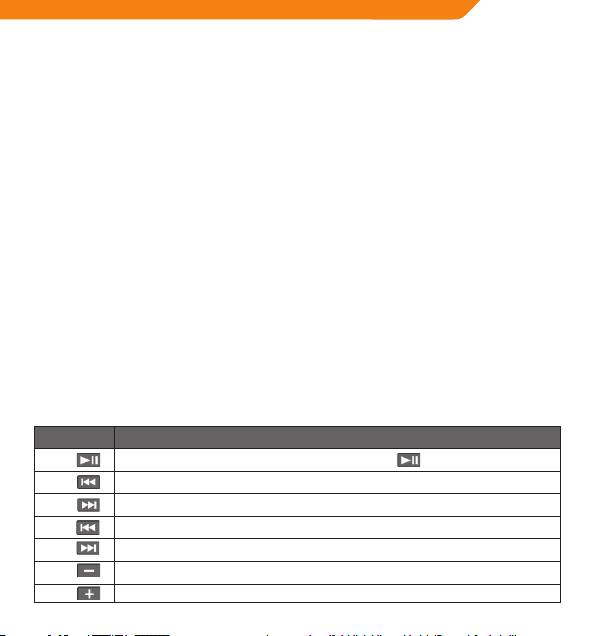
Use the following controls during music playback. The LED indicator will ash during music playback.
Key Action Function
Press
Start/Pause music playback. While playback is paused, press to resume.
Play the previous track.
Press
Press
Play the next track.
Rewind through the current track.
Hold
Fast-forward through the current track.
Hold
Decrease the volume level.
Press
Increase the volume level.
Press
5
