
Acme IA-200: Selecting the temperature Selecting the steam
Selecting the temperature Selecting the steam: Acme IA-200
Table of contents
- introduction important safeguards READ ALL INSTRUCTIONS BEFORE USING
- 11. The iron must only be used and rested on a stable surface.
- special instructions SAVE THESE INSTRUCTIONS
- description of device
- ANTI-CALC SYSTEM ANTI-DRIP SYSTEM AUTOMATIC SHUT OFF (for model IA-200)
- general instructions PREPARATIONS
- SUGGESTIONS BEFORE USING THE IRON FOR THE FIRST TIME steam ironing
- Selecting the temperature Selecting the steam
- Selecting Shot of steam and steam when ironing vertically. dry ironing
- cleaning self-cleaning how to put it away
- advice for good ironing
- troubleshooting
GB
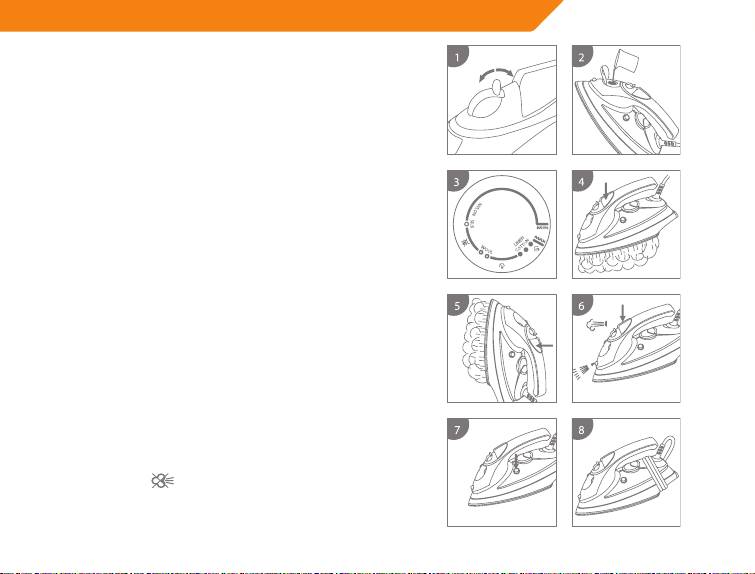
Selecting the temperature
- Put the iron in a vertical position.
- Put the plug in the socket (green light goes on in model
IA-200 and no indication light illuminate in model IE-200).
- Adjust the thermostat dial (10) [Fig. 3]. The plate
temperature control light (red) indicates that the iron is
heating up. Wait until the plate temperature control light
goes o before ironing.
Warning: during ironing, the plate temperature control light
comes on at intervals, indicating that the selected temperature
is maintained. If you lower the thermostat temperature after
ironing at a high temperature, do not start ironing until the
plate temperature control light comes on again.
Selecting the steam
The quantity of steam is regulated by the steam selector (3).
Move the steam selector to a position between minimum
and maximum depending on the quantity of steam
required and the temperature selected [Fig. 1].
Warning: the iron gives o steam continuously only if you
hold the iron horizontally. You can stop the continuous steam
by placing the iron in a vertical position or by moving the
steam selector to
. You can only use steam at the highest
temperatures. If the selected temperature is too low, water
may drip onto the plate.
11
