
Yamaha NS-SW310: CONTROLS AND THEIR FUNCTIONS
CONTROLS AND THEIR FUNCTIONS: Yamaha NS-SW310
Table of contents
- CAUTION: Read this before operating your unit
- • VOLTAGE SELECTOR SPECIAL INSTRUCTIONS FOR U.K. MODEL
- CONTENTS FEATURES
- SUPPLIED ACCESSORIES ATTACHING THE NON- SKID PADS
- PLACEMENT
- CONTROLS AND THEIR FUNCTIONS
- CONTROLS AND THEIR FUNCTIONS
- CONNECTIONS Connecting to line output (pin jack) terminals of the amplifier ■ Using one subwoofer
- ■ Using two subwoofers ■ Connecting to the LFE (INPUT3) terminal(s)
- Connecting to speaker output terminals of the amplifier ■ Using one subwoofer (with speaker cables) ■ Using two subwoofers (with speaker cables)
- ■ Using one subwoofer (with speaker cables) ■ Using two subwoofers (with speaker cables)
- Connecting to the INPUT1/OUTPUT Plug in the subwoofer to the AC outlet terminals of the subwoofer
- AUTOMATIC POWER-SWITCHING FUNCTION Changing the AUTO STANDBY setting
- ADJUSTING THE SUBWOOFER BEFORE USE
- Frequency characteristics
- ADVANCED YAMAHA ACTIVE SERVO TECHNOLOGY II
- TROUBLESHOOTING Problem Cause What to Do
- SPECIFICATIONS Limited Guarantee for European Economic Area (EEA) and Switzerland
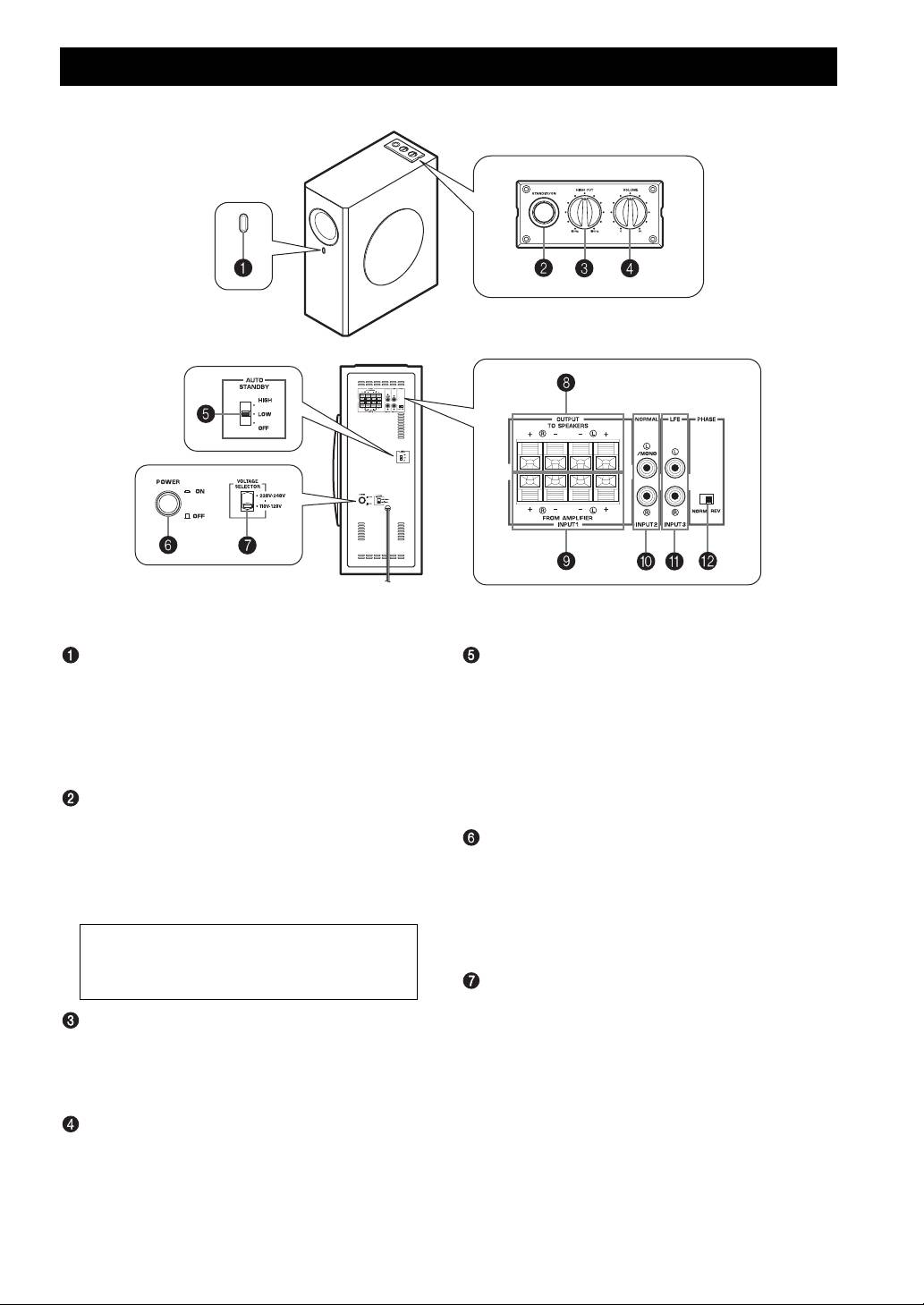
CONTROLS AND THEIR FUNCTIONS
Top panel
Front panel
Rear panel
(General model)
Power indicator
AUTO STANDBY (HIGH/LOW/OFF) switch
Lights up in green while the subwoofer is on.
This switch is originally set to the OFF position. By
Lights up in red while the subwoofer is set in the
setting this switch to the HIGH or LOW position, the
standby mode by the operation of the automatic power-
subwoofer’s automatic power-switching function
switching function.
operates, as described on page 11. If you do not need
Goes off when the subwoofer is set in the standby
this function, leave this switch in the OFF position.
mode.
* Make sure to change the setting of this switch only
when the subwoofer is set in the standby mode by
STANDBY/ON button
pressing the STANDBY/ON button.
Press this button to turn on the power when the
POWER switch is set in the ON position. (The power
POWER switch
indicator lights up in green.)
Set this switch to the ON position to use the subwoofer.
Press again to set the subwoofer in the standby mode.
In this state, you can turn on the subwoofer or turn the
(The power indicator goes off.)
subwoofer into the standby mode by pressing the
STANDBY/ON button. Set this switch to the OFF
Standby mode
position to completely cut off the subwoofer’s power
The subwoofer is still using a small amount of
supply from the AC outlet.
power in this mode.
VOLTAGE SELECTOR switch
(Asia and General models only)
HIGH CUT control
If the preset setting of the switch is incorrect, set the
Adjusts the high frequency cut off point.
switch to the proper voltage (110-120/220-240 V) of
Frequencies higher than the frequency selected by this
your area.
control are all cut off (and no output).
Consult your dealer if you are unsure of the correct
* One graduation of this control represents 10 Hz.
setting.
VOLUME control
WARNING
Adjusts the volume level. Turn the control clockwise to
Be sure to unplug the subwoofer before setting the
increase the volume, and counterclockwise to decrease
VOLTAGE SELECTOR switch correctly.
the volume.
4 En
