
Yamaha NS-SW310: CONNECTIONS Connecting to line output (pin jack) terminals of the amplifier ■ Using one subwoofer
CONNECTIONS Connecting to line output (pin jack) terminals of the amplifier ■ Using one subwoofer: Yamaha NS-SW310
Table of contents
- CAUTION: Read this before operating your unit
- • VOLTAGE SELECTOR SPECIAL INSTRUCTIONS FOR U.K. MODEL
- CONTENTS FEATURES
- SUPPLIED ACCESSORIES ATTACHING THE NON- SKID PADS
- PLACEMENT
- CONTROLS AND THEIR FUNCTIONS
- CONTROLS AND THEIR FUNCTIONS
- CONNECTIONS Connecting to line output (pin jack) terminals of the amplifier ■ Using one subwoofer
- ■ Using two subwoofers ■ Connecting to the LFE (INPUT3) terminal(s)
- Connecting to speaker output terminals of the amplifier ■ Using one subwoofer (with speaker cables) ■ Using two subwoofers (with speaker cables)
- ■ Using one subwoofer (with speaker cables) ■ Using two subwoofers (with speaker cables)
- Connecting to the INPUT1/OUTPUT Plug in the subwoofer to the AC outlet terminals of the subwoofer
- AUTOMATIC POWER-SWITCHING FUNCTION Changing the AUTO STANDBY setting
- ADJUSTING THE SUBWOOFER BEFORE USE
- Frequency characteristics
- ADVANCED YAMAHA ACTIVE SERVO TECHNOLOGY II
- TROUBLESHOOTING Problem Cause What to Do
- SPECIFICATIONS Limited Guarantee for European Economic Area (EEA) and Switzerland
CONNECTIONS
Choose one of the following two connecting methods most suitable for your audio system.
■ Choose (pages 6-7) if your amplifier has line output (pin jack) terminal(s)
1
■
Choose (pages 8-9) if your amplifier has no line output (pin jack) terminal(s)
2
Caution: Unplug the subwoofer and other audio/video components before making
connections.
Notes
• All connections must be correct, that is to say L (left) to L, R (right) to R, “+” to “+” and “–” to “–”. Also, refer
to the owner’s manual of your component to be connected to the subwoofer.
• After all connections are completed, plug in the subwoofer and other audio/video components.
1
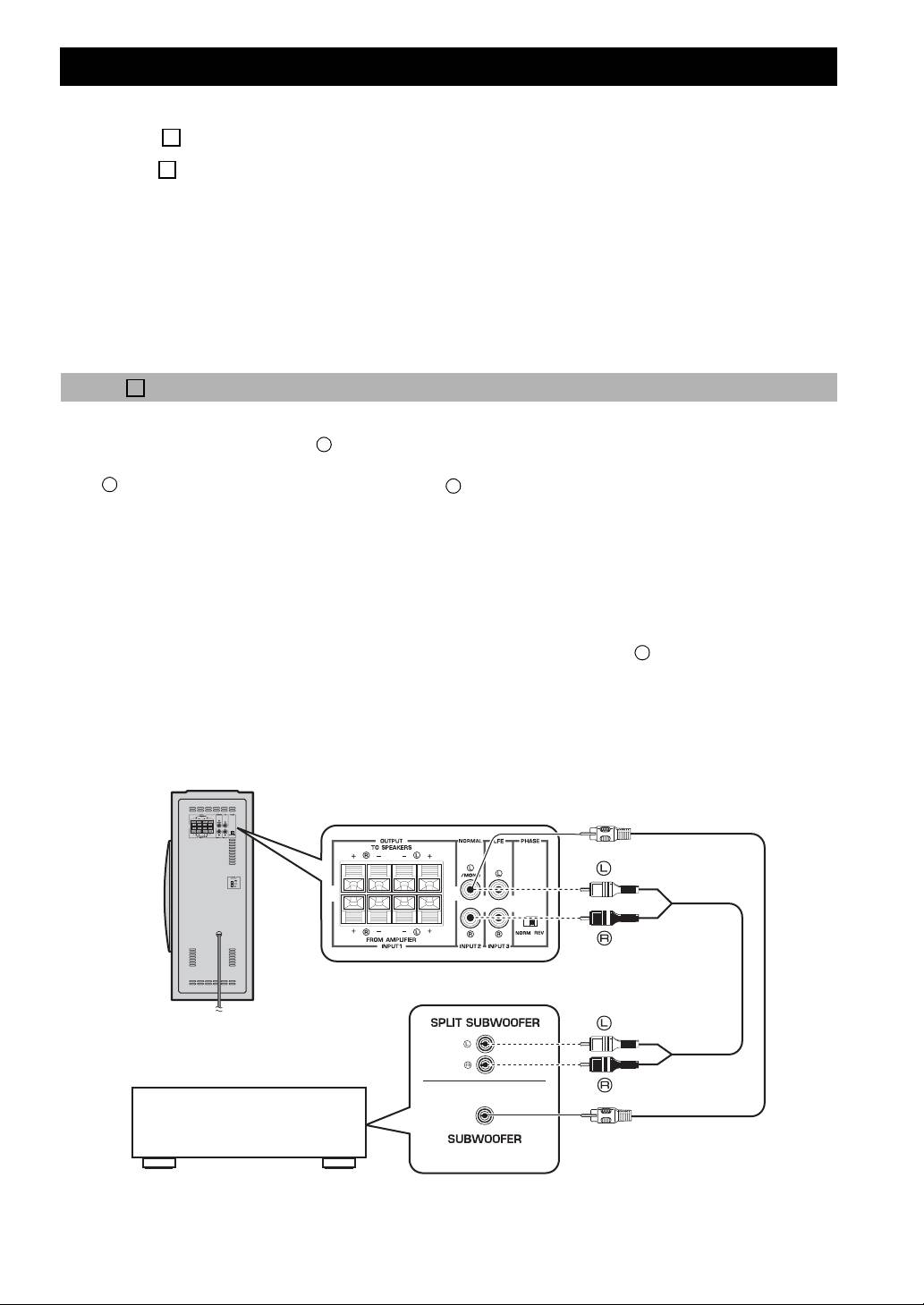
Connecting to line output (pin jack) terminals of the amplifier
• To connect to an amplifier (or AV receiver), connect the SUBWOOFER (or LOW PASS, etc.) terminal on the rear of
the amplifier (or AV receiver) to the /MONO INPUT2 terminal of the subwoofer.
L
• When connecting the subwoofer to the SPLIT SUBWOOFER terminals on the rear of the amplifier, be sure to connect
the /MONO INPUT2 terminal to the “L” side and the INPUT2 terminal to the “R” side of the SPLIT
L
R
SUBWOOFER terminals.
Notes
• Some amplifiers have line output terminals labeled PRE OUT. When you connect the subwoofer to the PRE OUT
terminals of the amplifier, make sure that the amplifier has at least two sets of PRE OUT terminals. If the
amplifier has only one set of PRE OUT terminals, do not connect the subwoofer to the PRE OUT terminals.
Instead, connect the subwoofer to the speaker output terminals of the amplifier. (Refer to pages 8-9.)
• When connecting to a monaural line output terminal of the amplifier, connect the /MONO INPUT2 terminal.
L
• When connecting to line output terminals of the amplifier, other speakers should not be connected to the
OUTPUT terminals on the rear panel of the subwoofer. If connected, they will not produce sound.
■ Using one subwoofer
Subwoofer
Mono pin cable
(not included)
Audio pin cable
(not included)
To AC outlet
Amplifier
6 En
