
Nikon Speedlite SB-400: Basic operation 1 Attach the SB-400 to the camera 2 Adjust the flash head
Basic operation 1 Attach the SB-400 to the camera 2 Adjust the flash head: Nikon Speedlite SB-400
Table of contents
- Preparation For your safety WARNINGS for Speedlights
- 7 Do not use the unit in the presence of flammable or explosive gas. If the
- Preparation 11 Keep small accessories out of the reach of children to avoid the possibility
- CAUTIONS for Speedlights WARNINGS for Batteries
- Preparation 12 Batteries should not be submerged in water, exposed to rain, moisture or
- CAUTION for Batteries Symbol for separate collection applicable in European countries
- Preparation Foreword Confirm receipt Using your Speedlight correctly
- Take trial shots Have Nikon regularly spot-check your Speedlight Life-long learning
- Preparation Compatible cameras Speedlight parts Installing the batteriesL
- Usable batteries Replacing/recharging the batteries Standby function to conserve battery power
- Basic operation 1 Attach the SB-400 to the camera 2 Adjust the flash head
- 3 Setting the camera's mode Flash shooting distance range
- Available flash modes
- Effective usage of Speedlight Bounce flash
- Effective usage of Speedlight Notes on bounce flash
- When the subject has a mottled appearance with the flash light, raise the tilting degree of the flash head. In case the light is not enough
- Reference information Optional accessories Cleaning Storage
- Operating location Notes on handling batteries
- Reference information Notes on continuous flash shooting
- Troubleshooting
- Reference information Specifications Warning
- Batteries Min. recycling
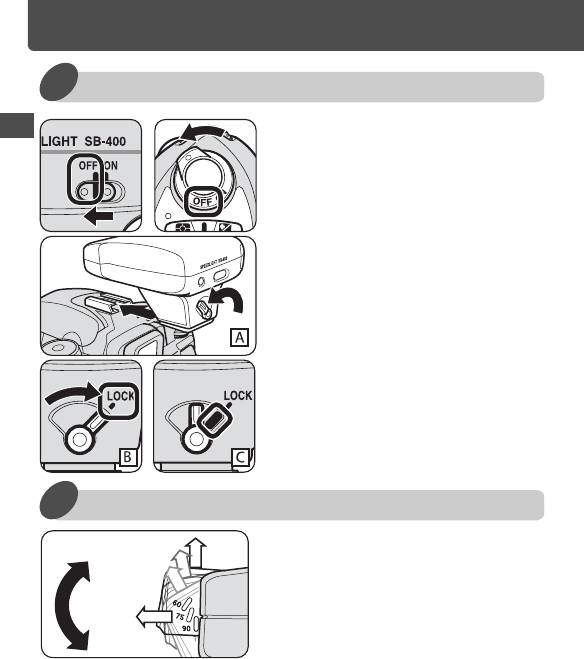
Basic operation
1 Attach the SB-400 to the camera
Make sure the SB-400 and
1
En
the camera body are turned
off.
Rotate the mounting foot
2
lock lever to the left, slide
the SB-400's mounting foot
into the camera's accessory
shoe and turn the lock lever
to the right. (illust. A and B)
• In case the mounting foot lock lever
does not stay to the right and a red
line appears (illust. C), the mounting
foot lock lever is not fully rotated to its
right position. Re-attach the SB-400 to
the camera again with the same
process above.
2 Adjust the flash head
Adjust the flash head to the
90º
1
75º
horizontal position.
60º
Horizontal
12
Top 10 manuals
100.00
NZXT HALE90 1000W99.99
Samsung SM-R38099.97
AEG BSB 18C99.97
Dell 2700W99.97
Smeg KSEC70X99.96
Beurer HDE 4099.96
Pyramida KH 50 v.299.96
MSI CSM-H81M-P3299.96
AEG HR 562799.95
Melissa 640-048


