
Nikon SD-9: En
En: Nikon SD-9
Table of contents
- Notes on handling batteries
- For your safety WARNINGS for Battery pack CAUTIONS for Battery pack
- WARNINGS for Batteries Always follow the warnings and instructions printed on the batteries10. to
- Remove dead batteries from your equipment immediately,18. as they could
- Preparation Compatible Speedlight ■ Nomenclature ■
- En
- How to use the SD-9 Hooking the SD-9 up to the SB-900 ■
- En
- Specifications Major specifications in combination with the SB-900 ■
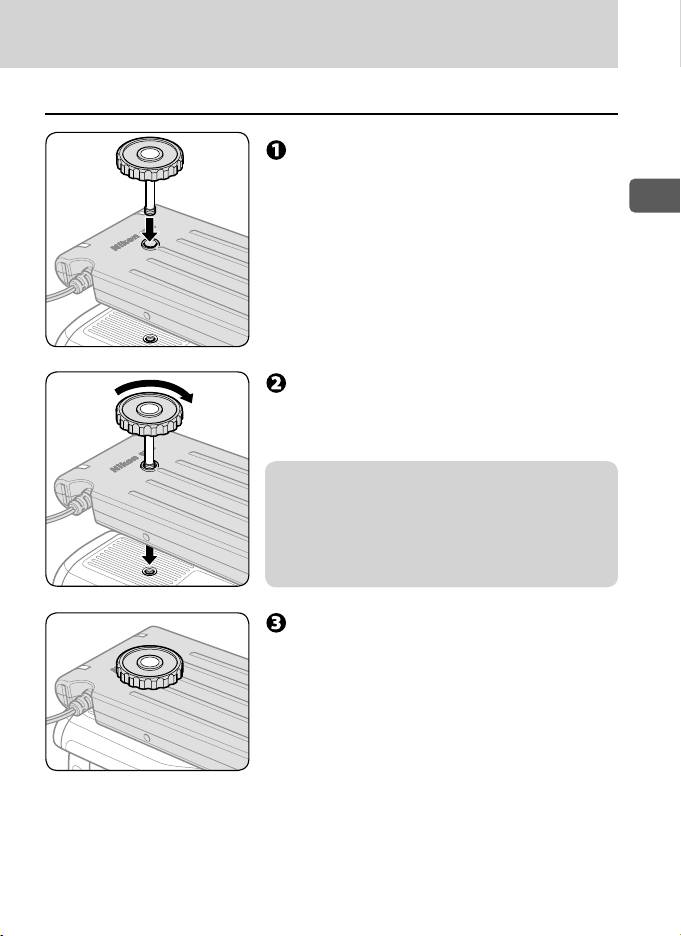
Attach the SD-9 to the camera ■
Insert the supplied camera attach
screw to the SD-9’s tripod socket.
En
Rotate the camera attach screw
according to the screw thread of the
tripod socket.
v Notes on SD-9’s tripod socket
SD-9’s tripod socket has a screw thread. Rotate the •
camera attach screw while inserting it to the tripod
socket to avoid to damaging the thread.
Follow the same procedure when unscrewing the •
camera attach screw from the tripod socket.
Insert the camera attach screw to the
camera’s tripod socket and fix both
SD-9 and camera using the screw.
19
Top 10 manuals
100.00
NZXT HALE90 1000W99.99
Samsung SM-R38099.97
AEG BSB 18C99.97
Dell 2700W99.97
Smeg KSEC70X99.96
Beurer HDE 4099.96
Pyramida KH 50 v.299.96
MSI CSM-H81M-P3299.96
AEG HR 562799.95
Melissa 640-048