
Nikon PC-E Micro NIKKOR 85mm f-2.8D: Revolving
Revolving: Nikon PC-E Micro NIKKOR 85mm f-2.8D
Table of contents
- Notes on Safety Operations
- 1. Nomenclature
- 2. Major features
- 3. Usable cameras and available functions
- Aperture stop-down button (one-touch preset aperture operation)
- Important! 4. Mounting lens
- 5. Using bayonet hood HB-22 6. Determining exposure
- When using other Nikon cameras Determining exposure (with an external exposure meter)
- 7. The shift/tilt function Important The shift function The tilt function
- Revolving
- 8. Focusing
- 9. Depth of field 10. Focusing at a predetermined reproduction ratio 11. Notes on close-up photography and duplication work
- 12. Taking flash pictures using cameras with a built-in flash
- 13. Recommended focusing screens
- 14. Lens care 15. Standard accessories 16. Optional accessories
- 17. Specifications
- Weight: Approx. 635 g (22.4 oz)
By rotating the tilt knob, the lens is tilted up and down (or right
and left, when the lens is revolved) ±8.5° to the camera body. By
tilting, you can obtain clear focus of the entire subject plane when
it is not parallel to the camera or can focus small areas of the
En
subject which are parallel to the camera. (p. 217)
• After tilting, tighten the tilt lock release knob to fix the lens’
tilt position.
• Note that tilting the lens also changes the viewfinder image.
• Once the lens is tilted, neither the depth-of-field scale nor the
distance scale on the lens barrel can be used.
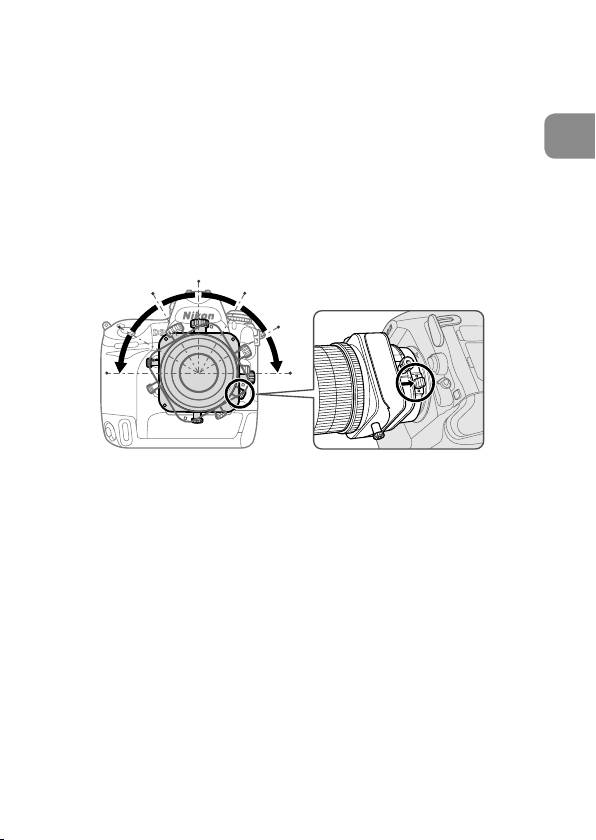
Revolving
Fig. 9
This lens can be revolved up to 90° right or left. By revolving the
lens, the shift function can be changed to operate vertically, and
the tilt function can be changed to operate horizontally.
• Before rotating the lens, set the shift and tilt amount to “0” by
rotating the shift and tilt knob.
Note:
When revolving the lens while using tilt and/or shift, be
careful to avoid nipping your fingers between the lens and
the camera body. Failure to lock each knob can also have the
same effect.
• Push the revolving lever and rotate the lens holding the square
parts of the lens.
• Click stops are provided in 30° steps both right and left.
At 30° and 60°, you can rotate the lens without pushing the
revolving lever.
27
